Inspiring
November 23, 2018
Answered

Please help! PP not exporting files for ME to encode

  • November 23, 2018
  • 1 reply
  • 1042 views

Hi,

Apologies for posting this again.

Really desperate for a robust, long term solution now or else there's no point with me continuing with Adobe products!

Massive deadlines coming up and beginning to wish I hadn't upgraded from CS5 but it's too late to go back!

I've tried various kind solutions to this problem (as listed below) which have worked for a while but again today PP won't talk to AMe. PP says it is exporting media and AME opens but nothing then appears in the encoding queuing space to encode.

I'm using...

PP CC 2019: Version 13.0.1 (Build 13)

AME CC 2019: Version 13.0.1 (Build 12)

Windows 10 Home 64bit (10.0, Build 17134)

Dell XPS8900 BIOS 2.4.0

Processor Intel Core i7-6700 CPU 3.40GHz (8CPUs) 3.4GHz

RAM 32768MB

GPU GeForce GTX745 (Driver 416.81) (11.08.2018)

I was advised to rename the AME folder "13.0" to "old13.0" and this worked but it doesn't anymore.

I have also "trashed" PP preferences.

I have also uninstalled ME with Adobe Cleaner and rebooted.

Very many thanks for any help you can give as I am really quite nervous I won't be able to deliver some really important deadlines coming up (first one is tomorrow).

Very grateful to you for any further help!

Have a good day!

Dan
    This topic has been closed for replies.
    Correct answer Mo Moolla

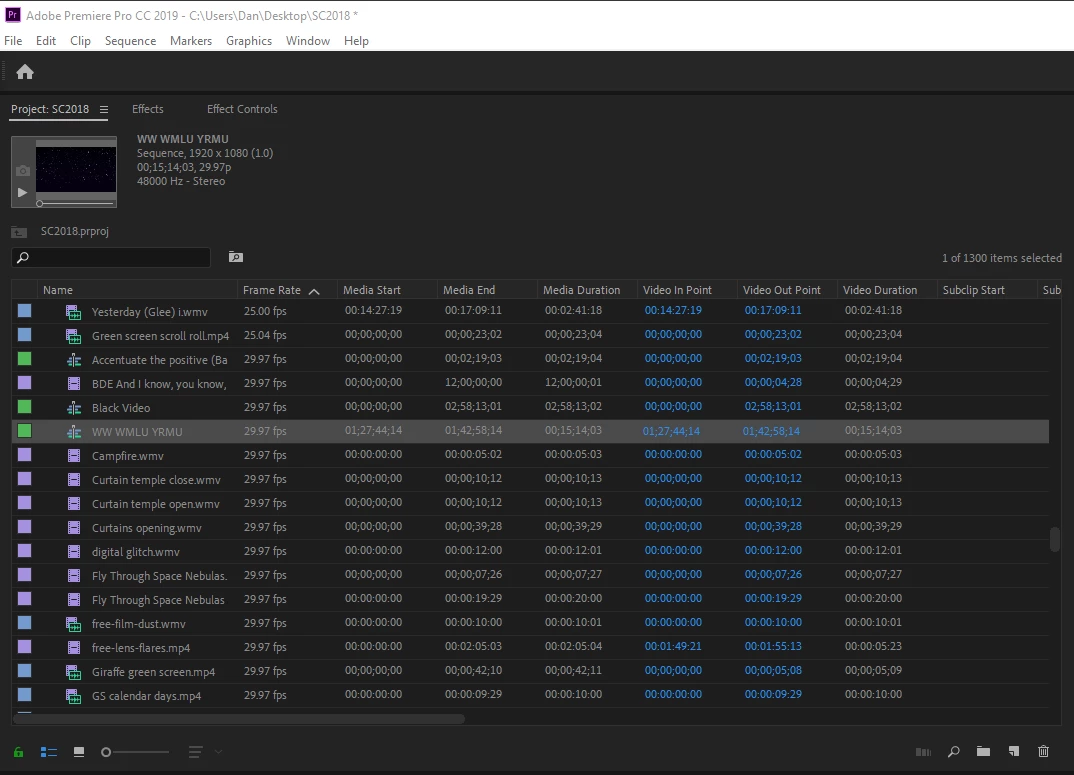
    Sorry, Here it is...

    The subsequence I'm wanting to export is highlighted.

    Hope this helps. Thanks for your time

    D


    There should be no reason that ME is spitting this out, Can you roll back to ME 2018 and see if that accepts the sequence with no error.

    1 reply

    Inspiring
    November 24, 2018

    OK, so I thought I'd solved this by copying the entire 3 hour timeline into a fresh project. And lots of sequences encoded (CUDA) no problem over night (apart from one sequence where I had the Error 1609629695 which I've never had before but seems to have been a mystery error in this community for a number of years.)

    Having rebooted to try and solve this 1609629695 error, I'm back to square one and it won't encode again!

    I've copied/pasted into a fresh project yet again, trashed the preferences, renamed ME's "13.0" folder to "old130" etc and it still doesn't work.

    It's as if once PP knows you've got a remedy to it's illness, it gets resistent to the treatment!

    Also, what is even more frustrating, PP is suddenly saying that my hardware doesn't support CUDA anymore for "H.264 Highbitrate" and my only option is software encoding.

    Since I invested in "upgrading" from CS5 (which never let me down) only in the Summer, I've had nothing but problems!

    Any help very appreciated!

    Many thanks,

    Dan

    Mo Moolla
    Legend
    November 24, 2018

    Hi Dan

    I am sorry that your are having such bad luck with, what is, a fantastic application from Adobe.

    Firstly that GTX745 has only 384 CUDA cores which are far from what makes for a decently specced card. I would suggest an upgrade but for now please download CUDA drivers as well.

    Next, how are you sending the project from PP to AE.

    I would do this:

    Have PP open. Have ME open

    Have them side by side on the screen. Take the sequence from PP and literally drag it onto the ME interface

    I find this was ensures ME is "force fed"

    Let me know if this works for you

    Inspiring
    November 24, 2018

    Thank you so much Mo!

    And yes, I agree PP is great! I've used Premiere since version 6.0. I'm just experiencing more problems than ever right now.

    Thanks for the advice about my graphics card. It's just that I've never had it saying I couldn't use CUDA before, but I do notice that my GPU isn't listed as being compatible with CUDA. You still recommend I download the drivers though?

    I am usually sending via file > Export.

    Thank you so much for the alternative export method, making a subsequence and dragging it across. I've tried this but I get an error that says "1 sequence identifier is missing in the project SC18.prproj". I am not aware of anything missing. Is there a way of rectifying this?

    Very grateful to you for your support.

    Dan