


Inspiring
Nov 3, 2021 8:33 PM UTC
Question

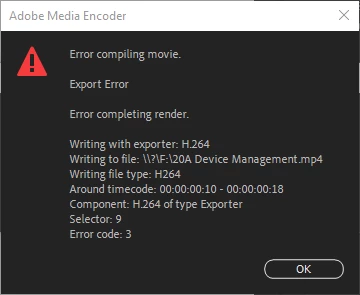
Please Help with Error Compiling Movie Error Code 3

After updating to Adobe Premiere 2022 I recieved error code 3 for compling movie (see image for details). I have tried emptying the Adobe Premiere cache, setting the renderer ro Mercury Playback Engine Software Only and tried GPU Accelleration, deleted the appdata Adobe Premiere folder, deleted the Encoder Appdata folder and rebooted with no help.

This gets so frustrating when your software doesn't work correctly. 
 

5 replies

Community Expert
Nov 3, 2021 8:55 PM UTC

you can also try deleting the render files form sequence when it happens again

Translate
Participant
Dec 11, 2024 11:24 PM UTC

yeah I know im seriously behind with this but how do I do that? 

Translate
Community Expert
Dec 16, 2024 2:37 PM UTC

Sequence => Delete Render Files


Translate
kkey1978Author
Inspiring
Nov 3, 2021 8:35 PM UTC

*compiling

Translate
kkey1978Author
Inspiring
Nov 3, 2021 8:52 PM UTC

It looks like I found the issue. I changed the export settings from H.264 Match Source High Bitrate to H.264 Match Source - 2020. I guess that I just needed to step away for a minute to find the solution. 


Translate