Participant
July 24, 2018
Answered

Poor Video Quality When Exporting

  • July 24, 2018
  • 6 replies
  • 178721 views

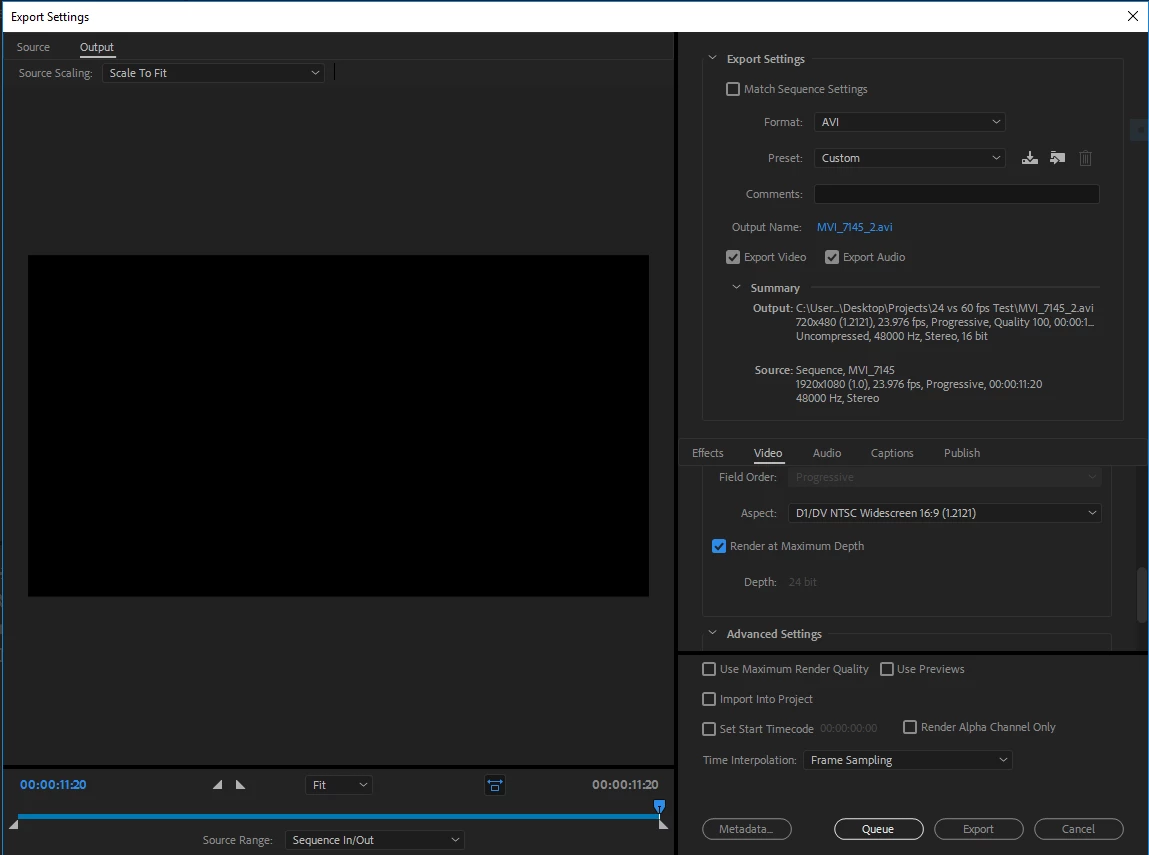
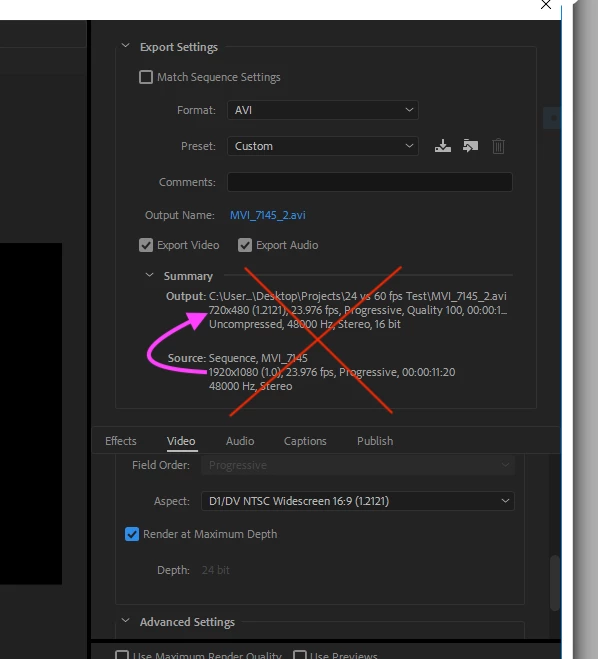
While viewing my project in premiere pro in the preview window, everything appears to be just fine. However, when I export the video it looks terrible and pixelated I am very new to Premiere Pro and I could have all my settings wrong but someone please help. I have attached what my export settings look like below. Thank you for any help!
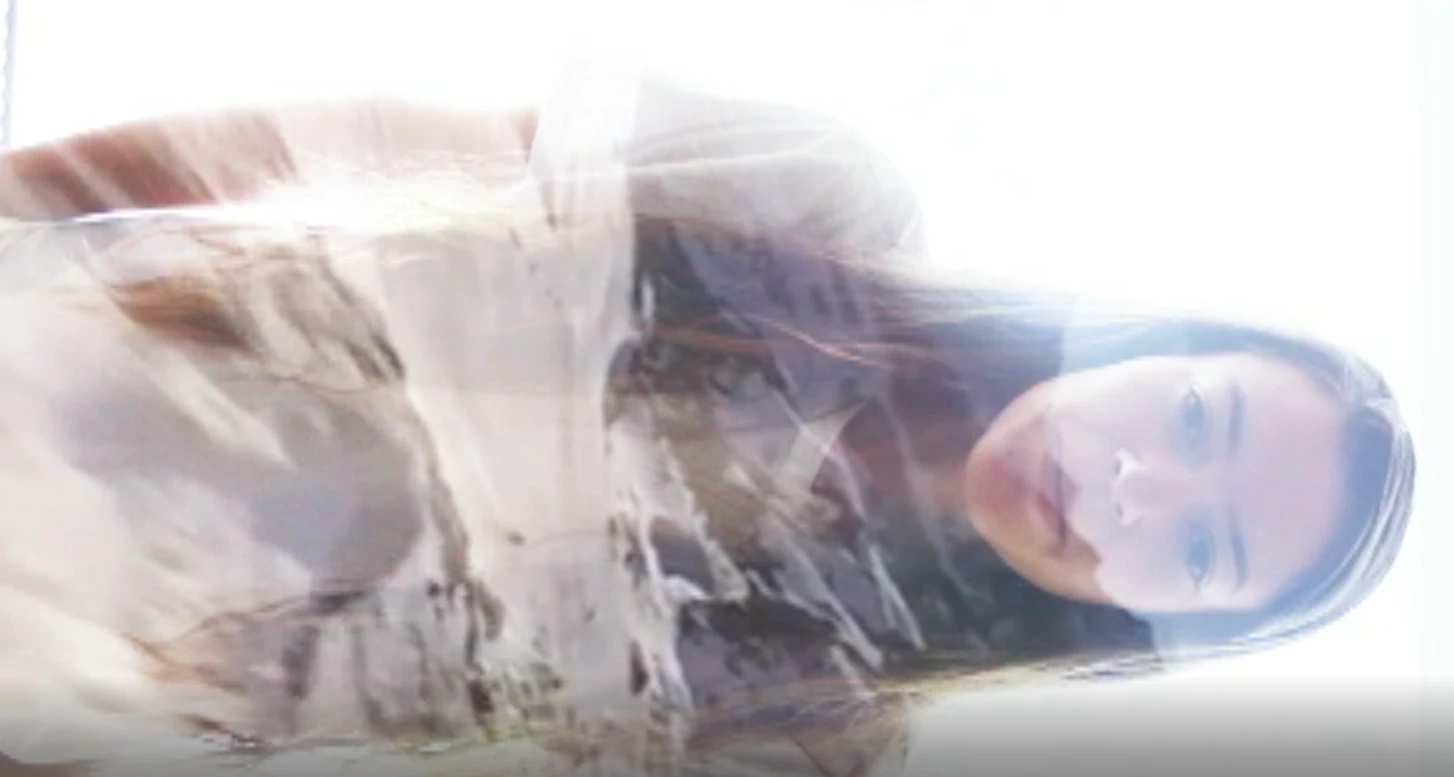
And here's how pixelated the video looks:
This topic has been closed for replies.
Correct answer Byron Cortez

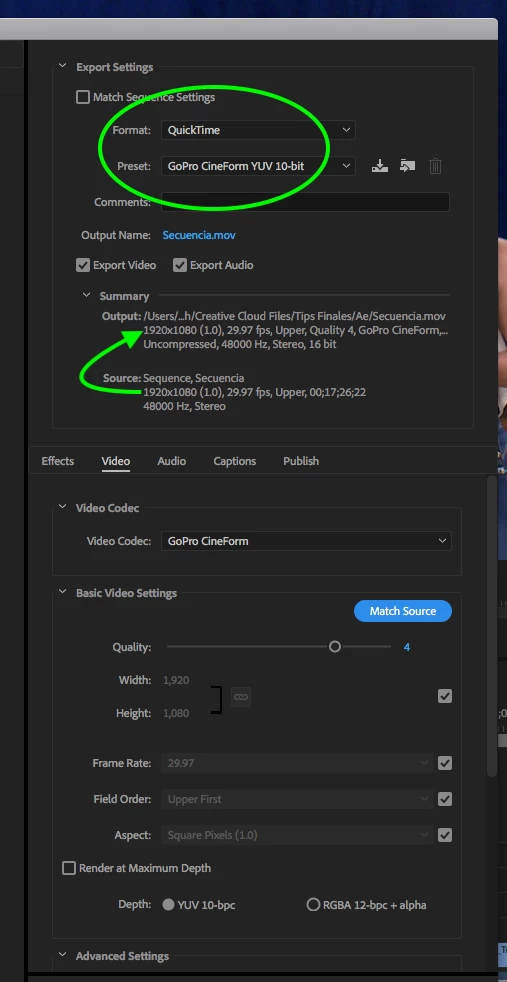
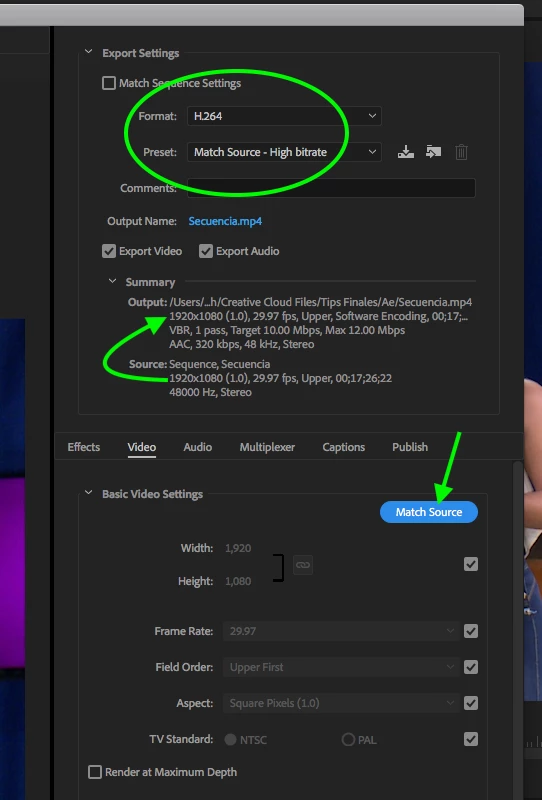
Your issue is that you are setting the export wrong.

Here you have a couple of export options for your video according to the resolution, pixel aspect ratio and the framerate that I can see in your screenshot.

Option 1:

Option 2:

I hope this helps.

6 replies

michealc49443376
Participant
January 3, 2021

I am having the sane issues. I should NOT. This should  be a no brainer.  Like it is in Final Cut Pro. They have ( like Win X ) complicated everything beyond all reason. It should be HARD to choose a crappy output rather than have to go thru all this crap to get the output that 100% of users are looking for. Will  someone explain to me what kind of mindset Adobe has where getting excellant results has to be DIFFICULT instead of  default. I have tried teh proper resolution, etc many times I can't even get teh export options when I choose it in the menu. How many years does it take them to get their software right ? Photoshop 2020 keeps crashing.   I am ready to give up on this.  Adobe after 30 years of software development   WTH are you doing?

Participant
June 29, 2020

I'm always having low/poor quality output when I export video (in .mp4) from Premiere Pro CS6.

It looks fine & of good quality while editing in PP CS6. It contains an audio, text & an image (.png) as background.

Audio Sample Rate is 44.1khz. Bitrate of the MP3 is 320kbps.


I'm getting Low Quality Video Output even after choosing YouTube 1080 preset followed by render at max depth. Please help me sorting this out! Below are the images of temp video which I made for testing out export settings for my original Music Lyric Video.


Participant
October 28, 2020

Im having the same issue. not sure how to fix it. 


Averdahl
Community Expert
Community Expert
November 1, 2020

Read the post by Byron Cortez earlier in this thread. You do probably have a mis-match somewhere. That´s what you need to fix.

Participant
July 24, 2018

Yes, that fixed it! Thank you so much! byroncortezh

Community Expert
July 24, 2018

You're welcome!

Byron.
Participant
January 14, 2021

Hi i am kind of having the same problem, I record my videos on 2k and edit with premiere pro. Whenever i wanna see how my clips look on premiere pro i double click(to make it full screen) but the quality looks really bad however when i watch my clips in my folders they look decent. I have been trying to fix this problem for 2 weeks but i couldnt.Id appreciate some help

thanks

Byron CortezCommunity ExpertCorrect answer
Community Expert
July 24, 2018

Your issue is that you are setting the export wrong.

Here you have a couple of export options for your video according to the resolution, pixel aspect ratio and the framerate that I can see in your screenshot.

Option 1:

Option 2:

I hope this helps.

Byron.
Participant
November 1, 2020

im having the exact opposite problem. my source is low quality. Even though I recorded it all at 1080p. Why did it set itself to a lower quality for me?

Participant
December 3, 2020

Okay,of course. So, i put clips in normal sequence and added some text which was low resolution, but somehow when i tried to export video, the source resolution was very low (same as text res, 640-320,something like that). After that, i copied everything in full HD sequence. But now, picture was very small in a large black rectangle. I tried to scale to fit but didnt work. If i tried to export it didnt stretch to fit. So, after whole day of searching i figured i can manually adjust clips to fit. So finaly it worked😂 whole day went by for such a little thing

Kevin-Monahan
Community Manager
Community Manager
July 24, 2018

Hi britt_zanone,

Your source is HD and your preset is standard def, so your settings are, indeed, wrong. You want to first change the format to something like H.264, then choose one of the HD presets. Try the one for YouTube HD.

At first glance, it also looks like you shot the original video incorrectly. Try shooting video in a widescreen "landscape" orientation by rotating the camera 90 degrees.

Let us know if you need more assistance.

Thanks,
Kevin

Kevin Monahan - Sr. Community & Engagement Strategist – Pro Video and Audio
Participant
July 24, 2018

Thanks! I had the portrait like that on purpose to create an effect on Instagram! As for the H.264 that fixed it!

Legend
July 24, 2018

[abuse removed by moderator]