stnv
Participant
July 9, 2019
Answered

PP-2018 - CUDA not being used with GTX 750 Ti - Options?

  • July 9, 2019
  • 4 replies
  • 6122 views

This is my current system:
Premiere Pro 2018 (Version 12.1.2, Build 69) - I have avoided upgrading to PP2019 as I have read that 4GB CUDA memory is required.

NVIDIA Driver: 430.86

Graphic Card: GeForce GTX 750 Ti, 640 CUDA Cores, 2048 MB GDDR5 Memory

Source video material: 4k Video from a Panasonic FZ300 camera and 5.7K 360° video from a insta360 One X camera.

Computer: ASUS Prime X470 Pro with an AMD Ryzen 7 2700 Eight-Core CPU, 32GB DDR4 RAM

Windows 10 Pro 64 bit (up to date)

Use SanDisk SSD drives to speed up video rendering.

When I run Adobe Premiere Pro, the renderer is given as "Mercury Playback Engine GPU Acceleration (CUDA)" and the same is true in Media Encoder 2018 (not in Media Encoder 2019).

https://helpx.adobe.com/premiere-pro/system-requirements.html

The specifications for Premiere Pro 2018 for using CUDA is 2GB GPU memory which are available, yet the CUDA is not being used. In previous versions (CS5) of Premiere Pro, it was being used when I added the name of my card to that text file.

When I try to render a video, I only get software encoding, no CUDA.

I realize that the Graphic Card is the weakest link, but it does provide the 2GB CUDA required by PP2018, yet does not use it.

What am I doing wrong?

Would it be sufficient to upgrade to an NVIDIA GeForce GTX 980 4GB GDDR5 in order for CUDA to be used?

I know that the smallest recommended card is the NVIDIA GeForce GTX 970, but I have read there are performance issues with that card. I am on a tight budget and need to get CUDA working again. Or what other low-budget graphic card will work to help speed up the rendering process for me?

I am often rendering 4K video and even 5.7K 360° VR video, so I realize that I need to upgrade my graphics card and 6GB CUDU memory would be better for that. So perhaps a GTX-1060 6GB or even a GTX-1070 Ti 8GB?

What should I do?

    This topic has been closed for replies.
    Correct answer Ann Bens

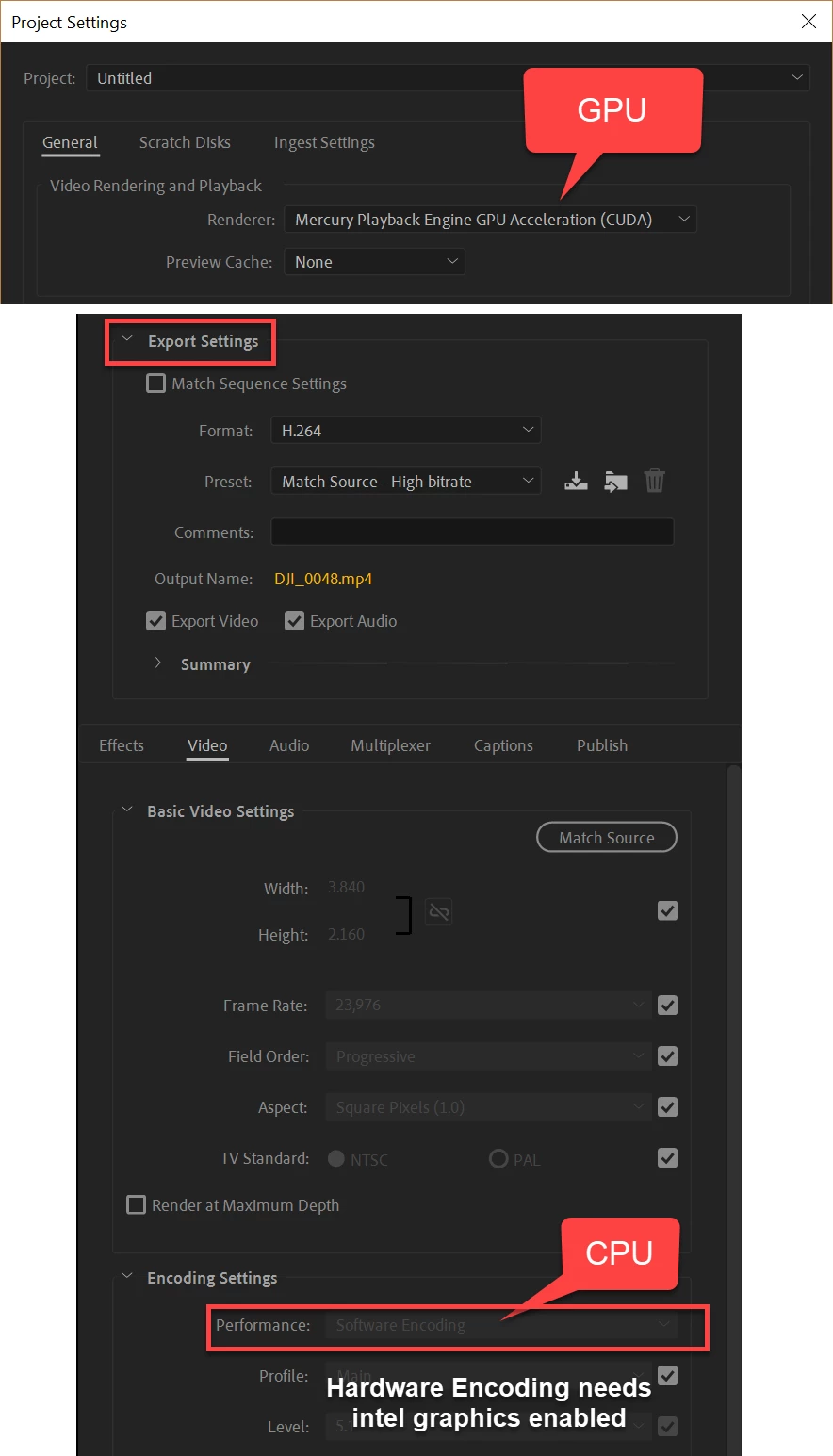
    You might be confusing two aspects of the export settings:

    MPE (cuda) is run on the GPU of the graphics card,

    Hardware encoding needs a intel cpu with Quick Sync enabled.

    4 replies

    Legend
    July 9, 2019
    yet the CUDA is not being used.

    If it's turned on, then it's being used where it can.

    stnv
    stnvAuthor
    Participant
    July 9, 2019

    I tried a clean install of the NVidia driver and rebooted the system.

    Under "Encoding settings," it tells me: "Hardware Encoding is unavailable. Please make sure this system meets hardware and minimum OS requirements for this functionality."

    As far as I can tell, my system does meet the minimum settings. What can I do to fix this`

    Would this work with a GTX-1060 6GB or even a GTX-1070 Ti 8GB?

    I have been using Premiere Pro for years and CUDA was working in the past with lesser hardware. I understand the limitations of CUDA, yet it does speed up the rendering. Other video software I have works fine with the CUDA on my graphic card.

    GPUSniffer reports the following:

    --- OpenGL Info ---

    Vendor: NVIDIA Corporation

    Renderer: GeForce GTX 750 Ti/PCIe/SSE2

    OpenGL Version: 2.1.2 NVIDIA 430.86 3.0.1226.0

    GLSL Version: 1.20 NVIDIA via Cg compiler

    Monitors: 2

    Monitor 0 properties -

       Size: (0, 0, 1920, 1080)

       Max texture size: 16384

       Supports non-power of two: 1

       Shaders 444: 1

       Shaders 422: 1

       Shaders 420: 1

    Monitor 1 properties -

       Size: (1920, -387, 1080, 1920)

       Max texture size: 16384

       Supports non-power of two: 1

       Shaders 444: 1

       Shaders 422: 1

       Shaders 420: 1

    --- GPU Computation Info ---

    Found 1 devices supporting GPU computation.

    CUDA Device 0 -

       Name: GeForce GTX 750 Ti

       Vendor: NVIDIA

       Capability: 5

       Driver: 10.2

       Total Video Memory: 2048MB

    Ann Bens
    Community Expert
    Ann BensCommunity ExpertCorrect answer
    Community Expert
    July 9, 2019

    You might be confusing two aspects of the export settings:

    MPE (cuda) is run on the GPU of the graphics card,

    Hardware encoding needs a intel cpu with Quick Sync enabled.

    stnv
    stnvAuthor
    Participant
    July 12, 2019

    Thanks for this explanation, I have looked at tons of posts about this and yours is the first that tells me that there are two separate systems in play here.

    So if I understand you correctly, it would be best to have a combination of a CUDA graphic card and an Intel QuickSync CPU to obtain maximum hardware acceleration.

    As I have read many reports about Intel CPUs having built-in spyware issues, I make a point of not using Intel CPUs and went for an AMD that is supposed to be just as fast. It would be great if Adobe would make full use of the AMD chipset as well.

    I will now look into upgrading my graphic card to have at least 6GB and I will pass on QuickSync.

    R Neil Haugen
    Legend
    July 9, 2019

    Premiere does not use the GPU for basic rendering but for those things like color correction, Warp Stabilizer, resizing and scaling of media. As it gets to  those things working down the sequence, and needs/can use assistance from the GPU.

    So if your clips don't have anything "on" them from that group the GPU will not be involved.

    Neil

    Everyone's mileage always varies ...
    Ann Bens
    Community Expert
    Community Expert
    July 9, 2019