
Participating Frequently
October 27, 2023
Question

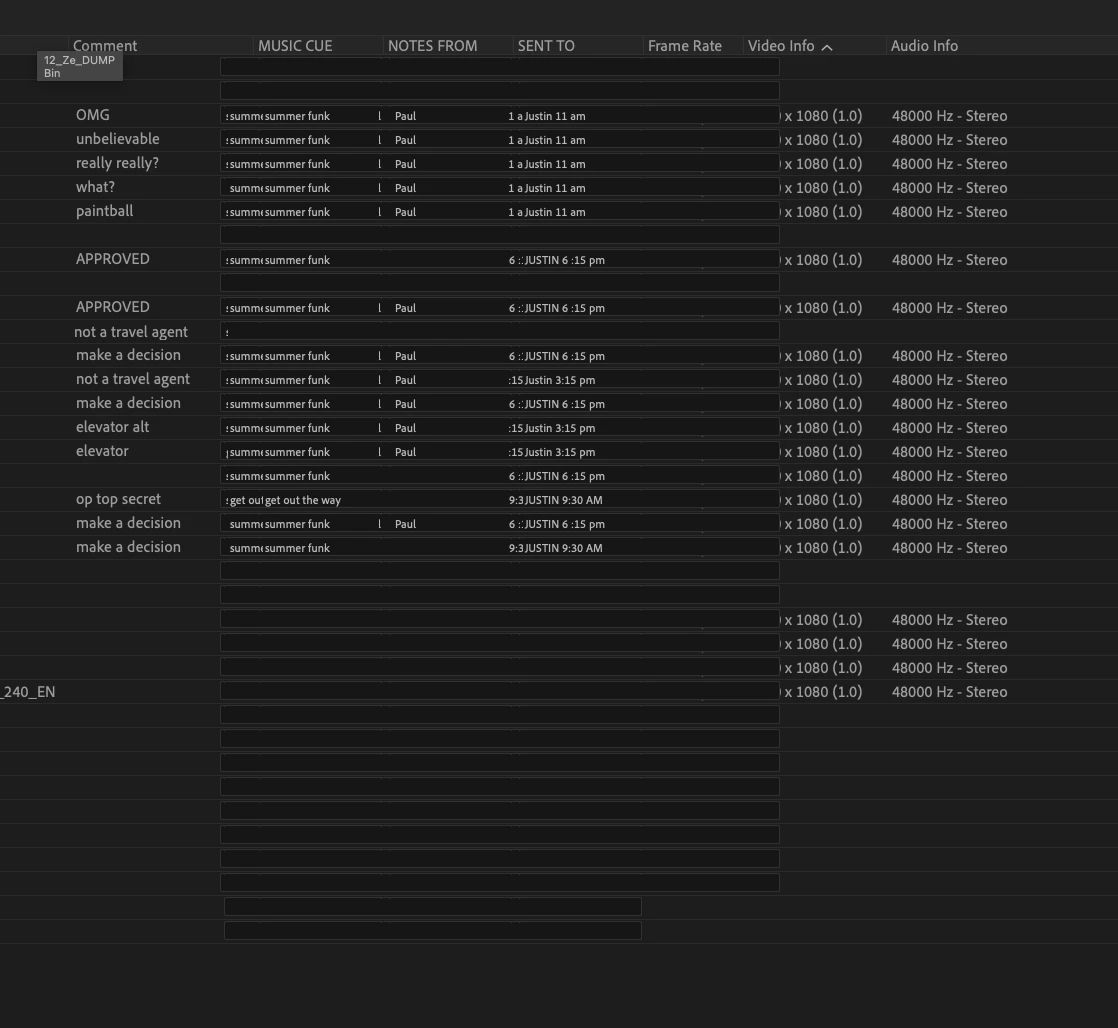
PP 2024 Metadata columns are glitchy - overlapping / not displaying correctly

  • October 27, 2023
  • 2 replies
  • 272 views

The metadata columns in the project window are not displaying correctly.  They overlap / run into each other.  It makes reading the metadata info difficult / impossible.  I've created some custom columns with text entry properties. They stretch unpredictably / merge with the adjoinging columns and overlap the standard columns.  

Please fix this!

Thanks!
This topic has been closed for replies.

2 replies

R Neil Haugen
Legend
October 27, 2023

They allow a lot of flexibility in how the columns are displayed. As shown in your vid, you can set them however you want. With that flexibility comes the issue of having some overlap another, which we users do need to set.


I have found that if I set then save a metadata custom view, when going back to that view later, it will display as I set it.


Everyone's mileage always varies ...
Participating Frequently
November 3, 2023

Thanks for your response! Yes, I had created a metadata custom view and a metadata view preset.  The interface was still acting twitchy.  I quit out of PP and relaunched.  I deleted all my previous custom settings and started over.  Hopefully, they will stay where i put them this time.  I'm not going to mess with them much moving forward; or at least I'm going to be much more cautious with my tweaks.
thanks again!

Community Manager
October 27, 2023

Moving it to Discussions for troubleshooting