
Inspiring
March 1, 2023
Answered

PP crashes on open

  • March 1, 2023
  • 3 replies
  • 3206 views

I tried to find a way to contact Adobe directly but each link took me here.

Yesterday, Premier Pro was running totally fine.  Today.. every project old and new that I open all lock up and crash within about 30 secs.  I don't have the most amazing pc but nothing has changed and it was working fine before.
Specs: 1080gtx, Ryzen 5 1600X (3.6GHz), 16gb RAM, heaps of SSD space.


I have tried reseting prefrences, rolling back to older versions, uninstalling totally and reinstalling.  Nothing works.


Please help =(
This topic has been closed for replies.
Correct answer MarekMularczyk

Can you help me undertand what this means please? 


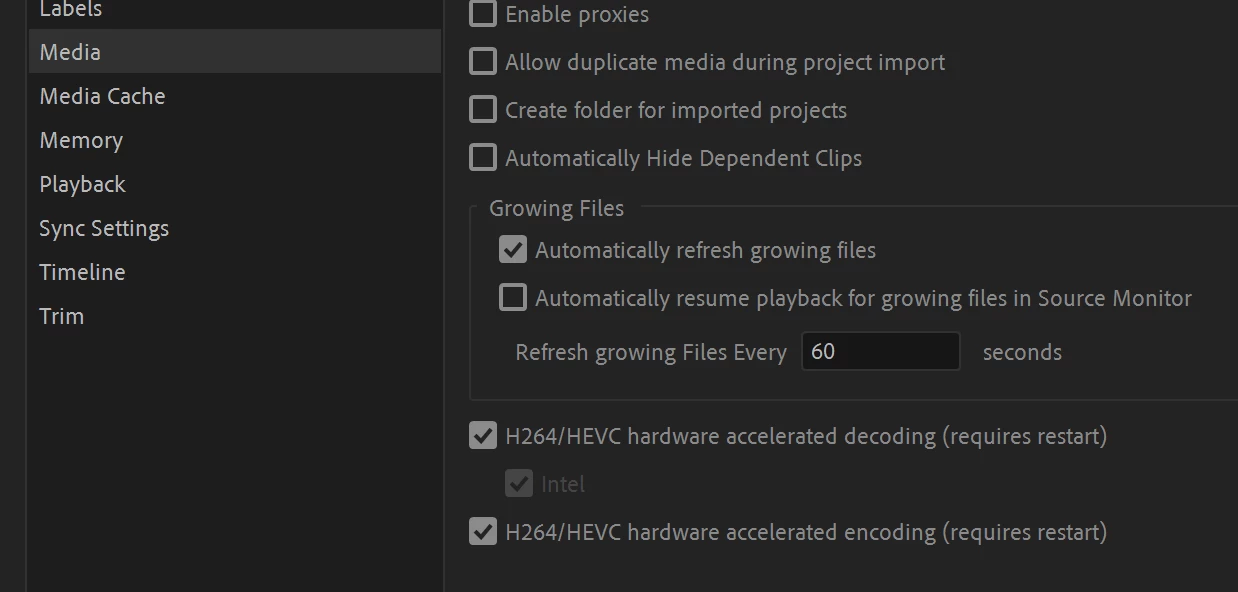
In Premiere preferences > Media, try to disable:

  1. hardware accelerated decoding
  2. hardware accelerated encoding

(bottom two tickboxes):


See if it helps.


3 replies

Kevin-Monahan
Community Manager
Community Manager
May 24, 2023

Thanks for letting us know about your progress, JP.


Cheers,

Kevin

Kevin Monahan - Sr. Community and Engagement Strategist – Adobe Pro Video and Audio
Participant
April 18, 2023

 dont understand? i am having the same issue but it wont open for me to even get to preferences 

MarekMularczyk
Community Expert
Community Expert
April 21, 2023

Have you tried to reset Premiere preferences?


Adobe Community ExpertAdobe Certified Professional
Participating Frequently
May 17, 2023

No dice for me. I've reset, rolled-back, uninstalled, pre-rendered, updated drivers, rolled back drivers. It's broke.


ShinishAuthor
Inspiring
March 1, 2023

UPDATE: It crashes the instant I interact with the timeline.

MarekMularczyk
Community Expert
Community Expert
March 1, 2023

Is it doing the same in Premiere 2022?


Adobe Community ExpertAdobe Certified Professional
ShinishAuthor
Inspiring
March 1, 2023

So I just did a full uninstall and currently installing v 22.6.4.  I will reply in time when I can tell if it crashes or not.