

PR 2020 compatibility report: Unsupported Video Driver Intel HD graphics 5500
Good mornig, i get following issue with Premiere cc2020 in combination with a NVIDIA Quadro K620M and Intel(R) HD Graphics 5500.
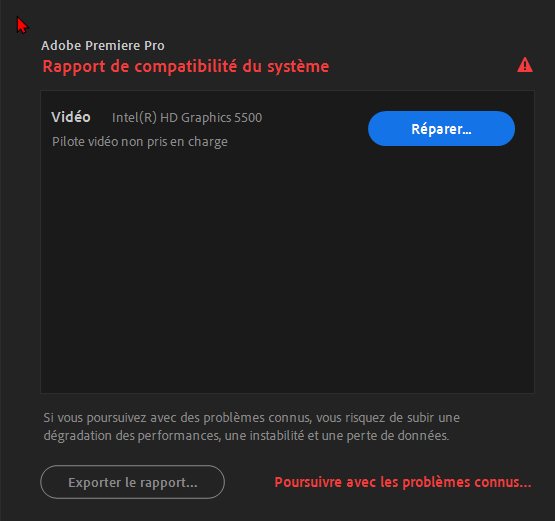
The reccomanded driver is older and obwiously not supported by Lenovo W520s.
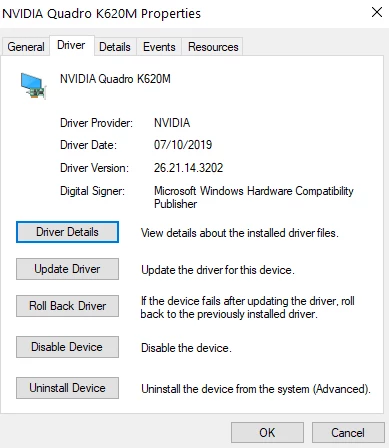
By the way Prcc2019 work perfectly with the same hardware config and also Ae,BR & Photoshop2020 Works fine with the, NVIDIA Quadro K620M v.26.21.14.3202
Thank you for Help.
___________________________________________________________________________________
Composants système :
Système d’exploitation Windows v.10.0.19037.1
----------------------------------------------------------------------------
Aucun conflit à signaler.
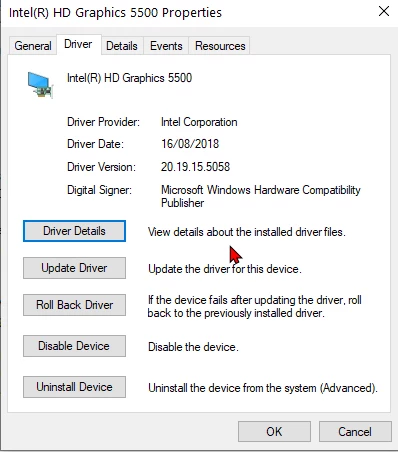
Vidéo Intel(R) HD Graphics 5500 v.20.19.15.5058
----------------------------------------------------------------------------
1. La version actuelle de votre pilote d’affichage Intel peut entraîner des problèmes de stabilité et de performances. La mise à jour vers la version 100.6286 ou ultérieure du pilote est vivement recommandée. Les pilotes sont fournis par Intel ou par le fabricant de votre ordinateur.
URL : https://helpx.adobe.com/premiere-pro/kb/drivers-video-win-intel.html
Vidéo NVIDIA Quadro K620M v.26.21.14.3202
----------------------------------------------------------------------------
Intel Driver
- Intel Corporation
- Video ProcessorIntel® HD Graphics Family
- Resolution1920 x 1200
- Bits Per Pixel32
- Number of Colors4294967296
- Refresh Rate - Current60 Hz
- Refresh Rate - Maximum75 Hz
- Refresh Rate - Minimum50 Hz
- Driver ProviderIntel Corporation
- Driver Version20.19.15.5058
- Driver Date8/16/2018
- Adapter DAC TypeInternal
- Adapter RAM1.00 GB
- AvailabilityRunning at full power
- StatusThis device is working properly.
- LocationPCI bus 0, device 2, function 0
- Device IdPCI\VEN_8086&DEV_1616&SUBSYS_222517AA&REV_09\3&B1BFB68&0&10
3D Settings in NVIDIA ctrl Pannel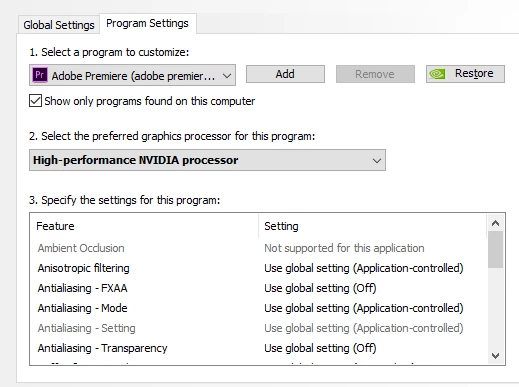
Driver Details
GPUSniffer testing 254
Initializing GPU Tech:
Try CUDA: 1
Try OpenCL: 1
Try Metal: 1
Try Vulkan: 1
KernelLoadAction: 0
UseOpenGLContext: 0000000000000000
UseDeviceContext: 0000000000000000
UseD3D11Context: 0000000000000000
CUDA system device count: 1
Found CUDA device index: 0 Name: Quadro K620M
No capability restrictions detected - adding device to list
OpenCL system device count: 2
Found OpenCL device Name: Quadro K620M supportsSSG: 0
Skipping nVidia OpenCL device
Found OpenCL device Name: Intel(R) HD Graphics 5500 supportsSSG: 0
No capability restrictions detected - adding device to list
Finished gpu initialization in 0 ms
--- OpenGL Info ---
Vendor: NVIDIA Corporation
Renderer: Quadro K620M/PCIe/SSE2
OpenGL Version: 2.1.2 NVIDIA 432.02 20.19.15.5058
GLSL Version: 1.20 NVIDIA via Cg compiler
Monitors: 2
Monitor 0 properties -
Size: (0, 0, 1920, 1200)
Max texture size: 16384
Supports non-power of two: 1
Shaders 444: 1
Shaders 422: 1
Shaders 420: 1
Vendor: NVIDIA Corporation
Renderer: Quadro K620M/PCIe/SSE2
OpenGL Version: 2.1.2 NVIDIA 432.02 20.19.15.5058
GLSL Version: 1.20 NVIDIA via Cg compiler
Monitors: 2
Monitor 1 properties -
Size: (1920, 180, 1280, 1024)
Max texture size: 16384
Supports non-power of two: 1
Shaders 444: 1
Shaders 422: 1
Shaders 420: 1
--- GPU Computation Info ---
Found 2 devices supporting GPU computation.
CUDA Device 0 -
Name: Quadro K620M
Vendor: NVIDIA
Capability: 5
Driver: 10.1
Total Video Memory: 2048MB
OpenCL Device 1 -
Name: Intel(R) HD Graphics 5500
Vendor: Intel
Capability: 2
Driver: 2
Total Video Memory: 13050MB


 AdChoices