
Nathan Lovell_52
Inspiring
November 30, 2020
Answered

PR Scripting QE .getItemAt() not working properly

  • November 30, 2020
  • 1 reply
  • 882 views

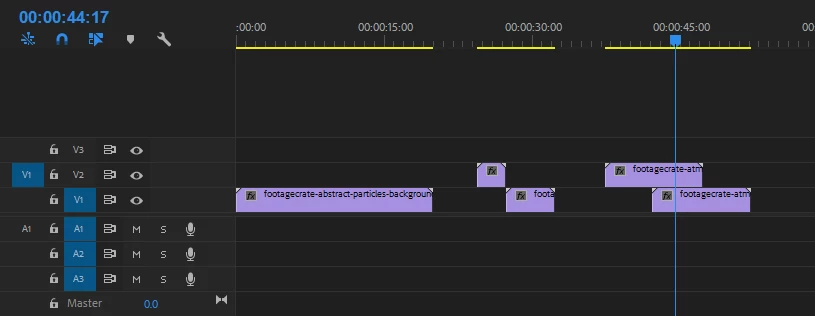
I am using the getVideoTrackAt and getItemAt methods to apply an effect to a clip. However it is only working when using the first clip on any given track. Also, the indices required seem to not be working, unless I am missing something simple. The videoTrack I am storing is working fine, but when I try to get any other item besides the first, it gives me undefined. Here is my simple project setup and code: 
app.enableQE();
var clip; 
var thisTrack = qe.project.getActiveSequence().getVideoTrackAt(1);

clip = thisTrack.getItemAt(0);
// gives me undefined

clip = thisTrack.getItemAt(1);
// gives me the first clip in the track

clip = thisTrack.getItemAt(2);
// gives me undefined
 

This topic has been closed for replies.
Correct answer Nathan Lovell_52

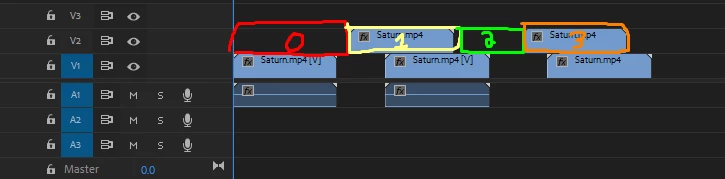
Thanks for your help @Bruce Bullis ! The issue was that I was confusing the vanilla and qe ways of looping through items. With the normal way of looping through all the clips in a video track, it only counts the visible clips, but with the QE way, you must also take into account the 'empty clips' between any present imported clips!


QE example of looping through each item (0->numItems-1)

1 reply

Bruce Bullis
Legend
November 30, 2020

> var thisTrack = qe.project.getActiveSequence().getVideoTrackAt(1);


This will get you the second video track in the sequence; the first would be at getVideoTrackAt(0).


The success (or not) of the getItemAt() calls, will depend on what's in that track.


Nathan Lovell_52
Inspiring
November 30, 2020

Right! In this case I mean to reference my V2 (second video track). On that track I have 2 clips (see above image), but the only non-undefined clip it returns is the very first 1, and in the wrong index.


getItemAt(0) should be the first clip, but it is returning undefined. getItemAt(1) is the only option working, and it returns the first clip. Furthermore getItemAt(2) returns undefined as well. Given that there are 2 clips on this track, why am I only able to access 1?

Bruce Bullis
Legend
November 30, 2020

Given that there are 2 clips on this track, why am I only able to access 1?


¯\_(ツ)_/¯


Send me a .prproj, and a snippet that repros the problem, and I'll debug into it. 🙂