Known Participant
April 25, 2019
解決済み

Precise position of razor cut

  • April 25, 2019
  • 返信数 3.
  • 7278 ビュー

When using the razor, the cut automatically snaps to some kind of hidden point.  How do I cut in between these points?

Thanks.

このトピックへの返信は締め切られました。
解決に役立った回答 gerikp

If I want to get very precise edits here one way I do it.

I change my timeline to "Show Audio Time Units" by right-clicking the top of your timeline and pulling down to "Show Audio Time Units" (see reference below)
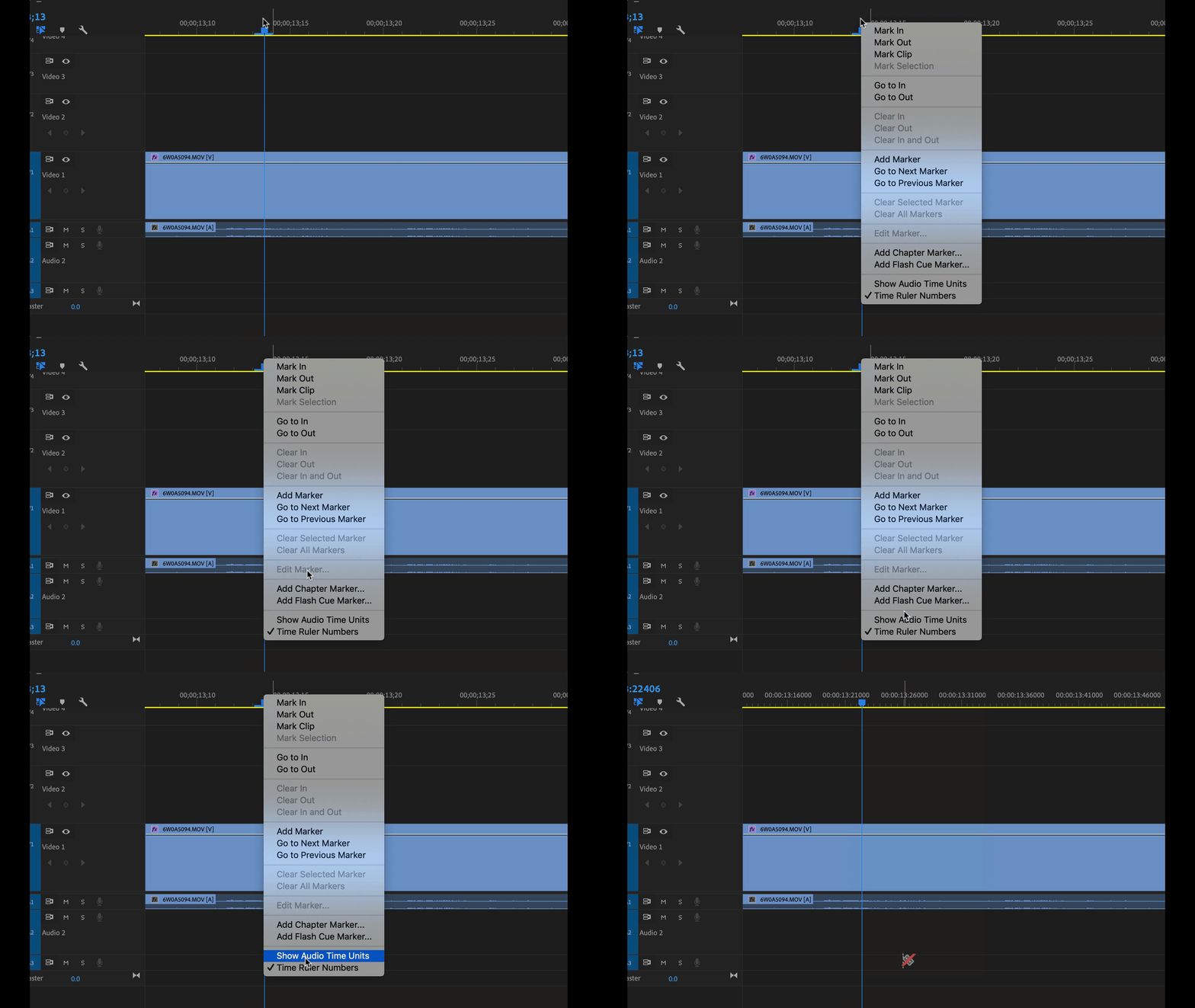
Then I place my CTI (the blue triangle and line) precisely where I want my cut to happen and instead of using the Razor Blade tool I use the keyboard shortcut Command+K to make a cut along the CTI.

I also zoom in on my sequence by activating the timeline panel and using the + and - keys.

BUT REMEMBER... Premiere doesn't let you cut or split a half of a frame of video. If you are placing your cut between video frames it's going jump to the next closest spot where a frame ends or a frame begins.

返信数 3

Bromelain作成者
Known Participant
April 25, 2019

Thank you Ann and gerikp.  This answered my question but did not solve the problem.  I will just have to live with it.  Not the worst thing.

gerikp
Community Expert
gerikpCommunity Expert解決!
Community Expert
April 25, 2019

If I want to get very precise edits here one way I do it.

I change my timeline to "Show Audio Time Units" by right-clicking the top of your timeline and pulling down to "Show Audio Time Units" (see reference below)

Then I place my CTI (the blue triangle and line) precisely where I want my cut to happen and instead of using the Razor Blade tool I use the keyboard shortcut Command+K to make a cut along the CTI.

I also zoom in on my sequence by activating the timeline panel and using the + and - keys.

BUT REMEMBER... Premiere doesn't let you cut or split a half of a frame of video. If you are placing your cut between video frames it's going jump to the next closest spot where a frame ends or a frame begins.

Participant
July 17, 2021

I'm having a similar issue, I have the playhead or CTI in the correct position but if I Contral+K or razor tool it cuts it in a spot close to but not where I need the cut. 


I'm sure somewhere my preferences aren't right. I have Show Audio Time Unit on so not sure why it's happening. Any clues?


Ann Bens
Community Expert
Community Expert
April 25, 2019

Razor cut will always cut on a frame for video.

If you have audio units selects and cutting audio it will cut at 1/48000 of a second.