jacquelinei50792337
Participant
July 16, 2017
Answered

Preference panel does not show all options

  • July 16, 2017
  • 2 replies
  • 415 views

Hi,

I want to change some of the preferences in Adobe premiere pro cc 2017. I go to Edit/Preferences/General.

When the window opens I click on General but here are only 8 options I can change. When I see youtube videos there are some many more options to change. I am trying to change specifically "Default scale to frame size" but I cannot find this option.

thank you for your help.
This topic has been closed for replies.
Correct answer Meg The Dog

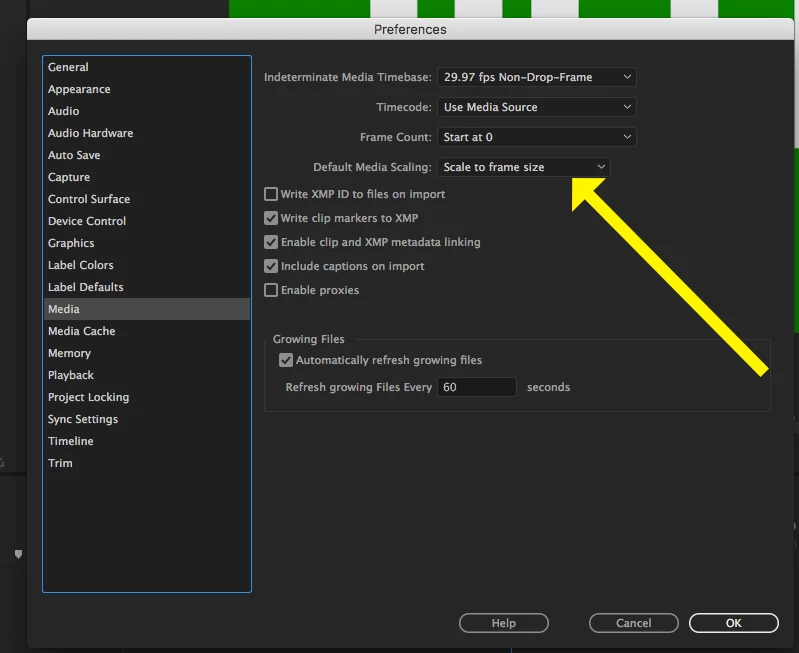
Default Media Scaling was moved to the Media Tab in a recent version:

The example you are showing is likely from an older version of Premiere.

MtD

2 replies

jacquelinei50792337
Participant
July 16, 2017

Thank you so much!!!!!!

jacquelinei50792337
Participant
July 16, 2017

This is the window that I see.

jacquelinei50792337
Participant
July 16, 2017

This is how it should look like.

Meg The DogCorrect answer
Inspiring
July 16, 2017

Default Media Scaling was moved to the Media Tab in a recent version:

The example you are showing is likely from an older version of Premiere.

MtD