Participant
August 26, 2021
Question

premier pro essential graphics

  • August 26, 2021
  • 2 replies
  • 115 views

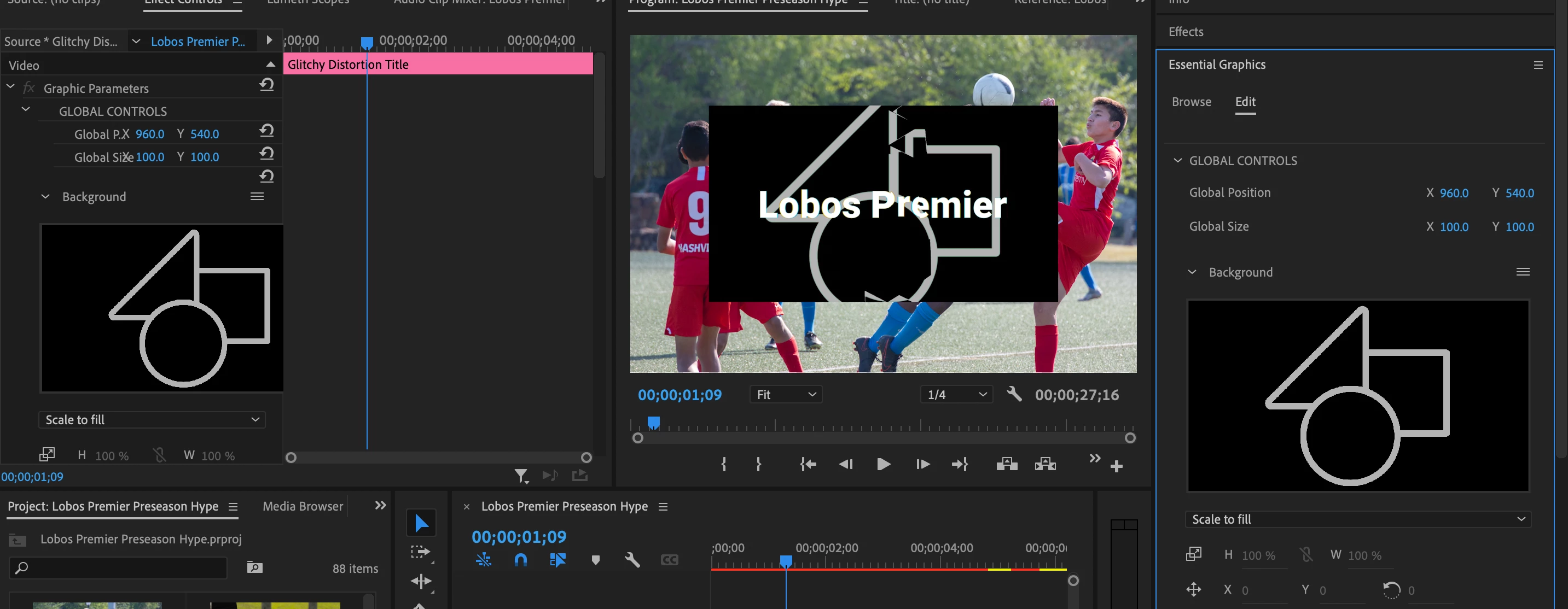
Im trying to use an essential graphic from adobe stock. how would i go about removing the black rectangular backgound. making that transparent so i just see the text?

 

This topic has been closed for replies.

2 replies

Kartika Rawat
Community Manager
Community Manager
August 26, 2021

Hi tristan5ECC!

Thanks for writing in. Let us know if Kevin's suggestion helps.


Happy to assist.

Kartika

Kevin-Monahan
Community Manager
Community Manager
August 26, 2021

Tristan,

Does the .mogrt have any other controls, such as, to make the background's Opacity to 0 or to change its color? It really doesn't appear so. We can't see the entire panel, so we'd need another screen shot to tell. You can also tell us the name of the .mogrt so we can check it out.


If you have no other controls, I would make the graphic full screen, then in the Effect Controls panel, under Opacity, explore some of the blending modes like Screen, Add, Overlay, etc. See if you can find a nice way to knock out the black that way. It's certainly the most elegant option.


Thanks,
Kevin

Kevin Monahan - Sr. Community & Engagement Strategist – Pro Video and Audio