

jbreeckner
Participating Frequently
July 22, 2020
Question

Premier Pro - white dots appearing on eyes

  • July 22, 2020
  • 7 replies
  • 1596 views

Hi, I was wondering if someone could give me a work around with an issue I'm coming across in Premier Pro with some  geen screen video I shot.


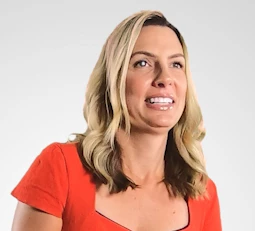
The issue I'm having is when I change the background to pure white/light gray, there are white dots that appear and disappear on the subjects eyes. When the background is pure black, I don't have this issue. I've tried an elipse mask and inverting it, but the subject moves her head around too much so the mask isn't very effective. 


Below is a screenshot of what I'm seeing. Is there a way to fix this without using a mask? Any suggestion are greatly appreciated!
 

This topic has been closed for replies.

7 replies

Inspiring
July 25, 2020

good going Warren. In your opinion are the white dots in eyes spectral highlight from lighting when she moves her head and eyes into the light ?? ( same with lower lip ) ??

Inspiring
July 25, 2020

THIS is sample of a spectral  highlight in the eyes of a model. The light source is reflected in the eye.

Is fairly common.


Inspiring
July 23, 2020

I think it's spectral highlights from lights, and the key just wasn't clean

Inspiring
July 23, 2020

hehe, poster just wants to avoid using mask or doing anything to fix it... so all this response is kinda moot.


Inspiring
July 23, 2020

maybe we could suggest how to turn the white dots in eyes into red dots, and then expand the feather and brightness of red slightly over a few frames, and this red evil light from a horror movie character ( our poster's sample pic ) shoots out of her eyes and lip !!!!!!!

SCARY !


Inspiring
July 22, 2020

not that it matters, but in resolve 15 there's a mask setting for looking at the product of the mask, namely a black and white 'result' of opacity, so you can actually adjust the thing or do what has to be done later in another node or mask.  Hard to explain, but it's not a suprise.... it's easy to see in program monitor.

I don't know if your version of ppro has that sort of ability, but you shouldn't have to wait for the export to see the results.


Inspiring
July 22, 2020

sounds like you have holes ( transparancy) in the green screen so that would be adjusting the parameters of the screen attributes ( frame by frame so you see those instants where the eyes are moving through lights ( spectral highlights )).

You're right, it's a question of the 'mask' adjustments to fix that.

I doubt PPro has the ability to do that sort of adjustment but AE might.


jbreeckner
Participating Frequently
July 23, 2020

That makes sense. So I can adjust the transparency frame by frame? Everytime I try, it seems to adjust it for the whole sequence. I'm still VERY new to Premier Pro (been relying on Youtube tutorials to get as far as I have with it lol) and AE is also something I've never messed with either. I'm hoping to figure out a fix that someone can explain to me easily that doesn't include a mask. 

R Neil Haugen
Legend
July 22, 2020

I'm with PeruBob ... I would expect it has to do with the color of her eyes, and the easy fix is simply to track an oval mask on most of her face. Won't affect the rest of the image, but would 'protect' the eyes from the green-screen matte.


Neil

Everyone's mileage always varies ...
Ann Bens
Community Expert
Community Expert
July 23, 2020

See white dots on lips; green lipstick? 😉


Peru Bob
Community Expert
Community Expert
July 22, 2020

Does the subject have green eyes?

jbreeckner
Participating Frequently
July 23, 2020

Nope! She has brown eyes

Ann Bens
Community Expert
Community Expert
July 22, 2020

Difficult to see as the screenshot is rather small.

Please post a image of the original footage with the green background.

Also post computer specs, OS and Premiere build and media used.

Guessing you key is too agressieve.

pure white is filling the holes created by the key.

jbreeckner
Participating Frequently
July 23, 2020

Here's a screenshot from the original footage, let me know if you can see it okay. I understand my green screen background has ripples and shadows, the lighting I had to work with wasn't the best either. Overall this was a difficult shoot and it's made it rough to key in Premier.


Dell Laptop (not sure the exact model, it's my work computer) Windows 10

Premier Pro 2020

Footage shot on a GoPro Hero 7 Black in 2.7K at 30fps

Warren Heaton
Community Expert
Community Expert
July 25, 2020

I managed to get a better key than I expected from Keylight in After Effects.


My best guess is that you're getting occasional macro blocking as a result of keying a highly compressed inter-frame 420 color-sampled file format.