Known Participant
June 25, 2016
Beantwortet

Premiere 2015.3 missing LUTs?

  • June 25, 2016
  • 2 Antworten
  • 18041 Ansichten

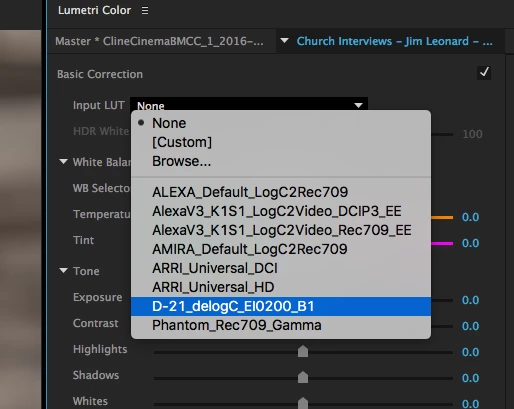
In version 2015.2, there was a long list of LUTs under Basic Correction, including LUTs for the Black Magic Cinema Camera. But in 2015.3, they appear to be missing. What happened to them and how do I get them back?

Dieses Thema wurde für Antworten geschlossen.
Beste Antwort von Kevin J. Monahan Jr.

Hi KB8WFH,

I found them in

Applications > Adobe Premiere Pro CC 2015 > Contents > Lumetri > LUTs > Legacy.

Nut sure why they did not load up. However, if I copy the old .itx version from the 2015.2 version LUT folder into the 2015.3's "Technical" folder, and reload Premiere, they appear. At least a work around for the moment.

It is not recommended you copy older LUTs from previous versions of Premiere Pro into newer ones. They are removed for a reason. That is, that there are new encoders/decoders installed. Using these LUTs from previous versions can result in an unstable system, meaning crashes.

We apologize for this inconvenience, but for all new projects, use new versions of these LUTs. For all updated projects, remove the older LUTs and apply new copies of the same LUT.

If the input LUT is not available for your specific camera, go to the manufacturer's website for an updated one. If that is not available, please let us know in a bug report.

Thanks,
Kevin

2 Antworten

Participant
July 26, 2016

Hello guys,

I have fixed it, go to Applications>Adobe Premiere Pro CC 2015.3> Adobe Premiere Pro CC 2015 (right click)> Show Package Contents> Contents> Lumetri > LUTs, then open Legacy > copy the files > go back and open Technical > Paste

Close the program and open it and you will find them all.

KB8WFHAutor
Known Participant
July 26, 2016

Also, be aware that you also have to copy the LUTs to the similar folder for Media Encoder. If you don't the media encoder won't be able to process them and your output video will look awful and hot have your LUT effects included in them.

Kevin J. Monahan Jr.
Community Manager
Community Manager
March 2, 2017

Hi KB8WFH,

Also, be aware that you also have to copy the LUTs to the similar folder for Media Encoder. If you don't the media encoder won't be able to process them and your output video will look awful and hot have your LUT effects included in them.

Not recommended you do this. You can introduce instability to Media Encoder by doing so. Seek out installations of Camera LUTs from the manufacturer.

Thanks,
Kevin

Kevin Monahan - Sr. Community and Engagement Strategist – Adobe Pro Video and Audio
KB8WFHAutor
Known Participant
June 25, 2016

I found them in

Applications > Adobe Premiere Pro CC 2015 > Contents > Lumetri > LUTs > Legacy.

Nut sure why they did not load up. However, if I copy the old .itx version from the 2015.2 version LUT folder into the 2015.3's "Technical" folder, and reload Premiere, they appear. At least a work around for the moment.

Participant
July 4, 2016

Hello, I cannot found the path you mentioned above (

Applications > Adobe Premiere Pro CC 2015 > Contents > Lumetri > LUTs > Legacy.)

There isn't such a path in my Mac. The Applications>Adobe Premiere Pro CC 2015.3 folder doesn't contain a "Contents" folder. Moreover, Under "Applications" folder the closest thing to "Adobe Premiere Pro CC 2015" is "Adobe Premiere Pro CC 2015.3". Can you verify this? Thank you.

hongnin.
Participant
July 6, 2016

"Adobe Premiere Pro CC 2015" should be "Adobe Premiere Pro CC 2015.3"