
jcomninellis
Inspiring
December 12, 2019
Answered

Premiere 2019 - Freezes every five minutes - PLEASE HELP!

  • December 12, 2019
  • 3 replies
  • 1580 views

We are in the final days of editing a 60min documentary and Premiere 2019 (Version 13.1.5 - Build 47) has begun to freeze/lock up (spining "beach ball") every 5-10 min. This often happens when I move or trim an item (audio, video or graphic) on the timeline. Premiere freezes for about five minutes and then comes back. When it is not frozen, it runs VERY slowly. Each action, whether its hitting play or making an edit, takes about 3-5 seconds to respond. When moving the playhed to a new spot in the timeline it generally takes about 10 seconds for the program monitor to update with the new image. There are three of us working on this film, which consists of five different premiere projects (one for each section of the film). The same problem is consistently happening for all of three of us and in all five projects. These problems are bringing this incredibly tight production schedule to dead halt. PLEASE HELP!


The projects are obviously very large and have a great deal of footage in them, but the odd thing is that I have been working on this project solo for months and never had this problem until this past week.


Some observiations:

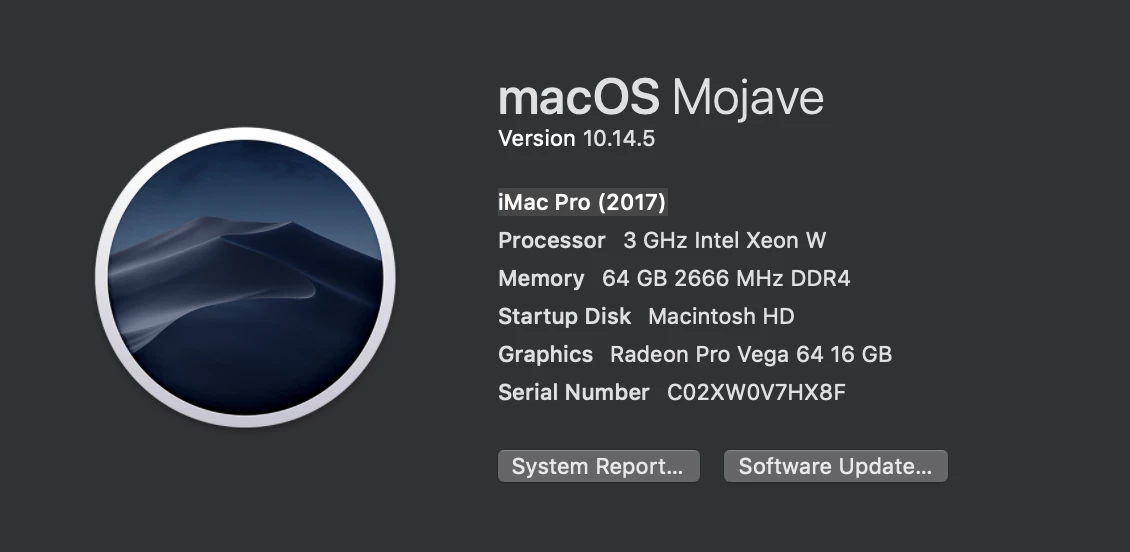
We are all three working on identical computer models. Details below.

We are all working off the same shared company server. (We've tested connecting with AFP and SMB with the same results).

Turning video quality down does not seem to impact this at all. Even with all the video tracks TURNNED OFF this problem continues.

I'm watching my CPU usage constantly on the Activity Monitor to see when I'm overloading the machine and this also does not seem to be a factor. 
When premiere freezes the CPU percentage is ofte around 50-100% and once it freezes it bottoms out at 1% till it comes back online.

Restarting premiere and restarting the computer does not solve the problem.

Reseting preferences does not solve the problem.

I have tried setting my project renderer to either one of our GPU accelerations (OpenCL or METAL) and the problem continues.


Computer Details:

All three team members are working on idetical 2017 iMac Pros


This topic has been closed for replies.
Correct answer jcomninellis

The only solution we found was to edit portions of the film on sub sequences which worked flawlessly, and then bring in fully edited chunks into the large sequnce, which never stopped freezing on us. It would apeart that premiere struggles with sequences of a certain length or complexity. One time I pulled a large chunk of the main sequence into a subsequence and it started freezing up on me to. I guess it had passed some sort of "threshold" of how complex of a sequence premiere was willing to deal with. To be clear, we weren't dealing with heavy motion graphics or anything like that and, except for a few drone shots, none of it was in 4K, just 1080. Each of these "long sequences" were under 15min in length. In order for the subsequences to work without freezing, they had to be only a couple minutes in length. 

Still a VERY frusterating problem that I wish I could get to the bottom of, but this stragegy is effective as a work around. Hope this helps someone else!

3 replies

jcomninellis
jcomninellisAuthorCorrect answer
Inspiring
December 20, 2019

The only solution we found was to edit portions of the film on sub sequences which worked flawlessly, and then bring in fully edited chunks into the large sequnce, which never stopped freezing on us. It would apeart that premiere struggles with sequences of a certain length or complexity. One time I pulled a large chunk of the main sequence into a subsequence and it started freezing up on me to. I guess it had passed some sort of "threshold" of how complex of a sequence premiere was willing to deal with. To be clear, we weren't dealing with heavy motion graphics or anything like that and, except for a few drone shots, none of it was in 4K, just 1080. Each of these "long sequences" were under 15min in length. In order for the subsequences to work without freezing, they had to be only a couple minutes in length. 

Still a VERY frusterating problem that I wish I could get to the bottom of, but this stragegy is effective as a work around. Hope this helps someone else!

Kevin J. Monahan Jr.
Community Manager
Community Manager
December 13, 2019

JcomninE,

This sounds like a real mess. I hope we can help you. When facing these issues, I like to hit the usual suspects first.

  • Before you do anything, repair R/W permissions on Adobe folders.
    Large complex projects can break when you update them from one major version to the next. If you did that from 12.x to 13.x, that might be the case.
  • I like the idea of creating a new project, then importing the older project(s) into it. However, before doing so, strip out any extraneous sequences, clips, graphics, music, SFX, and anything you definitely are not using. Strip down the projects to the leanest and meanest bare bones you can.
  • Make sure "Allow Duplicates" is deselected in the Media Browser panel menu before importing projects.
  • Try these steps.


Report back after troubleshooting and let us know if you got the project repaired.


Thanks,
Kevin

Kevin Monahan - Sr. Community and Engagement Strategist – Adobe Pro Video and Audio
Richard van den Boogaard
Community Expert
Community Expert
December 12, 2019

Without being able to go into the nitty gritty details of your machine, I have come to realize that PPro may experience more hardware issues when handling long(er) form content.


As a possible solution, you may consider the following:

- Create a new project and import your previous project into that one

- Reset your preferences

- Update your GPU

- Consider breaking up the project in segments of 5-10 minutes each. Once done, render out the files as uncompressed video and then stitch these files together to create your final render.


Hope (any of) this helps.