
Participant
March 19, 2021
Question

Premiere 2020 playback keeps pausing 1-3 seconds after pressing space

  • March 19, 2021
  • 4 replies
  • 2490 views

I've been trying to fix this for a while now and I can't find anything about it online other than it potentially being an audio hardware issue. The playback just keeps pausing itself after a few seconds when I'm trying to play it.


PC Specs:
Ryzen 9 3900x

RTX 3090

64 GB RAM


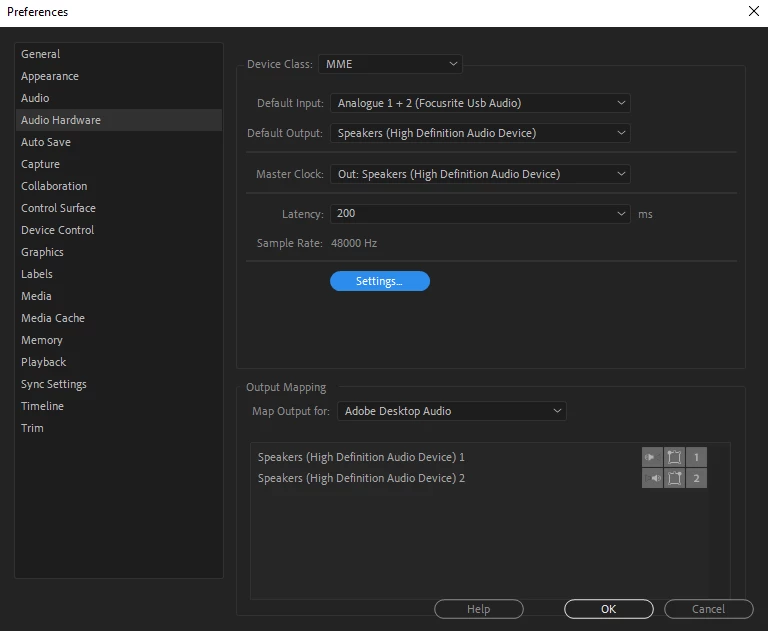
And also, here's a picture of my audio hardware settings.
This topic has been closed for replies.

4 replies

Participant
March 30, 2024

*SOLUTION*

Tried everything. Finally fixed. USB ports were overloaded on PC Tower. Almost every usb plug was being used, disconnected 2 of my el gato cam links and fixed the problem! No more pausing on its own on playback.

I was with adobe support for 30 minutes trying everything and finally came up with this solution. Remove some of your usb connections until it fixes it.

Kartika Rawat
Community Manager
Community Manager
October 21, 2021

Hi Danomil!

Sorry to hear that. What happens when you switch Default Input to No Input? Does that help?


Let us know.

Thanks,

Kartika


Peru Bob
Community Expert
Community Expert
October 20, 2021

Delete the Media Cache and Media Cache files:
https://community.adobe.com/t5/premiere-pro/faq-how-to-clear-your-media-cache-in-30-seconds-in-premiere-pro-2020/m-p/11017257/thread-id/260446?page=1

If that doesn't work,try resetting the preferences:
https://community.adobe.com/t5/premiere-pro/faq-how-to-reset-trash-preferences-in-premiere-pro/td-p/8236158?page=1

If that doesn't work, try resetting the Workspaces:
Reset a workspace
Reset the current workspace to return to its original, saved layout of panels.
1. Do one of the following:
• Click the Workspace menu icon and select Reset to Saved Layout.
• Choose Window > Workspace > Reset to Saved Layout.
from here:
https://helpx.adobe.com/premiere-pro/using/workspaces.html

If that doesn't work, try Preferences > Audio Hardware and set Input to None.

If that doesn’t work, try updating or rolling back your graphics driver directly from the video card manufacturer’s site. If NVIDIA, do a clean install of the latest Studio Driver (NOT the Game Driver)

If that doesn't work, try creating a new project and import the old one into it.

Also, please help us help you:
https://community.adobe.com/t5/premiere-pro/faq-what-information-should-i-provide-when-asking-a-question-on-this-forum/td-p/3929027?page=1

Danomil
Participant
October 20, 2021

I'm having same issue, were you able to figure out how to fix it? My Pc has similar  spec's but I have a amd gpu

Participating Frequently
February 29, 2024

did anyone find the solution . i have same problem

Peru Bob
Community Expert
Community Expert
February 29, 2024

@Yash35717096g4ji 

Are you still using 2020?

Have you tried all the suggestions listed here?