
olllieelmes
Inspiring
August 19, 2022
Answered

Premiere 22.5.0 Error with linking proxies

  • August 19, 2022
  • 1 reply
  • 754 views

Hello, 

Since updateding to Premiere 22.5.0 I get a red proxy logo (instead of blue) next to each video plus this error message. (see below)

Proxies are somehow no longer compatible. 
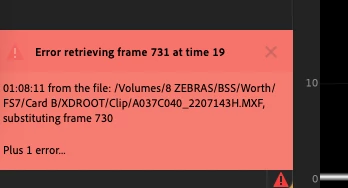
 

When I come to do the final export, I get black frames that appear which aren't in the edit. 

Any help appreciated. 

Thanks, 

Ollie 


This topic has been closed for replies.
Correct answer olllieelmes

Sorry to hear that. Let me know if it works out on the laptop.


Thanks,
Kevin


Fixed it by loading the project from my 2nd backed up media on a different hard disk with no proxies. 

1 reply

olllieelmes
Inspiring
August 19, 2022

This is the message I get indicating the black frame insertion. 

The lesson here is, don't update before you finish a project BUT(!) in my defence, when I tried to launch premiere, it said reinstalltion needed. 

olllieelmes
Inspiring
August 19, 2022

So I have rolled back to the previous version of Premiere, and I'm now getting the same issue with the black frames when exporting. Very frustrating

Kevin J. Monahan Jr.
Legend
August 19, 2022

Hi, olllieelmes,

Very frustrating. What is the source footage? Looks like some .mxf wrapped H.264. Is that correct? What format are the proxies using? Is your footage located on an external drive? I hope I can help. You might try transcoding some source footage to ProRes as a test.


Thanks,
Kevin

Kevin Monahan - Sr. Community and Engagement Strategist – Adobe Pro Video and Audio