
Participating Frequently
July 16, 2025
Question

Premiere 25.2.3 Crashes as soon as I add or move content in the timeline.

  • July 16, 2025
  • 6 replies
  • 392 views

Any time I add footage, audio or try to make any cuts or moves to the timeline Premiere crashes. 

I tried updating to the newest version and while it fixes the issue with Premiere it causes After Effects to no longer allow me to open or create new projects (I posted about this bug in the After Effects community). I need to use both pieces of software for work, and having to uninstall and reinstall Premiere/roll back versions in order to get After Effects to work is a maddening and time consuming endeavor. 

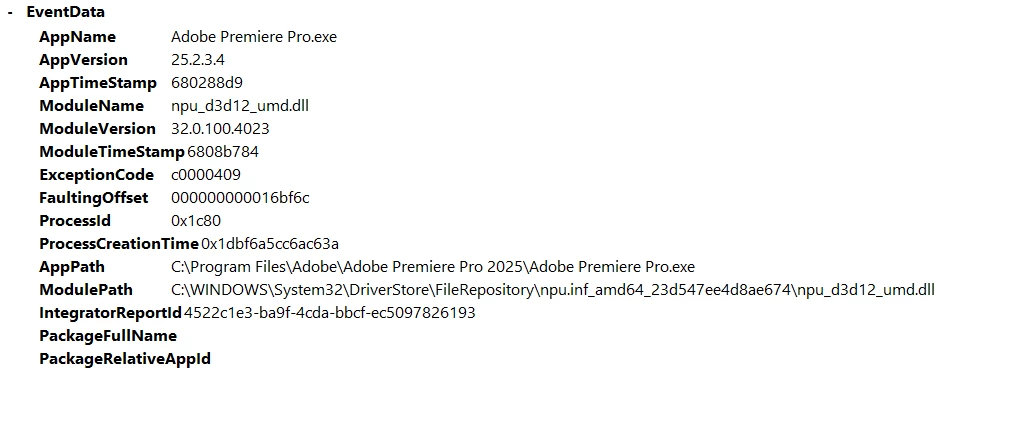
I am running Windows 11. Here is the Event Log. 
6 replies

Participating Frequently
July 25, 2025

Got an entirely different machine and I am still having the same issue. Windows 11

After Effects crashes anytime I try opening a project, and Premiere crashes any time I add footage to the timeline. 

I have used dynamic links with most of my After Effects projects. 

The beta works enough for me to get work done but this issue being the same on two different computers is so confusing. 

Participating Frequently
July 17, 2025

System File Checker did not come up with anything. I have tried signing in and out of creative cloud. I have tried uninstaling and reinstalling the entire suite multiple times. 

Community Manager
July 17, 2025

Hi @Benj_Braman
Do you know if the System File Checker found anything?  Have you tried logging out of Creative Cloud and logging back in? 
Here's some more info on troubleshooting, specifically Error code 0xc0000409.  Although there could be something with dynamic links at play, it would be nice to eliminate that error.

Participating Frequently
July 17, 2025

The issue started happening after the last 25.3 update. I had to roll back Media Encoder, AE, and Premiere in order to work in any of the apps at all. I installed the beta and it is working for Premiere, but I am running into the same issue I had before with the 25.3 update where I can't open or create new projects in the After Effects Beta. I have reinstalled the graphics card drivers and that didn't make a difference. I am using dynamic linking from Premiere on most of my projects in AE. 

Community Manager
July 16, 2025

Hi @Benj_Braman,

Did you also update After Effects?  
Error code 0xc0000409:
-I'd like to confirm that your graphics drivers are up to date.  
-Are you familiar with the System File Checker?  You can also try running that to see if there is any hidden damage or corruption.


Do you know if this issue began with an update?  Is this a new computer?  Does it happen with the mouse or keyboard shortcuts, or both?  Are you using dynamic links? We’ll need a bit more info to try to help with your issue. Please see: How do I report a Problem?   I hope we can help you soon.

Peru Bob
Community Expert
Community Expert
July 16, 2025

Have you tried the beta versions of PP and AE?