
Participant
May 21, 2025
Question

Premiere 25.2.3 MOGRT Issues

  • May 21, 2025
  • 2 replies
  • 188 views

Recently updated to Premiere 25.2.3 (from 25.1), and now the MOGRTs in my sequences are acting strange. When I highlight some MOGRTs and open the properties panel, the text displayed is shown from a completely different MOGRT in a different sequence. When I make edits, it effects the other MOGRT too. I am unable to edit the MOGRTS in some of my sequences, because they are just referencing others.


You can see in the screenshot that the MOGRT properties don't match the MOGRT on in the program window.
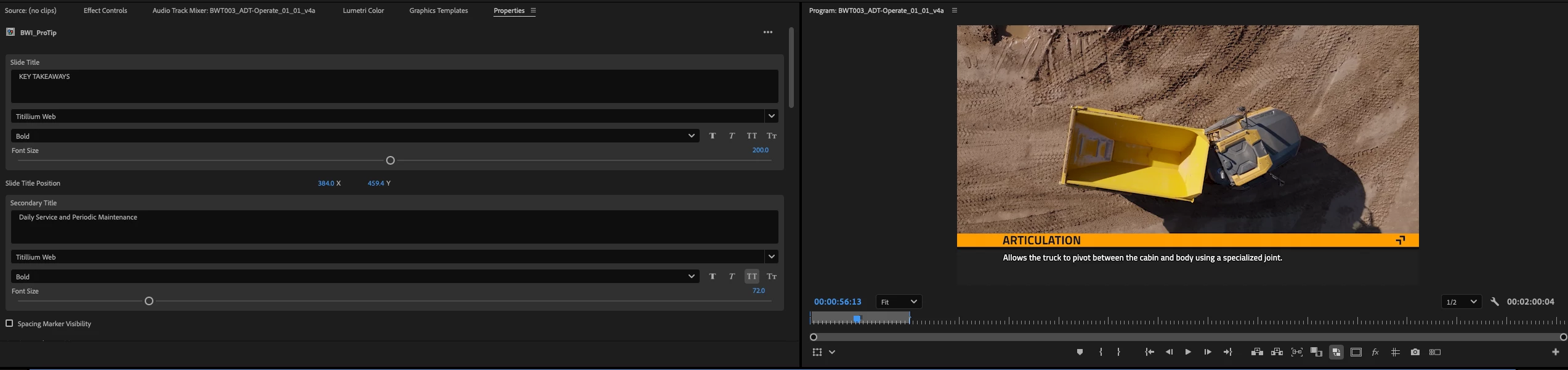
 

Using Mac OS Sonoma 14.7.4

2 replies

Theresa Rostek
Community Manager
Community Manager
May 22, 2025

Hi @defaultk8u17hhkrf1r,


Thanks for your report. Is the Progress Dashboard done loading before you've interacted with the mogrts? You can check in Windows -> Progress if anything is running.


Do you have any plugins/extensions?


Can you share a video of all of Premiere to show the issue?


Thanks,

Theresa

Ann Bens
Community Expert
Community Expert
May 21, 2025

Start with trashing media cache. If that does not help

rest Preference by holding down shift while opening premiere.