



Teet37539471igol
Participating Frequently
February 26, 2026
Question

Premiere and Media Encoder not using the right GPU

  • February 26, 2026
  • 4 replies
  • 160 views

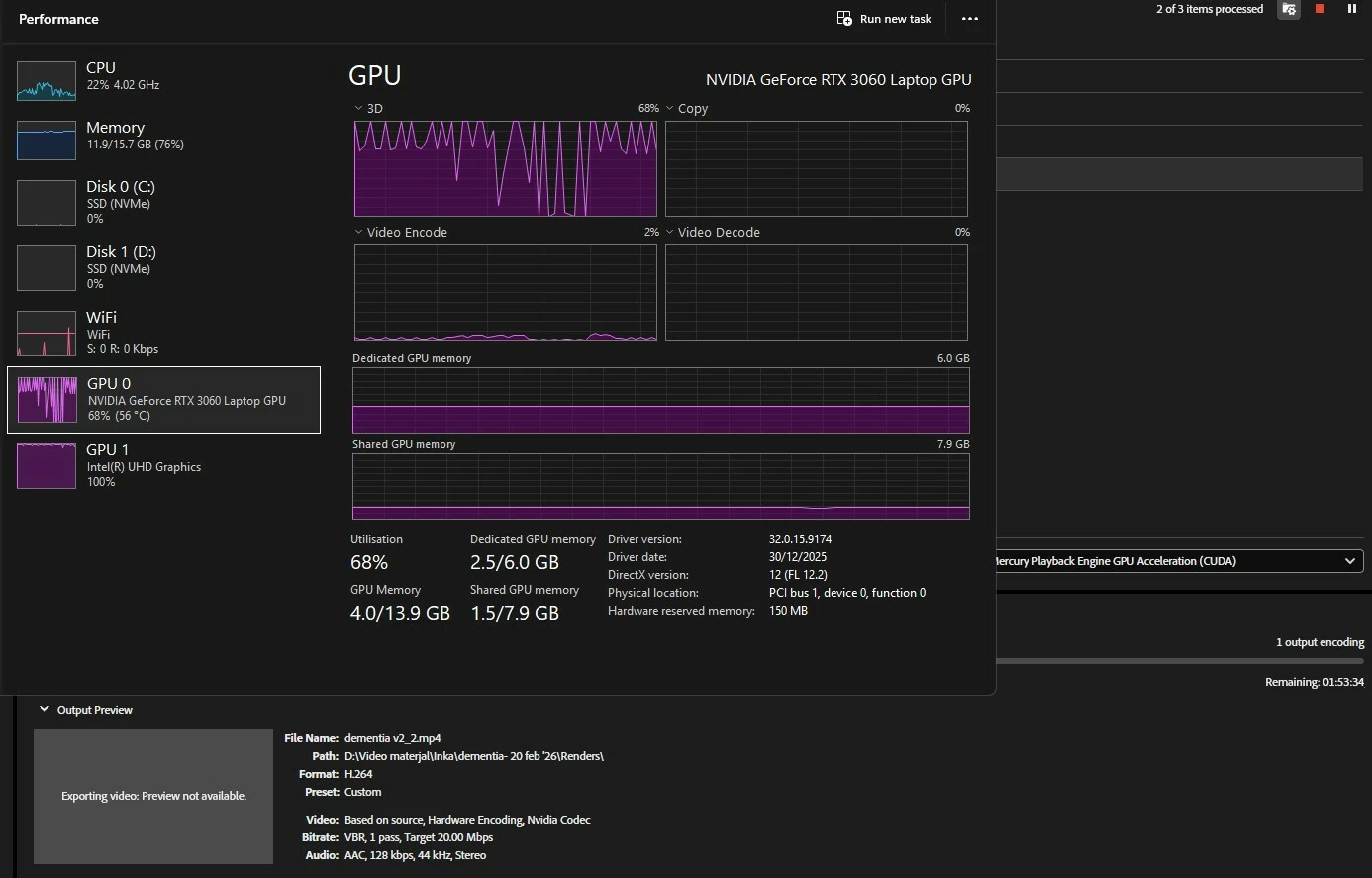
Trying to render a video but neither Premiere Pro or Media Encoder is using my Nvidia GPU fully but instead going full ham on the integrated Intel Gpu. 


Rendered the same video last week and completed it in 10 minutes or so and now it takes 1- 1.5 hours.


Tried everything google had to suggest:

  1. Disabled Intel in the hardware accelerated decoding settings
  2. Forced Windos 11 to use the Nvidia GPU when running the apps
  3. Reinstalled my Nvidia Studio Driver
  4. Used the Media Encoder console to disable Intel hardware acceleration

But still no luck. Added a screenshot of my task manager, rendering settings and time when rendering. 


Thanks for your help
 

    4 replies

    Teet37539471igol
    Participating Frequently
    March 3, 2026

    Seems that maybe I’ve figured it out? Or maybe it corrected itself somehow.

    The source file on the last slow render was in .mov format but now I got another project that I converted to .mp4 before editing and rendering and it now renders super fast with the proper GPU.

    Need to do some more tests to confirm this.


    Is there a chance that the .mov converting during the encoding and rendering of the full project somwhow defaults to the iGPU? I’m not that tech-savvy but maybe someone finds this interesting and can maybe explain this more.


    Thanks 

    MyerPj
    Community Expert
    Community Expert
    February 28, 2026

    Under Preferences/Media you can play with these options to see how it affects that. That’s how I leave my desktop RTX-4070. Thought I haven’t checked it recently.


    Teet37539471igol
    Participating Frequently
    March 2, 2026

    Yes, I have disabled the Intel and enabled Nvidia but it doesn’t change a thing. But maybe I should change it up and maybe some freak miracle happens.

    MyerPj
    Community Expert
    Community Expert
    March 2, 2026

    Yes, try it with different settings, enable or the other, etc...

    Legend
    February 27, 2026

    One thing to check:


    Which renderer are you using? CUDA or OpenCL?


    If OpenCL, then it will only use the integrated Intel iGPU for hardware acceleration. But if CUDA, there is something in your laptop which forces things back onto the iGPU-in particular, you cannot disable the iGPU at all without resulting in a completely black screen.

    Teet37539471igol
    Participating Frequently
    February 28, 2026

    I’m using CUDA.

    Feels like I’ve looked at every setting and tried a lot of things. Might be something Windows decides on its own? Or something busted with the Nvidia driver?

    Community Expert
    February 27, 2026

    Do you have the most current version of the apps installed?

    Teet37539471igol
    Participating Frequently
    February 27, 2026

    Yes, everything is up to date.


    Community Manager
    February 27, 2026

    Hi Teet37539471igol,

    Please let us know the version of Premiere & Media Encoder you are using. Also, are there any effects applied to the clips in the timeline?

    Thanks,
    Sumeet