


Inspiring
May 23, 2025
Answered

Premiere Cannot Attach Proxies if Audio Interpreted to Dual Mono Instead of Stereo

  • May 23, 2025
  • 2 replies
  • 204 views

This is on Premiere 25.2.3 on a MacBook Pro 2020 and an iMac 2020 both running the latest macOS Sequoia 15.5.


On the MacBook Pro 2020 I used Premiere to create proxies from XAVC UHD MP4 clips that I had used "Interpret Footage" to change the stereo audio track to dual mono. This process proceeded as usual. However, once I moved the created proxies and Premiere project file to my iMac 2020 on a different volume (where I have to reattach the clips), now I get this error when trying to reconnect to the proxies.
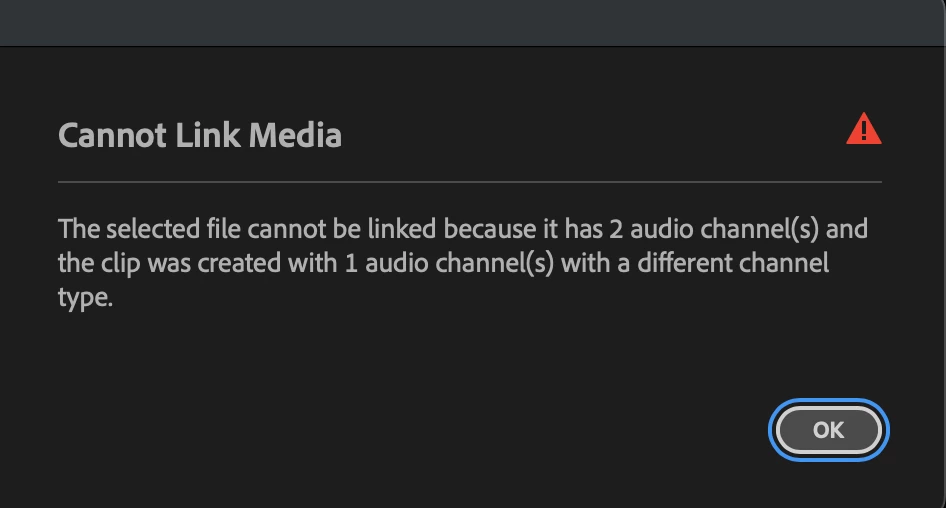
 

I used a portable drive (a Samsung T9) to copy the project to off my RAID for use in the MacBook Pro to create the proxies. When I connect the T9 to my iMac, I can load up the project no problem, so this seems solely due to a bug in the re-linking process when the footage is moved to a different volume.

Correct answer jamieclarke

Hi @ghuff - 
Thanks for submitting your bug report. 


When you open your project, set all your proxy media to Offline. Then, right click your clips and go to Proxy > Attach Proxies. From there, select your proxy files in their new location.


Let us know if that resolves the issue.


Sorry for the frustration.

2 replies

ghuffAuthor
Inspiring
May 23, 2025

Thanks, Jamie, that did indeed work, so it looks like the bug is just on the initial re-linking before the project is fully open.

jamieclarke
Community Manager
jamieclarkeCommunity ManagerCorrect answer
Community Manager
May 23, 2025

Hi @ghuff - 
Thanks for submitting your bug report. 


When you open your project, set all your proxy media to Offline. Then, right click your clips and go to Proxy > Attach Proxies. From there, select your proxy files in their new location.


Let us know if that resolves the issue.


Sorry for the frustration.