
Participant
December 18, 2016
Answered

Premiere CC 2017 crashes with 120 fps clips

  • December 18, 2016
  • 2 replies
  • 1810 views

I'm using Premiere Pro CC 2017.0.1 -- or rather, trying to use, if it would stop crashing on me for 2 seconds!! I filmed a number of clips on my iPhone in "slow-mo" mode, which really just means it films 120 fps MOV files, instead of the usual 30 fps MOV files. The instant I try to do virtually anything with these clips, Premiere crashes. I get the Windows crash dialog which says "Adobe Premiere Pro CC 2017.0 has stopped working" and "Windows will close the program and notify you if a solution is available." I found a help article about Premiere 2015 crashing but that doesn't offer any relevant solutions. I can't drag the clips around the timeline, I can't scrub them, I can't do anything. The whole program is completely unusable.

I checked my system event viewer logs, and while the errors are clearly and obviously logged there, I can't say the logs are all that forthcoming. Here's one example.

Faulting application name: Adobe Premiere Pro.exe, version: 11.0.1.6, time stamp: 0x5822ef8f

Faulting module name: dvaaccelerate.dll, version: 11.0.1.6, time stamp: 0x5822c100

Exception code: 0xc0000005

Fault offset: 0x0000000000515fb0

Faulting process id: 0x1ddc

Faulting application start time: 0x01d25978ab2bd613

Faulting application path: C:\Program Files\Adobe\Adobe Premiere Pro CC 2017\Adobe Premiere Pro.exe

Faulting module path: C:\Program Files\Adobe\Adobe Premiere Pro CC 2017\dvaaccelerate.dll

Report Id: 7cc927fc-0a8a-4840-87c7-96d230ecd86a

Faulting package full name:

Faulting package-relative application ID:
This topic has been closed for replies.
Correct answer Meg The Dog

SoaperGEM0 wrote:

I filmed a number of clips on my iPhone in "slow-mo" mode, which really just means it films 120 fps MOV files, instead of the usual 30 fps MOV files.

I don't believe this is correct - when you shoot in Slow-Mo on the iPhone, it shoots at 120 fps but creates the movie file at 30fps. This is how you get the slow motion, by playing it back at 1/4 the shoot rate.

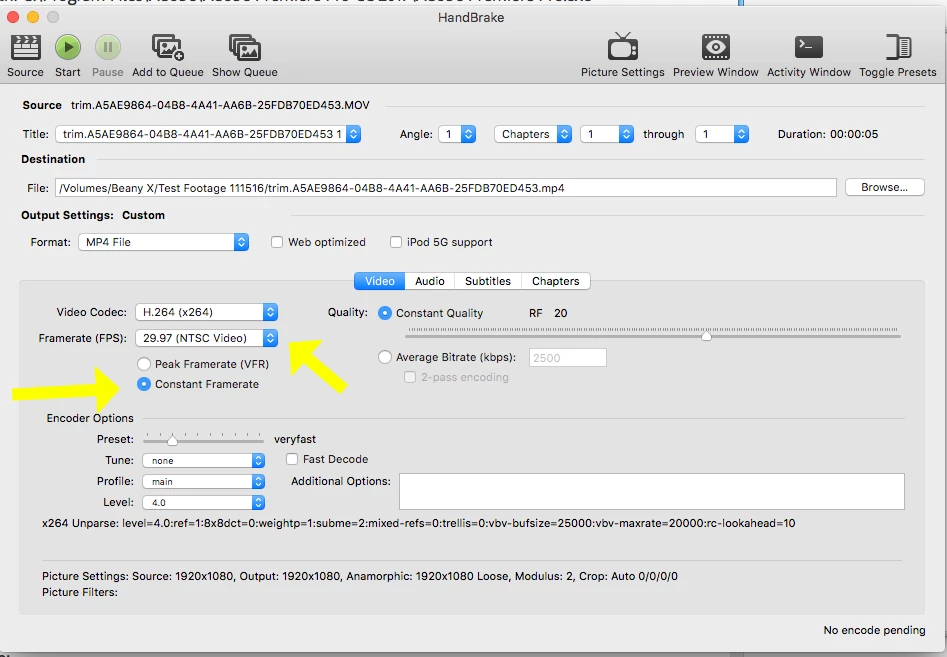
However, the iPhone video files are variable frame rate files, and Premiere Pro only works correctly  with constant frame rate files. You might they downloading the free app Handbrake:

https://handbrake.fr/

and use it to convert you iPhone files to a constant frame rate of 29.7 fps:

and see if that eliminates the problem.

MtD

2 replies

Meg The DogCorrect answer
Inspiring
December 18, 2016

SoaperGEM0 wrote:

I filmed a number of clips on my iPhone in "slow-mo" mode, which really just means it films 120 fps MOV files, instead of the usual 30 fps MOV files.

I don't believe this is correct - when you shoot in Slow-Mo on the iPhone, it shoots at 120 fps but creates the movie file at 30fps. This is how you get the slow motion, by playing it back at 1/4 the shoot rate.

However, the iPhone video files are variable frame rate files, and Premiere Pro only works correctly  with constant frame rate files. You might they downloading the free app Handbrake:

https://handbrake.fr/

and use it to convert you iPhone files to a constant frame rate of 29.7 fps:

and see if that eliminates the problem.

MtD

Inspiring
December 18, 2016

Just a guess, since little information is being supplied - the clip from your iphone may be a variable rate which PPro does not like. Convert it with Handbrake (Google it.)