Participant
November 18, 2016
Answered

Premiere CC 2017 Release - Audio keyframes don't highlight in the timeline when selected

  • November 18, 2016
  • 3 replies
  • 2786 views

I've recently upgraded to the new version (11.0.0) and I've noticed that when you are selecting keyframes in audio clips in the timeline they don't highlight. They do get selected but since all of them are blue you cannot identify which ones are selected.
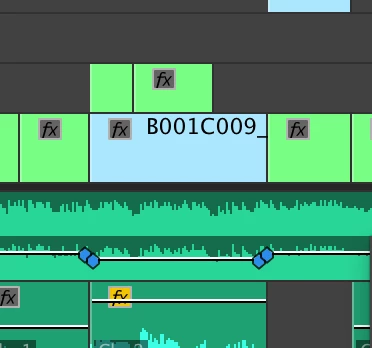
Any idea why this is happening?

This topic has been closed for replies.
Correct answer Trent Happel

This is an open issue that is being worked on. It should be addressed in a future update (after CC 2017.0.1).

3 replies

Participant
March 22, 2017

This happens to me as well at times, and it has been super frustrating...  In the timeline, right next to the sequence name, i clicked the little hamburger menu and unchecked "Logarithmic Keyframe Scaling". That changed it for me.

benfth
Known Participant
December 6, 2016

This is also happening for me.

Running Mac OS 10.12.1 on a late 2013 MBP

Trent HappelCorrect answer
Participating Frequently
December 6, 2016

This is an open issue that is being worked on. It should be addressed in a future update (after CC 2017.0.1).

Participating Frequently
January 19, 2017

This issue should now be fixed in the 11.0.2 update. Keyframes will be light-grayish when not selected and turn blue when selected.

Legend
November 18, 2016

I'm seeing the same thing here under Windows 10, version 2017.0.1.

I would consider this a bug.

Feature Request/Bug Report Form

Known Participant
November 24, 2016

Concurring with you all. This can't be right. I filled out the bug report form.