Participant
August 4, 2022
Answered

Premiere colors different than imported video

  • August 4, 2022
  • 1 reply
  • 288 views

Hi, I have noticed that once I import one video to premiere, it changes colors a bit.

For example this is how it looks like in quicktime player or on frame.io (in browser)



In the second image you see how it looks like when imported in prmiere with no effects added (it has more red tint, which I like)

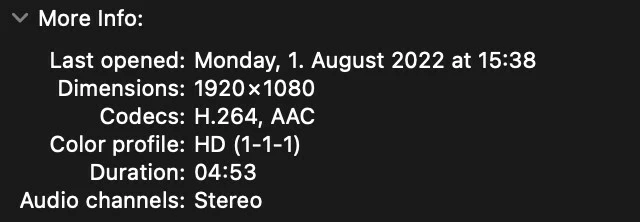
Third image shows more info about the file, which is over 500 MB in sizeT

What do you think is causing this discrepency?

MORE DETAILS:

- PP 22.5.0

- MacOS monterray 12.1

- Video file: MPEG-4 movie, H.264, AAC, It’s a new project, so I have no experience with this issue before

- MacBook Pro (16-inch, 2021), 16GB ram, Apple M1 Pro, 16-core GPU

- Mercury playback engine seems to be enabled
- Do you still have the issue when choosing Project Settings > General > Renderer > Mercury Playback Engine (Software Only)? ⇒ setting is grayed out, cant change it
- Working color space is rec. 709 which I can see in the sequence settings or "Color" tab in the Lumetri Scopes section. I can see "8 Bit" there too

I exported a short clip from the video here  https://www.dropbox.com/s/hg05iag5vppwf6a/clip.mp4?dl=0

This topic has been closed for replies.
Correct answer R Neil Haugen

First, the Macs don't use "correct" color management ... the standard used for Rec.709/SDR video for years has been sRGB primaries, display gamma 2.4, but for some reason Apple decided to go with display gamma of 1.96. Making the shadows a bit lighter, and colors a bit less saturated in appearance especially in the mids & shadows.


QuickTime player, and Chrome and Safari browsers allow the Mac ColorSync utility to apply the color settings. Ergo, they tend to give the same appearance as each other.


Premiere uses a display gamma of 2.4 for Rec.709/SDR video internally, so yes, things will look different within Premiere than outside of it on a Mac. It seems to vary somewhat by computer. For those working on a Mac, it is best to set the Preferences option for "Display Color Management" to on, so Premiere looks at the ICC profile of the monitor and remaps the image to the closest to Rec.709 proper that it can.


And there isn't any 'fix'. As long as Macs use 1.96 for the display gamma for Rec.709/SDR video, and everyone else uses 2.4 or 2.2, well ... devices will display the same file a bit differently.


But then, as someone who works with pro colorists all the time, I can guarantee you that you've never ever in your life seen exactly what the colorist has seen on their reference monitor when grading long-form, broadcast, or streaming content. Every screen/viewing situation is at least slightly to a lot different.


Neil

1 reply

R Neil Haugen
R Neil HaugenCorrect answer
Legend
August 4, 2022

First, the Macs don't use "correct" color management ... the standard used for Rec.709/SDR video for years has been sRGB primaries, display gamma 2.4, but for some reason Apple decided to go with display gamma of 1.96. Making the shadows a bit lighter, and colors a bit less saturated in appearance especially in the mids & shadows.


QuickTime player, and Chrome and Safari browsers allow the Mac ColorSync utility to apply the color settings. Ergo, they tend to give the same appearance as each other.


Premiere uses a display gamma of 2.4 for Rec.709/SDR video internally, so yes, things will look different within Premiere than outside of it on a Mac. It seems to vary somewhat by computer. For those working on a Mac, it is best to set the Preferences option for "Display Color Management" to on, so Premiere looks at the ICC profile of the monitor and remaps the image to the closest to Rec.709 proper that it can.


And there isn't any 'fix'. As long as Macs use 1.96 for the display gamma for Rec.709/SDR video, and everyone else uses 2.4 or 2.2, well ... devices will display the same file a bit differently.


But then, as someone who works with pro colorists all the time, I can guarantee you that you've never ever in your life seen exactly what the colorist has seen on their reference monitor when grading long-form, broadcast, or streaming content. Every screen/viewing situation is at least slightly to a lot different.


Neil

Everyone's mileage always varies ...