
Premiere crashes if "Hardware-accelerated GPU sched." enabled
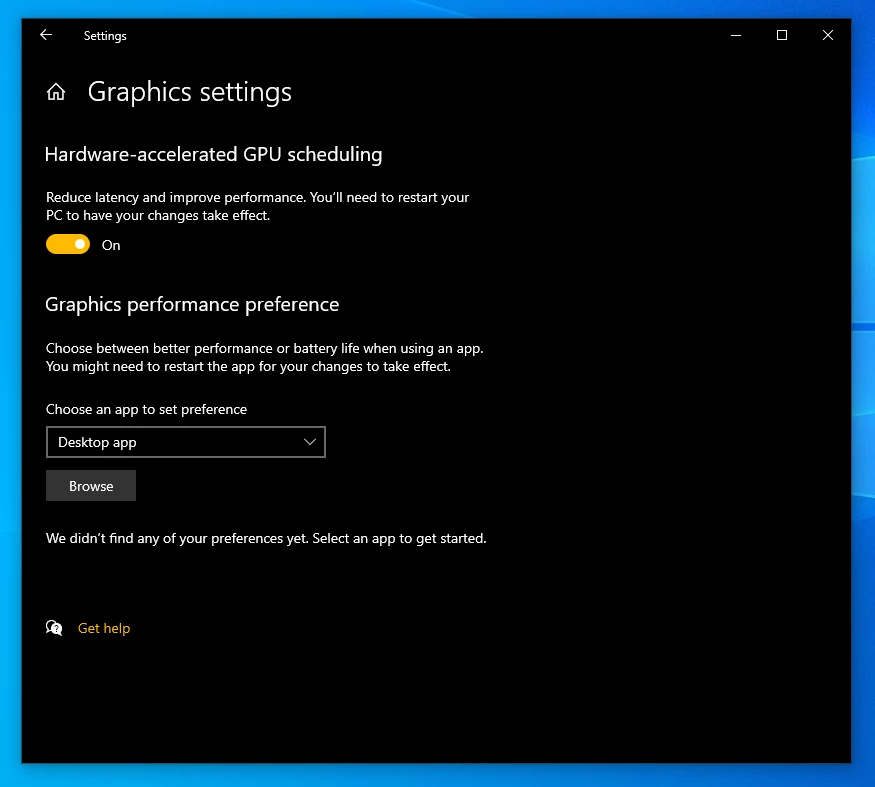 Premiere freezes then crashes during importing *.exr files into the Project/Timeline, on Windows 10 ver. 2004, with "Settings -> Graphics settings -> Hardware-accelerated GPU scheduling" enabled in control panel (please see the attached file)
I tried latest versions of Adobe Premiere 2018 - 2019 - 2020, the result was the same. I've also tried;
-Completely removing GPU drivers&updating my GPU drivers to the latest stable (and to the Adobe-recommended 'studio' drivers)
-Disabling any other applications running background
-Updating Windows 10 to the latest patches
-Completely removing all Adobe softwares and manually deleting all the related folders/files in my system.
Nothing has fixed the situation. However, when I turn the "Hw-accelerated" setting off, Premiere doesn't crash anymore, it's most likely that Premiere *might* has a bug with the mentioned graphics setting.
My hardware specs:
-Intel i9-7900X 3.30 Ghz CPU
-64 GB DDR4 Ram
-2xNvidia GeForce RTX 2080TI (Nvlink enabled)
-2xSSD drives
 AdChoices