Known Participant
December 22, 2018
Answered

Premiere creating CFA media cache files on the wrong disk

  • December 22, 2018
  • 3 replies
  • 918 views

Hi all,

I'm having a very puzzling issue with Premiere Pro CC. I have created a brand new project. The project itself, and every scratch disk in the Project Settings > Scratch Disks menu, are set to my D drive. Despite this, whenever I import a clip, Premiere is creating a CFA cache file for it on my C drive. This can't continue because my C drive is a very small SSD only used for my OS. I can't figure out why this is happening, especially when all of my settings show that cache files should be going to my D drive. Any help appreciated!
This topic has been closed for replies.
Correct answer Averdahl

Any help appreciated!

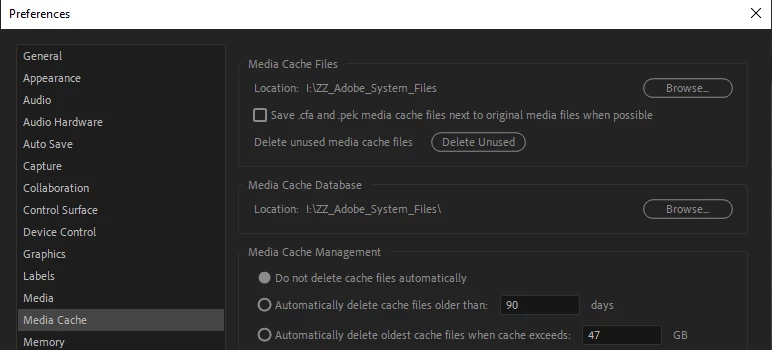
If Jims solution doesn´t work, go to Edit > Preferences > Media Cache and make sure that Media Cache Files and Media Cache Database points to your D drive.

For some reason Premiere Pro from time to time resets the Preferences on shut down and when it does it starts to place the files on the C drive again.

3 replies

Kevin J. Monahan Jr.
Legend
January 9, 2019

We haven't heard back from you, JosiahClark? What's going on?

Thanks,
Kevin

Kevin Monahan - Sr. Community and Engagement Strategist – Adobe Pro Video and Audio
Averdahl
Community Expert
AverdahlCommunity ExpertCorrect answer
Community Expert
December 22, 2018

Any help appreciated!

If Jims solution doesn´t work, go to Edit > Preferences > Media Cache and make sure that Media Cache Files and Media Cache Database points to your D drive.

For some reason Premiere Pro from time to time resets the Preferences on shut down and when it does it starts to place the files on the C drive again.

Legend
December 22, 2018

Manually delete the files on C:.

Do they come back?