
danielk20
Participant
February 3, 2020
Answered

Premiere displaying different images as the same

  • February 3, 2020
  • 2 replies
  • 1927 views

Hello,


I'm trying to import some images I created in Illustrator. But if I browe them through premiere they all are displayed as the same. If I import them they have different names, but are all the same image. Even if I place them on the timeline, althought they are all different, they are displayed as the same.


Here ist the same folder in premiere and in finder:
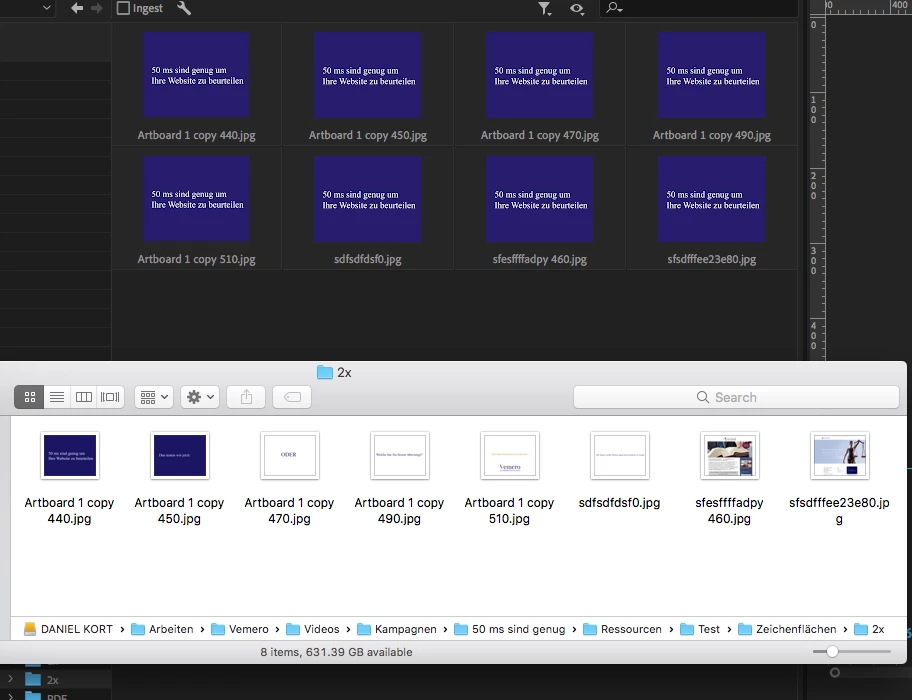
 

Anyone got an idea how to fix it?


Cheers

Daniel

This topic has been closed for replies.
Correct answer konsole100

Probably a little too late but maybe it will help someone else.
In the Illustrator image export, this problem will occur with the JPG and resolution option.

Simply change the Illustrator export to PNG or open existing images in Photoshop and override (ctrl-s) them.

2 replies

konsole100Correct answer
Participant
April 14, 2022

Probably a little too late but maybe it will help someone else.
In the Illustrator image export, this problem will occur with the JPG and resolution option.

Simply change the Illustrator export to PNG or open existing images in Photoshop and override (ctrl-s) them.

nz84719002
Participant
March 29, 2024

faced this issue today and PNG solved the problem! thank you


Participant
February 4, 2020

Solved by using the "Video" mode in Illustrator which you can select while setting up your file after you click "create new"