
Participant
May 1, 2022
Answered

Premiere doesn't recognize my video as a video

  • May 1, 2022
  • 2 replies
  • 1121 views

Hello everyone,


I'm very new to Premiere Pro and I've run into a small problem. (I'm going to try my best to describe it)

When I upload my video it is seen as an audio file and not as a video. 

Therefore, I can't drag it into the timeline panel as a video, only as audio.

As you can see on the picture I included, the left one is a video and the right one is audio. How can I change this to make Premiere recognize the right one as a video?
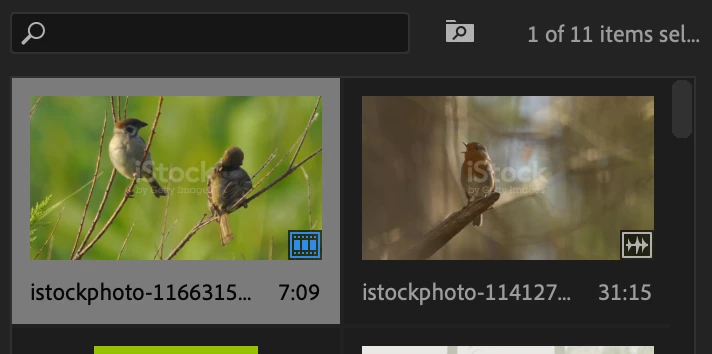


(Both of the files are videos I downloaded as mp4 from a stock website)

Thanks in advance!


This topic has been closed for replies.
Correct answer Sumeet Kumar Choubey

Hi Lotte24271977zw2q,


As suggested by Ann, it seems like an issue with source patching. You may refer to this link to learn more about it. Also, the small icons that you see on the thumbnails are to show the number of times the video is used on the timeline and if the clip contains any linked audio. Hovering the mouse over these icons will show the meaning of the icons. Hope this helps. Let us know if you have any questions.


Thanks,

Sumeet

2 replies

Sumeet Kumar ChoubeyCommunity ManagerCorrect answer
Community Manager
May 1, 2022

Hi Lotte24271977zw2q,


As suggested by Ann, it seems like an issue with source patching. You may refer to this link to learn more about it. Also, the small icons that you see on the thumbnails are to show the number of times the video is used on the timeline and if the clip contains any linked audio. Hovering the mouse over these icons will show the meaning of the icons. Hope this helps. Let us know if you have any questions.


Thanks,

Sumeet

Ann Bens
Community Expert
Community Expert
May 1, 2022

The most common user error is not source patching the track.
Solved by first opening clip in Source Monitor. Then drag/insert into timeline.


Lingo: you import or ingest (not upload) assets into Premiere.

Participant
December 23, 2023

Very Helpful! Thanks !!