June 21, 2016
Answered

Premiere & Encoder: OpenCL vs. Metal

  • June 21, 2016
  • 15 replies
  • 124950 views

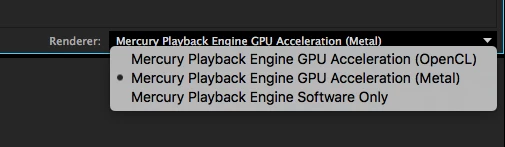
Hey there, so I just installed the latest 2015.3 update. My question though is which one of the Mercury Playback Engines is better to use on MacOS, OpenCL or Metal? I saw the option and was wondering if Metal has better performance and faster export times? Can anyone fill me in on this?

This topic has been closed for replies.
Correct answer

Well I have some preliminary results of it. It looks as if using OpenCL is still better.

I've been using one of the trash can Mac Pro's (Model Identifier: MacPro6,1) with 2GB of graphics memory, 16GB of RAM, and a 6-Core Intel Xeon E5 at 3.5GhZ clock speed and for one hour of final product video, it took Encoder ten hours to export it using Metal. OpenCL would have done that way faster. Also, I noted that if I set my project settings to use Metal over OpenCL, then I notice that it requires me to render more often (Red Line) than if I'm using OpenCL which normally doesn't require me to render hardly at all (Yellow Line).

So in conclusion, I feel that OpenCL is still the render engine of choice for me. I hope this is useful and helpful to you all!

Cheers,

Danny

15 replies

Vadim Cherny
Known Participant
December 6, 2023

So, after almost ten years, the Metal engine still hasn't worked as it should. I still have to stay on version PP15.2 because it still has OpenCL support.
From time to time I test new versions of PP on Mac, but every time I come across the same problem with timeline playback with brakes, I give up and return to my old version.

PS. In my dreams I see the return of the OpenCL engine to PP...

Inspiring
May 16, 2019

Actually, I'm using a Hackintosh with an Nvidia 1080Ti card. Don't know why this is so slow with Metal...

ChezTrey
Adobe Employee
Adobe Employee
May 16, 2019

Alesclandre​ it's possible that for some reason the Mercury engine can't use metal effectively on that card, and if you have multiple GPUs, Mercury/Metal ends up on a slower GPU instead. Or if the metal drivers don't match up well with the card, you could have a driver-related performance issue. One of the downsides of hackinstoshes is that they don't always work as desired.

Inspiring
May 15, 2019

Hello,

I must say (ok, maybe some years later) that Metal took me 30 minutes to render a video, whereas CUDA and OPENCL took me 5 seconds for the exact same parameters !... And the videos are the same while rendered !

I underline the two because these results are just insane !... and should not question you anymore...

I have a very good machine (good GPU, good CPU) and I'm on Mac.

Metal should not be a default parameter...

Hannah Mackinlay
Participant
May 15, 2019

Well I've now installed an AMD RX 580 8GB (from the amazing Mac-pimping team at Create Pro (Mac Pro Workstations | Buy Refurbished Apple Computers | Create Pro )  and given up on Nvidia seing that Apple is publicly saying no support for NVIDIA, and using Metal for the GPU encoding . The result is not as fast as the old CUDA 980Ti but its liveable with.

Progress - I don't think so.

Anyone want to buy a hot NVIDIA GT980TI for your windows machine so you can be smug at us poor apple users?

Participant
July 6, 2017

Well, I had just upgraded to the CC 2017 version and I never heard of Metal before outside of CUDA and OpenCL options and I have to say after adding some Red Giant film filters, the playback was still impressive before rendering. I experienced no freezing and when I rendered the file, it was blazing fast! I had to do a double take because it rendered under 6 mins with Metal vs 25+ mins with OpenCL with the same series of clips. Very positive experience for me! I have a Macbook Pro:

MAC OS Sierra

Processor: 2.5 GHz Intel Core i7

Memory: 16 GB 1600 MHz DDR3

Graphics Card: NVIDIA GeForce GT 750M 2048 MB Intel Iris Pro 1536 MB

kthnxlucas
Participant
May 21, 2017

Hey guys,

I'm running Premiere CC 2017 on a 2013 15" MacBook Pro Retina 16GB of Ram. I tried exporting a 12 minute video (no effects or colour correction at all) with OpenCL and it took 20:53s.  I am currently running another export exactly the same 12 minute video with the software only and so far it's proving to be faster.  Do you know if there's any way to optimize or check the performance of the GPU to push for faster export/render times?!

I dont see why my GPU would be slower than the software.

Hannah Mackinlay
Participant
February 28, 2017

Well I'm doing my first render of 30 mins of AVCHD with a bit of lumetri colour correction and some overlaid static images video on my shiny new  top spec 15 retina mbp and depressed that it took 49 mins to render.

Out of interest I  rendered the same sequence on my old 2013 MBP with the GT750M using Cuda not open CL and it took 35 mins

On my macpro 5.1 12 core using the  Nvidia  960  ( a £700 card) using cuda acceleration it took only 11 minutes!!!!!!!!

so with Apple turning its back on Nvidia, really they are turning their back on the professional video community. I'm not going to almost five times as long watching something render when I've got stuff to do - costs time and money. If I'm going to be using P Pro (the only choice since FCPX is a joke that no significant number of professionals use), when I can't get an old MacPro with Nvidia it's going to be a windows HP Z800 workstation much as I detest the thought

Participant
January 9, 2017

Im on the cc2017 and on a 2013 Mac Pro , AMD FirePro D500 , 6-Core with 16 GB ram, macOs Sierra 10.12.2

Ive had issues with using metal in both after effects and premiere see below....Any reasons to why this is happening?

gazellebxl
Participant
August 2, 2016

Hello,

For me too, Open CL was better :-/ it is a real disappoitment... I have even some issues using Metal (the video is often freezing when reading in full screen), i will go back to Open CL

willsull
Participant
December 29, 2016

Anyone try out Metal on CC 2017 yet?

Eyemo
Participating Frequently
January 4, 2017

I'd been using Metal fine before Premiere 2017.0.1 but I had to switch to Open CL after updating. I'm running a 2014 iMac Retina 5k with max RAM and AMD Radeon R9 M295 X and timeline playback looks like this using Metal (at best):

Participating Frequently
July 6, 2016

Hey guys so I tried both and it went faster for me on Open CL

pedrod13139875
Participant
June 29, 2016

I've noticed Metal seems to use the GPUs more, and reduces time of exporting, i'm only exporting 1080p 264 but for me, i'm leaning towards metal right now. No problems with playback, iStat Menu shows less CPU and more GPU usage on my trashcan 6.1 6 core, 2 x 3GB FirePro. There isn't much in it, but I do hope this is the beginning as this should have surfaced years ago. I bought a Mac Pro thinking how well the GPUs would work only to find out one is practically redundant, Metal API, to my limited knowledge can change this. So let hope apple do their bit too with Metal and we will finally be seeing full use of our GPUs when needed.

It was a nice surprise for me to see it added, although it was a disappointment after buying what is a very expensive machine in the UK to find out only one GPU is utilised. 

ChezTrey
Adobe Employee
Adobe Employee
June 29, 2016

Hi Pedro,

Multiple GPUs, if available, are used during render/export. However, depending on the sequence complexity and encoder chosen, many people find themselves bottlenecked in the CPU encoding rather than the GPU image processing.

Regards,

Ray