
Premiere Essential Sound introduces replicated sound snippets
I'm post processing with premiere pro (25.2.3 Build 4).
The video that I'm processing is a recorded teams meeting.
I usually don't spend to much time on this. But find the Essential Sound an usefull tool to automatically enhance the audio. And thus also for this recording. But in this recording something strange keeps happening with Essential Sound. Unfortunately due to privacy regulations I cannot share a sound file to show the issue.
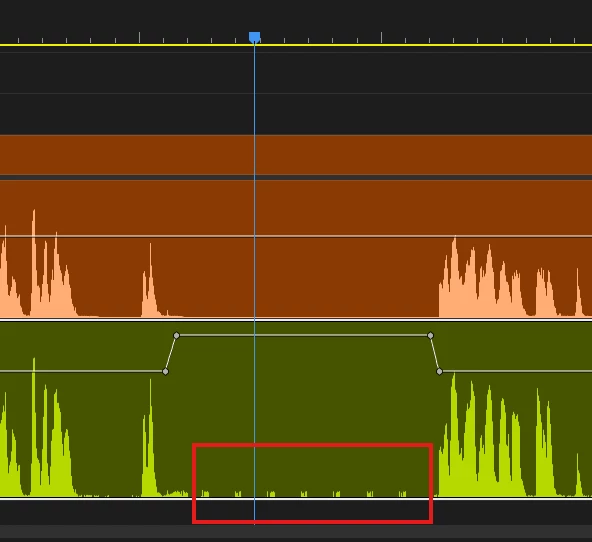
What has happend:
The original recording was completely fine. After enhancing the audio with "Essential Sound". The essential sound seemed to add a very small snippet of a word of someone in the recording. And this snippet is spread over the complete recording of approximately an hour. Its not something constant but is does occur at random moments 6-7 times in the timeline. Please find the image below. Where the mango track is the original and the green track is the enhanced track with the dialogue preset and no further changed settings.
Workarounds/troubleshooting:
Removing and re-adding the enhancements did not do the trick. Copying the orginal recording and enhancing it again did not solve it as the same issue is reintroduced. The snippets are placed randomly sometimes in a silent area, but sometimes at a moment that some other person is speaking the snippet is mixed through the existing audio. Using another sequence did not resolve the issue.
Checking the original audio in Audition did not show any irregularities. Nor did it occur there.
Rendering the file with Premiere did also add it to the rendered file. So its actually there and not cache related or something that Premiere previews it wrong.


 AdChoices