DragonWizard
Participant
November 15, 2020
Question

Premiere Graphics Workspace Glitches

  • November 15, 2020
  • 3 replies
  • 427 views

Hey all! Tried searching for similar issues but haven't been able to find anything that works. Whenever I switch over to the Graphics workspace it glitches out. Premiere Pro doesn't crash, it just glitches out super heavily. After several minutes of waiting it sorts itself out somehow. I've tried resetting my workspaces, clearing caches, etc. Its just the Graphics tab that does this, no others cause any issues. Below you can see a sample of what it does, kind of screen tearing it looks like:
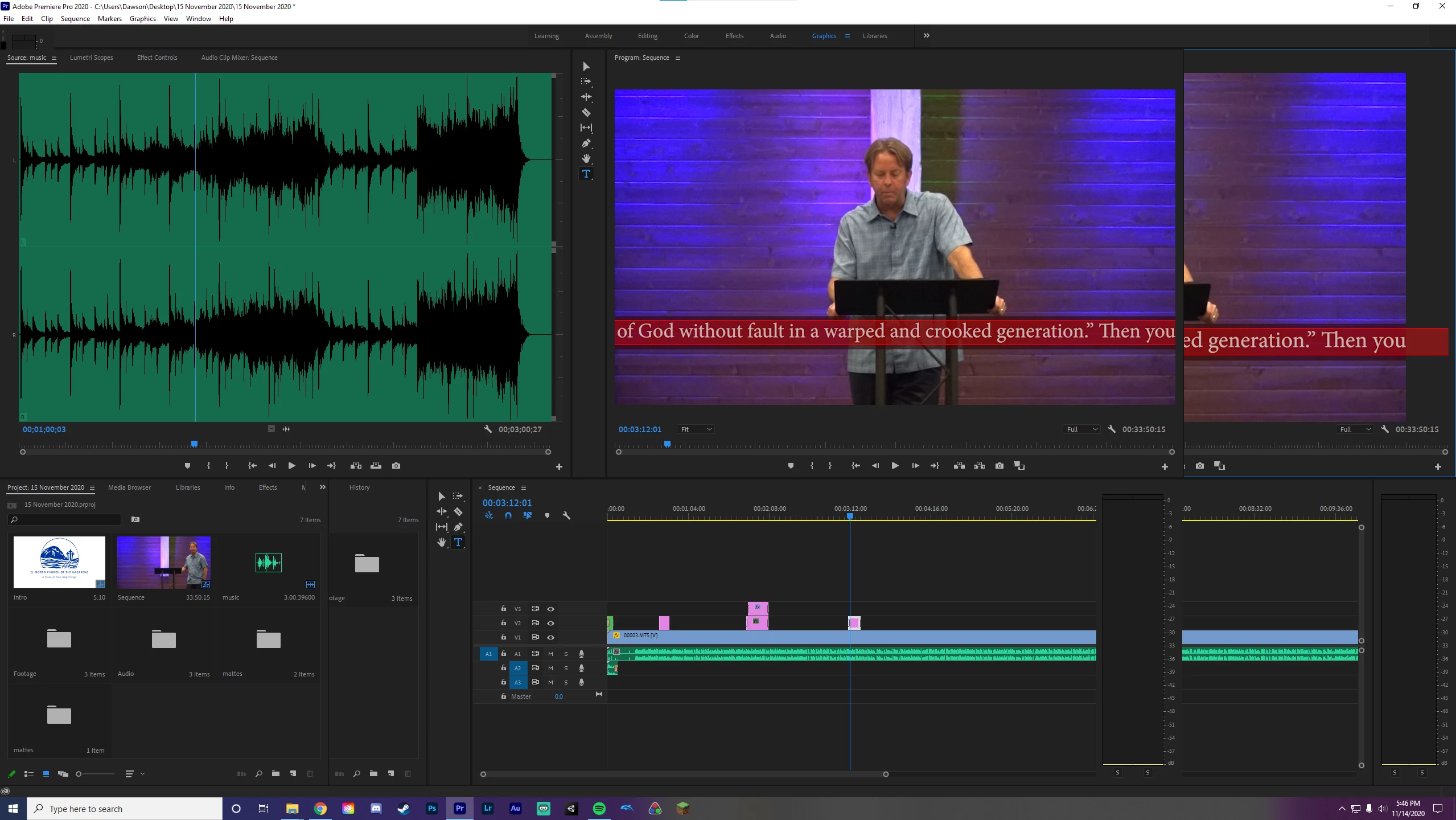
 

I'm not working on immensly big projects either, as you can see there are only a few small text layers.


Also, in case it matters, here's my PC specs:

Ryzen 7 3700x

EVGA 1080ti

Asus TUF X570

Corsair 16gb 3200mhz

Samsung 850 evo 1tb


This topic has been closed for replies.

3 replies

DragonWizard
Participant
December 27, 2020

Just bumping this because I thought this issue was resolved but this past week it has returned. All drivers, os, premiere, etc. are all up to date. Kind of desperate at this point as I have been having to resort to using the text editor in the Effect Controls which is by no means ideal.

Legend
December 28, 2020

what are your source properties and sequence settings?  and are any of your sources from a smartphone or screen recording?

Peru Bob
Community Expert
Community Expert
November 15, 2020

Make sure that you have the latest Studio Driver for the 1080ti.

Legend
November 15, 2020

what version of premiere are you using?

have you checked to see if your system meets the requirements?

https://helpx.adobe.com/premiere-pro/system-requirements.html

and what resolution is your display set to?  

DragonWizard
Participant
November 15, 2020

I'm using the current Premiere Pro version and yeah I meet the requirements. My monitor is 1440p but the footage is only 1080p.