
Participant
November 14, 2016
Answered

Premiere Help! [Blurry video playing in preview screen]

  • November 14, 2016
  • 2 replies
  • 34780 views

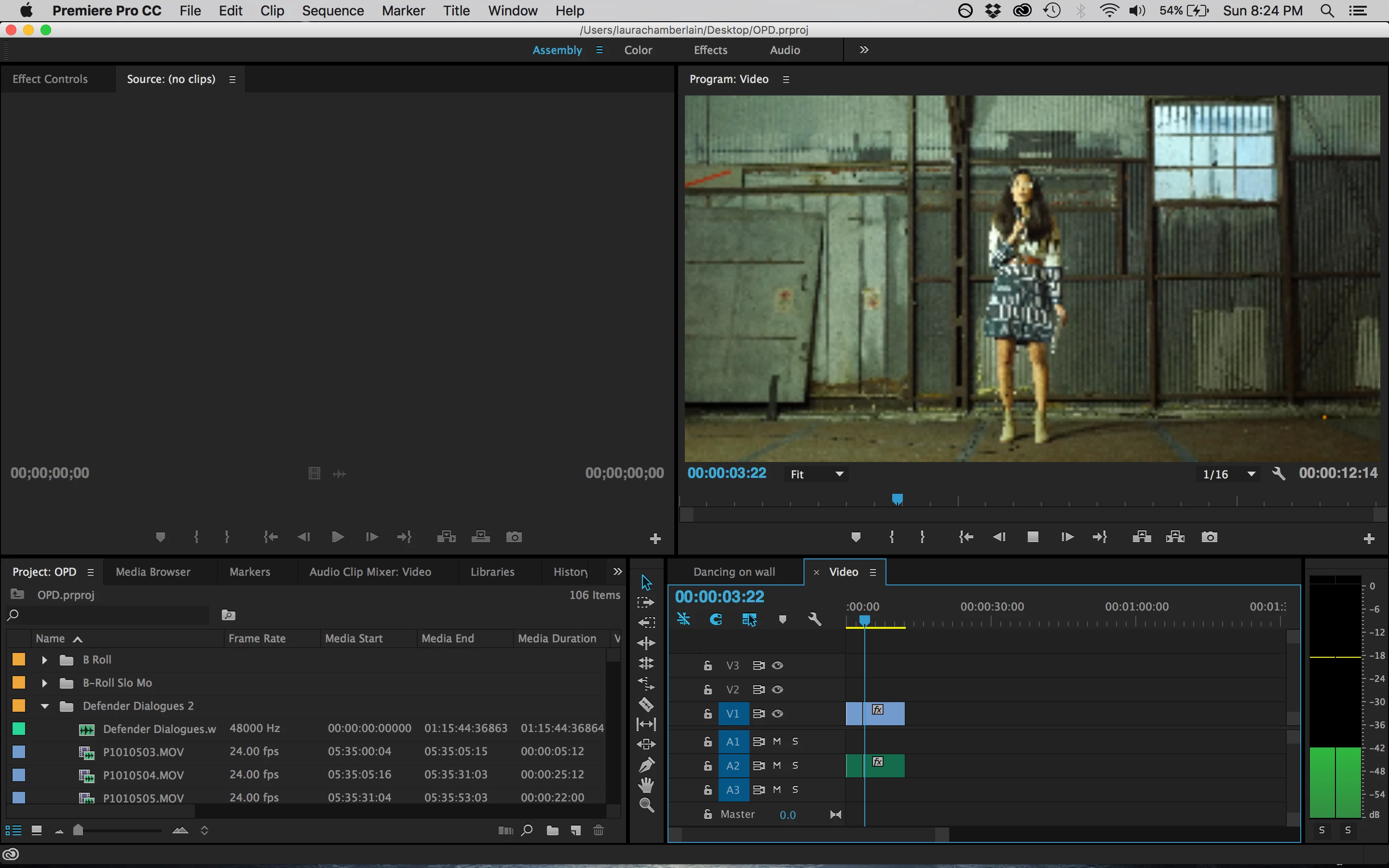
I had a problem with the preview screen having red yellow and blue lines through it when I paused a video. So i changed my renderer to "software only."  But now when I play videos they are blurry as the photo shows. Anyone know how to fix this? Any help would be greatly appreciated!
    This topic has been closed for replies.
    Correct answer clipsandhandles

    The quality of your video during playback is set to 1/16. You can see that on the bottom right hand corner of the program monitor. If you up the resolution, The video should get sharper .

    2 replies

    Participant
    March 6, 2024

    Oh man, I had the same issue. It is the 1/16 thing

    clipsandhandles
    clipsandhandlesCorrect answer
    Participating Frequently
    November 14, 2016

    The quality of your video during playback is set to 1/16. You can see that on the bottom right hand corner of the program monitor. If you up the resolution, The video should get sharper .