Luan Lopes Fotografia
Participant
February 22, 2019
Question

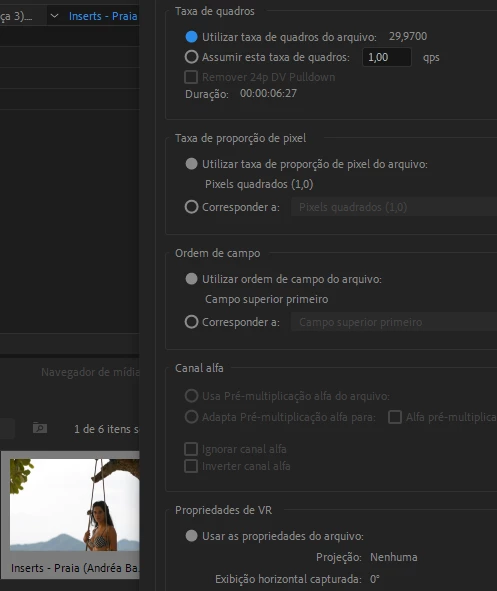
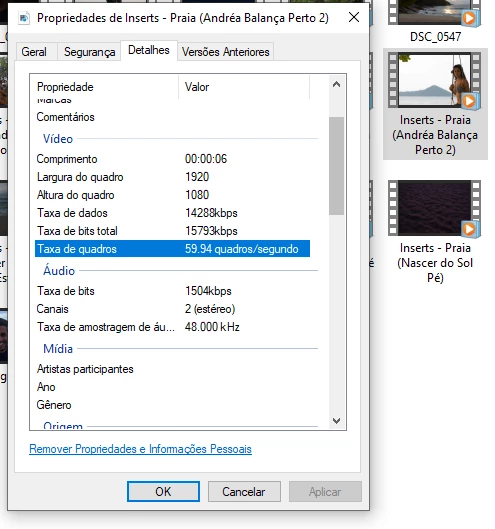
Premiere is changing my frame rate.

  • February 22, 2019
  • 4 replies
  • 1394 views

Hi, i was making a video today and i shot the video in 60 frames to do slow motion, but when i throw the video in premiere, it automatically changes the frame rate to 30 frames. This only happens in some clips, i have other clips that i shoted in the same day and this is not happening. (really sorry about my english)

Can anyone help me please?

Thank you so much!
This topic has been closed for replies.

4 replies

Adobe Employee
February 27, 2019

Hi Luan Lopes Fotografia,

Sorry to hear that you are facing this issue. Please let us know the version of Premiere Pro that you are using.

Thanks,

Sumeet

Legend
February 22, 2019

I would trust PP over the Windows Properties.

Chances are you recorded at 30i, which is almost always incorrectly listed as 60i, which doesn't really exist as a format.  (No such thing as 60 interlaced frames per second.)

Windows Properties is probably listing the field rate, which is incorrect.  Premiere Pro is listing the frame rate, which is correct.

Ann Bens
Community Expert
Community Expert
February 22, 2019

I just checked the manual: its all progressive.

Community Expert
February 22, 2019

Maybe this question seems absurd, but did you record in progressive or interlaced?

Byron.
Community Expert
February 22, 2019

You must take the 60 Fps video and create a new sequence by dragging this video to the New Item icon that is on the bottom right of the Project panel, so you create one with exactly the same characteristics of your video. Do not put it in a sequence already created at 30 Fps.

Byron.
Luan Lopes Fotografia
Participant
February 22, 2019

Thanks for your answer byroncortezh, it didn't work because premiere changes my frame rate before i create my sequence, i tried to create a whole new project with a 59 frames sequence and another with a 60 frames sequence, but when i drag my clip to the sequence it asks to change the sequence to match the clip, so the sequence becomes 30 frames, even though my raw clip is in 60 frames

Ann Bens
Community Expert
Community Expert
February 22, 2019

Which camera was used?

Please post screenshot of clip in Mediainfo in treeview here on forum.

MediaInfo windows

MediaInfo Mac