
Premiere is freezing / generating errors when I try to export
My export/render situation is currently a mess. I've been a Premiere Pro user since 2013 and I've never experienced anything like this before. Long story short, I spent an entire day trying to export a preview video for my clients without success--and I went down the rabbit hole of the Internet to try and find a solution...but I'm officially stumped.
Since I'm making a short documentary-style video, I have sourced footage from a few different cameras and with varying frame rates (30fps, 60fps, 1920x1080, 4K Canon-log, etc from Canon 6D Mk ii, Canon 5D Mk IV, the new Canon R5, etc). My sequence is 1920x803 (2.39:1), 60fps, 00:04:59 long, previews currently set to Apple ProRes 422 HQ.
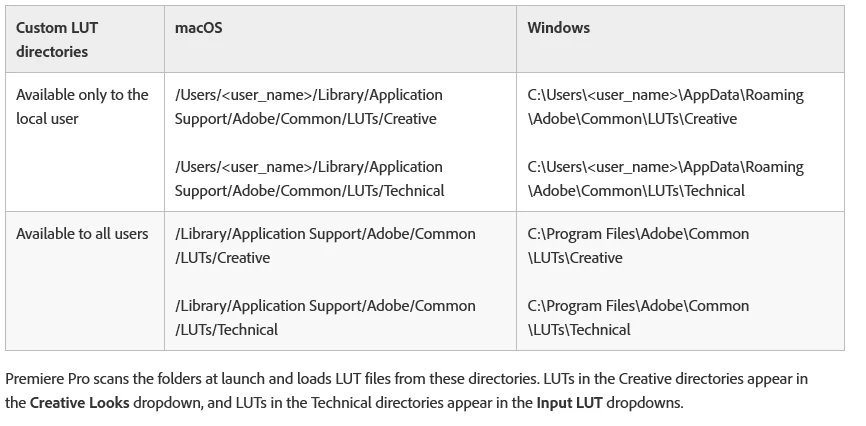
I have my own custom LUTs and they're located in the correct "Creative" folder. They exist in Media Encoder, too. I have Warp Stabilizer applied to some of the clips in the sequence, too. Usually, I can only color grade for about 10 minutes before receiving the Lumetri AEVideoFilter: 11 error, but that's another story.
My timeline has been rendering without errors and the playback is decent (some areas of lag and chop). BUT, when I attempt to export the video within Premiere OR Media Encoder, the render will freeze around 46% OR generate errors (A Low-Level Exception occurred in Lumetri AEVideoFilter: 11 ... GPU Video Filter: Get Frame Dependencies ... Error Compiling Movie ... etc). At this point, the only thing I can do is Force Quit to get out of Premiere or Media Encoder and start the cycle in this purgatory all over again.
Things I have already tried:
1. Removing the problematic clips from the timeline (at the Error Message's specified time code)
2. Copying and pasting everything into a new sequence (AND new project)
3. Clearing Media Caches
4. Resetting Preferences
5. Exporting in both Premiere + Media Encoder
6. Exporting with Previews in Premiere (because I render my timeline before each export attempt)
7. Switching between H.264 and Apple ProRes 422 HQ for previews and export (Apple ProRes seems to work better)
8. Restarting / Re-installing Premiere + Media Encoder
9. Restarting my computer (MANY times)
10. Enabling / Disabling Hardware Accelerated Decoding
11. Optimizing rendering for Performance or Memory (I have the maximum allowed RAM available for Premiere / other Adobe products not used on this project – 58 GB!)
12. Switching between Renderers (Metal, OpenCL, and Software)
13. Ensuring all Warp Stabilizer Clips are analyzed
14. Ensuring there are no gaps in my timeline
15. Ensuring all Nested Sequences aren't missing frames
If I'm totally off-base with something or if you have another solution idea, please let me know! I'll do anything at this point!
Computer Info:
2019 Macbook Pro (16 inches)
macOS Big Sur (Version 11.0.1)
2.4 GHz 8-Core Intel Core i9
64 GB 2667 MHz DDR4
Intel UHD Graphics 630 1536 MB
Running Premiere Pro 2020 (14.6)
Running Media Encoder 2020 (14.6)
 AdChoices