
Thorrison
Participating Frequently
April 17, 2020
Answered

Premiere is only allowing me to use audio from .mp4 video clips in CC 2020 (Mac)

  • April 17, 2020
  • 5 replies
  • 2231 views

Apparently this has been a long time issue, judging by the posts I've seen, but I have yet to find a solution.


Premiere CC (2020) is only allowing me to drag the audio of some of my .mp4s to the timeline. The files play in their little thumbnails, I can see the video, but only the little audio icon is in the bottom right corner of these videos. It seems to happen randomly, as some were fine before, but now are only allowing me to import the audio to the timeline


I've tried clearing my media cache, restarting, re-importing files from the media browser, and alas - nothing. 


If you look at the attached image, you can see that some of the videos do not have the video icon on them, just the audio.


This topic has been closed for replies.
Correct answer Ann Bens

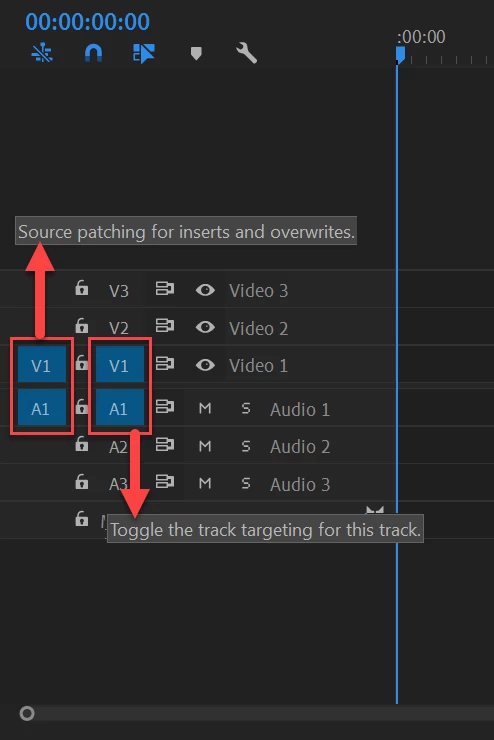
Most common user error is not source patching the track.

5 replies

Ann Bens
Community Expert
Ann BensCommunity ExpertCorrect answer
Community Expert
April 18, 2020

Most common user error is not source patching the track.

Ann Bens
Community Expert
Community Expert
April 18, 2020

When a clip only has the audio icon it means it contains linked audio.

Legend
April 17, 2020

Neil, didn't know that trick.  Just importing the project file complete has worked for me. 

That's why I monitor this forum, not for the overwhelming good I'm doing mankind, but for learning stuff that makes me a better editor (not a better person).

Ann Bens
Community Expert
Community Expert
April 18, 2020

I hardly ever use the Media Browser.

Import project into project window works for me too.

R Neil Haugen
Legend
April 17, 2020

In the new project, use the MediaBrowser panel to navigate to the other project file. Right-click Import that file's assets, should do it.


Sometimes simply closing Premiere, deleting all in the media cache/cache database folders does the trick for something like this.


Neil

Everyone's mileage always varies ...
Thorrison
ThorrisonAuthor
Participating Frequently
April 18, 2020

Unfortunately, I did the other trick already and it didn't help! I'll try importing again now. Thanks!


Legend
April 17, 2020

have you tried importing your old premiere project into the new project?  worth a shot.  It's solved a few problems for me...

Thorrison
ThorrisonAuthor
Participating Frequently
April 18, 2020

I just tried this (I actually didn't know you could do that, so thanks for that tip) and it says the project cannot be loaded - it may be damaged or contain outdated elements. I kind of want to cry?

Jeff Bugbee
Community Expert
Community Expert
April 17, 2020

If you start a brand new Project, import the MP4, and drag it into the empty Timeline panel (to create a new sequence from that clip) does that work?

Thorrison
ThorrisonAuthor
Participating Frequently
April 17, 2020

They all work in the new project! Any ideas how I might remedy this without losing all my work?