Question
Premiere- legacy 32 bit quicktime change
I am in the middle of a project and just upgraded. I am using tons of old footage so half my project is now offline because of the change of not importing certain older media. Here are my questions:
1. If I revert to the old version of Premier Pro so I can continue my project will that cause any problems in a project I plan to work on for the next year? As long as I don't upgrade it will all still work?
2. What is the best way to reformat my older media and keep it good quality? Can I use mpeg streamclip? What setting should I choose?
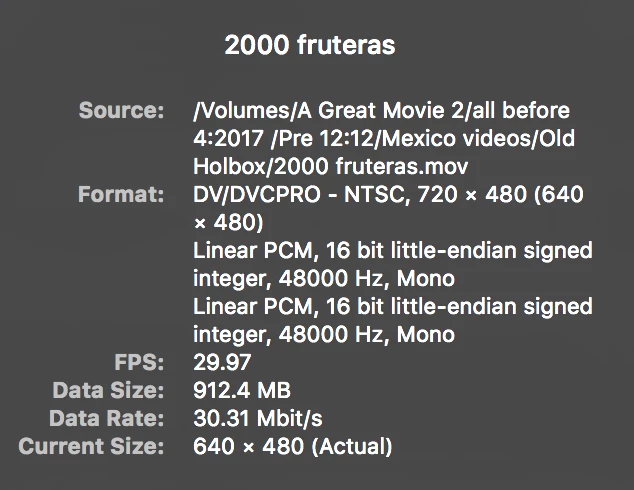
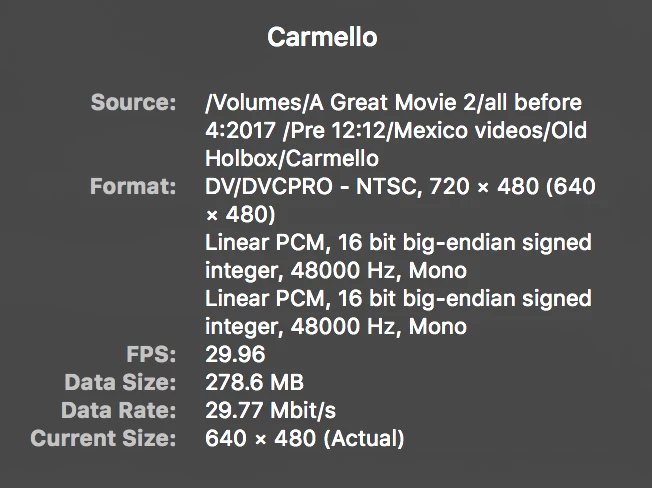
3. Why is it allowing me to import some footage that is old, and others it doesn't allow and they have almost identical specs:
I can import this:
I cannot import this:
Your timely response is appreciated.
 AdChoices