


John_W_Pilgrim
Participating Frequently
October 22, 2018
Question

Premiere Media Start timecode issue MXF

  • October 22, 2018
  • 12 replies
  • 9717 views

We are having big trouble with some Sony Venice MXF footage.

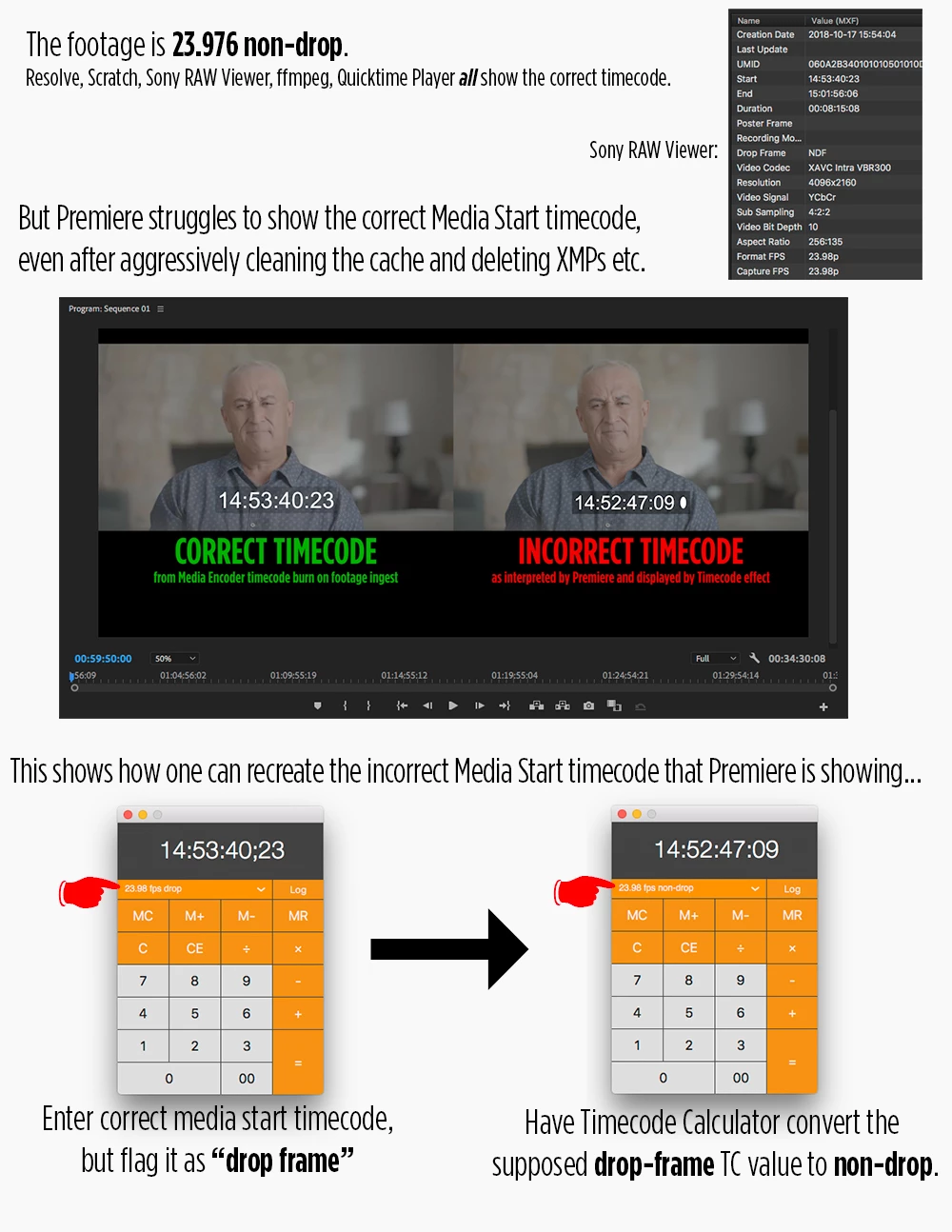
Premiere is misinterpreting the Media Start timecode across several days worth of shoots.

The problem reproduces in both Premiere 2018 and 2019, on multiple machines, in old and new project files, and even after clearing the cache and aggressively deleting XMP and other sidecar files.

Please see the graphic below for more description.

Since the text on that graphic isn't web searchable, here's a summary of the issue:

We received a drive from our DP and copied it onto our NAS, as we have successfully done dozens of times before.

We ran the footage through Adobe Media Encoder to make smaller MP4s with burned in timecode for the producers to review, as well as WAVs for transcription.

As we started editing using selects notes with TC from the producers, it became clear that the timecode was off.

Upon investigation, we ascertained that Premiere had the Media Start timecode screwed up.

Nothing we've done has been able to get the timecode correct, short of manually going clip by clip and using Interpret Footage/Timecode to set the correct timecode as an Alternate Start Timecode, which is not an acceptable solution in a busy post-production studio.

Anybody been having similar experiences, or have a solution?

Thanks in advance,

John

San Francisco, CA
    This topic has been closed for replies.

    12 replies

    John_W_Pilgrim
    Participating Frequently
    October 24, 2018

    I'm quite confident hacking around in XML files and Premiere ".prproj" files are XML, so…

    Looking through some ".prproj" files I created in both Premiere CC2018 and CC2019, containing either (a.) the original MXF file with the wrong Media In timecode or (b.) a MOV transcode of the MXF that has the correct Media In timecode, I found the following.

    The TL;DR is that Premiere CC2019 appears to have two bugs:

    1. it misinterprets the Media Start timecode of MXF files on import

    2. it misinterprets the Media Start timecode of MXF files when converting a CC2018 project file

    Participant
    December 10, 2018

    Hi John,

    I'm wondering what program you used to transcode your MXF into an MOV with correct timecode before bringing it into Premiere. My experience so far has been that if I transcode within Premiere or Media Encoder the resulting video file still displays incorrect timecode?

    Thanks!

    Galen

    Participant
    December 10, 2018

    Hi Galen,

    You could transcode your MXF files using any "non Adobe" program (ex. Resolve, Apple Compressor, etc.) to maintain correct timecode.  The other option would be to downgrade to a previous version of Adobe Premiere / AfterEffects / Media Encoder (ie. CC2018) and transcode there.

    John_W_Pilgrim
    Participating Frequently
    October 22, 2018

    PS: Sadly, After Effects also is showing the incorrect timecode for the start of these clips. :-(