


Participant
April 28, 2025
Answered

Premiere não reconhece a placa de vídeo
  • April 28, 2025
  • 2 replies
  • 686 views

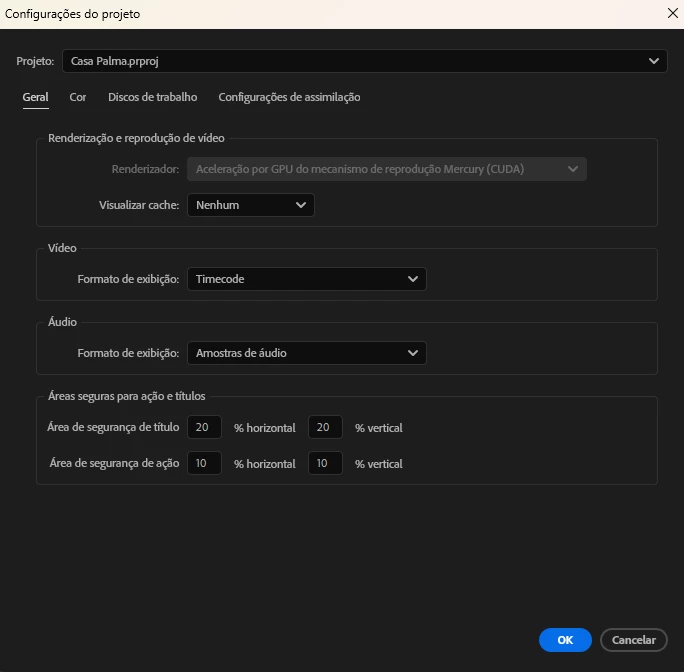
Meu premiere não está reconhecendo minha placa de vídeo, ocasionando em erro ao renderizar vídeos maiores.

Ja desinstalei e instalei novamente os drivers da placa, ja fiz downgrade da versão do premiere, acompanhei tutoriais no youtube, mas nada funciona.

Minha placa é uma NVIDIA GeForce RTX 3060
Utilizo o Windows 11

Versão do Premiere 25.2.3

Correct answer R Neil Haugen

Again Premiere is recognizing the GPU if the options are greyed out. The behavior has changed in Premiere, as you must now close the program and hold down shift on launch to get to the option to do software only.


So you can't turn te GPU off, because it doesn't allow you to. From within Premiere.

2 replies

Participant
May 27, 2025

Ocorreu a mesma coisa comigo. A minha placa também é RTX 3060

R Neil Haugen
R Neil HaugenCorrect answer
Legend
May 27, 2025

Again Premiere is recognizing the GPU if the options are greyed out. The behavior has changed in Premiere, as you must now close the program and hold down shift on launch to get to the option to do software only.


So you can't turn te GPU off, because it doesn't allow you to. From within Premiere.

Everyone's mileage always varies ...
R Neil Haugen
Legend
April 28, 2025

Actually, it is recognizing your GPU,  but they changed the behavior of the drop-down there.


You can no longer disable the GPU there, But if the GPU is usable, as the 3060s certainly are, Premiere will use the GPU for what it uses a GPU for.


There are limitations on say long-GOP 422 in 10-bit, and higher, 'hardware' encodes, that are due to the limitations of the format, not limitations within Premiere.


So what is your media on the sequence, and what in very specific detail, are you exporting to?

Everyone's mileage always varies ...