Participant
March 11, 2021
Answered

Premiere Pro 15.0 Hebrew letters are reversed in captions
  • March 11, 2021
  • 2 replies
  • 2082 views

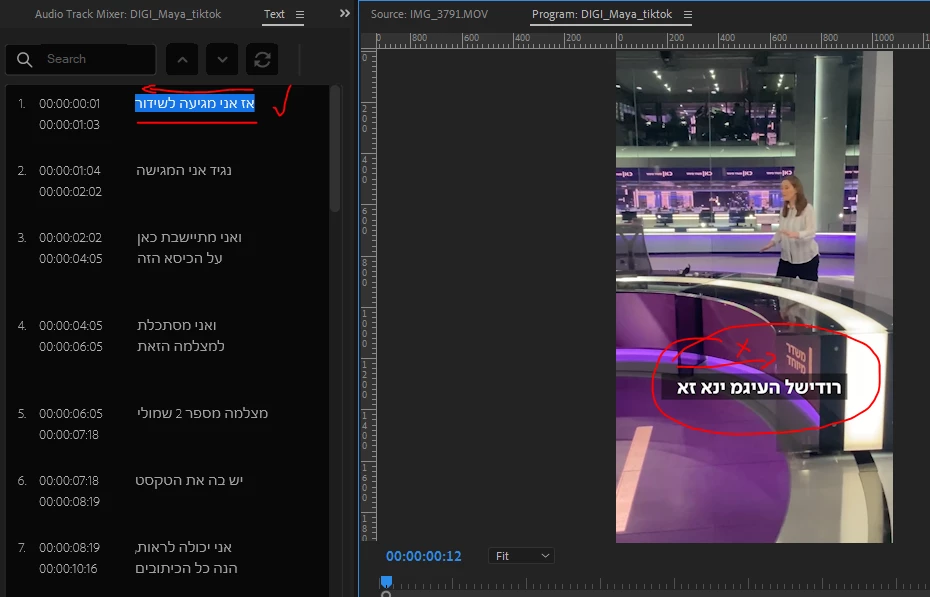
Thanks for the update. When using Hebrew on Subtitle Captions - it is fine in the text panel, but in program panel the leters are reversed! please fix it... thanks

This topic has been closed for replies.
Correct answer Kevin J. Monahan Jr.

Hi Emanuel,

Our engineer asks you to try the following: Please check in the settings for the caption track (right-click on the caption track header) that the South Asian and Middle Eastern engine is enabled.


Let us know if that worked for you, please.


Thanks!
Kevin

2 replies

Kevin J. Monahan Jr.
Kevin J. Monahan Jr.Correct answer
Legend
March 16, 2021

Hi Emanuel,

Our engineer asks you to try the following: Please check in the settings for the caption track (right-click on the caption track header) that the South Asian and Middle Eastern engine is enabled.


Let us know if that worked for you, please.


Thanks!
Kevin

Kevin Monahan - Sr. Community and Engagement Strategist – Adobe Pro Video and Audio
WhiteHaired_
Participating Frequently
November 2, 2021

In 22.0 Theres no settings when you right click a caption track, but in the preferences, I've changed to mid eastern and it won't work.

Stan Jones
Community Expert
Community Expert
November 2, 2021

The "Track settings" are still there in 22.0. In the sequence/timeline, in the HEADER area, right click on the caption track, for example, the "C1" or the word for the track type, for example "Subtitle."


 And yes, I don't know why the two places that the font setting occurs, but only the caption track setting will work for captions.


Stan


Kevin J. Monahan Jr.
Legend
March 12, 2021

Ouch, I can see that now, Emanuel. I am so sorry! Can you file a bug by posting on User Voice?

I will try to raise awareness of the bug on your behalf.


Thanks,
Kevin

Kevin Monahan - Sr. Community and Engagement Strategist – Adobe Pro Video and Audio