

Premiere Pro 2018 CC Mac - no sound on some clips, in Source and/or Timeline
Hi all,
weird problem started appearing in my Premiere Pro yesterday, there is no sound on some clips when I load them in SOURCE monitor and sometimes even when they are in the TIMELINE.
My system stats:
- pc: Macbook Pro 2014;
- os: OSX High Sierra 10.13.5;
- editing suite: PremierePro 2018 CC;
- audio: Audio Technica ATX50 headphones plugged into phone jack;
Video clips were recorded with these settings:
- camera and app: iPhone 6, FilmicPro 6;
- fps: 24;
- codecs: video: H.264, audio: Linear PCM;
- quality: 1080p;
- they ALL play sound correctly in Finder or Quicktime;
Workflow:
- import footage using Lightroom (easier that way as it has stills as well);
- sort footage, audio, assets, fx, in filesystem into (sub)folders;
- open Premiere, start new project, save into one of the subfolders in main projects' folder;
- import media by double-clicking in the Project panel;
I first preview almost all clips in the source monitor, double-click them in the Project panel, hit Space bar to start playing in Source. Video starts, audio sometimes start, sometimes not.
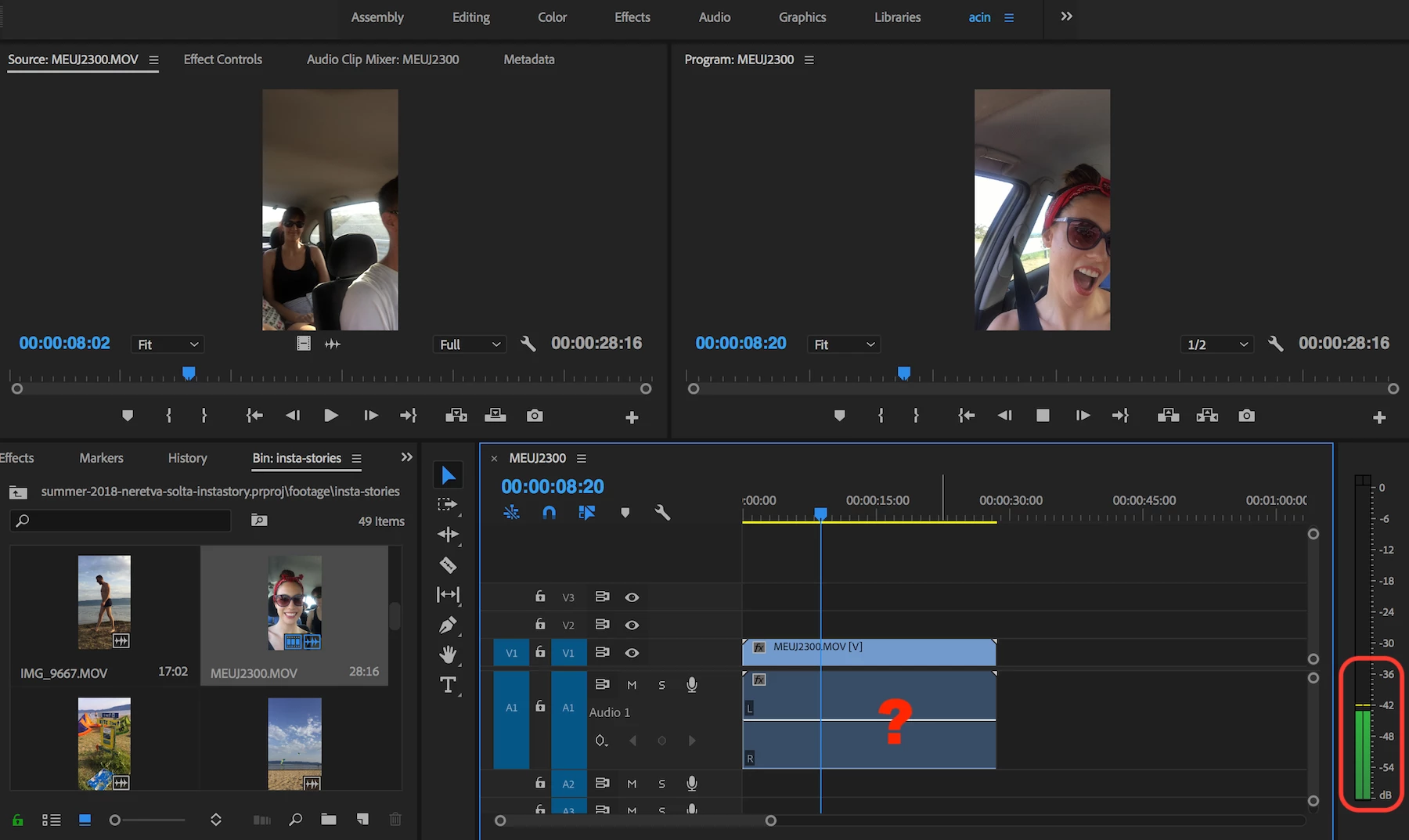
From Source, I grab the footage (NOT little 'video' or 'audio only' icom but the whole thumbnail) and drag it onto the timeline. Video appears in V1, Audio in A1 but the audio shows no waveform. There is a 'bar' but no signal waves displayed on the bar. No sound plays. Now, this clip plays no sound in Source either.
This erratic behaviour continues with various clips, in varying panels (sometimes in Source, sometimes in Timeline). I read a bunch of topics on the internet but none seem to fix the issue. I even tried reinstalling my Premiere  but no luck.
Any ideas?
Thanks
UPDATE:
- clips recorded by FilmicPRO app, audio encoded as LinearPCM are problematic;
- clips recorded by iPhone native camera, audio encoded as AAC not problematic;
- Screenshot - completely new project, imported just footage, inserted a single clip onto the timeline. Sound plays, no waveform showing
 -
-
 AdChoices