richards63497742
Inspiring
October 23, 2019
Answered

Premiere Pro 2018 will not open Audition 2019

  • October 23, 2019
  • 4 replies
  • 754 views

I updated from audition 2018 (not sure which version number, as i have deleted it) to audition 2019 version 12.1.5.3. I am currently using premiere pro version 12.1.

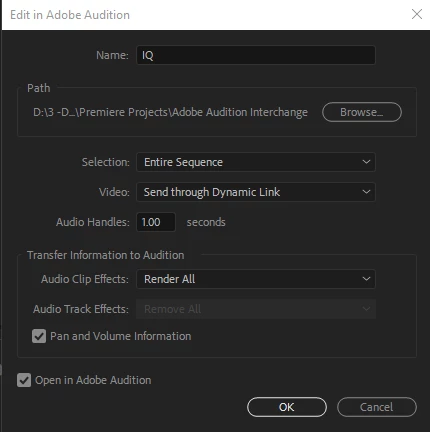
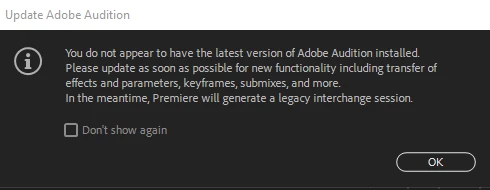
My issue is that audition no longer opens in premiere pro. When I use the edit in adobe audition from the edit menu, I get a message stating that I do not have the latest version installed (see the image).  when i click ok to the message, it opens the (what I know as) the dynamic link box.  when I select OK to this box, nothing happens.  It will not open audition. 

has anyone else had this issue?   

Thanks. 

I had found that there were similar issues in premiere pro cc 2017.  


This topic has been closed for replies.
Correct answer richards63497742

After debating about installing a newer version of Premiere Pro and the reports of crashing (which I have yet to have in 2018) I found out that on creative cloud that I could reinstall the older version of Audition to my computer. This took care of the issue. 

4 replies

richards63497742
richards63497742AuthorCorrect answer
Inspiring
November 1, 2019

After debating about installing a newer version of Premiere Pro and the reports of crashing (which I have yet to have in 2018) I found out that on creative cloud that I could reinstall the older version of Audition to my computer. This took care of the issue. 

Legend
October 23, 2019

yeah, the naming is very confusing but at least on the mac, the application is in a folder with the ccyear in the name.

MyerPj
Community Expert
Community Expert
October 23, 2019

Unfortuantly the version numbers don't sync, making it confusing. However, you do have to have matching actual versions. That means in this case:

PP is currently 13.1.5

AU is 12.1.5 (the above also works with 12.1.4.5) which are the two versions I currently have installed.

It would be my suggestion to Adobe to re-do the numbering to have all the major builds have the same number. But that's neither here nor there... 🙂


richards63497742
Inspiring
October 23, 2019

Looks like I am updating premiere pro....

Thank you for your help.  I'll let you know if that works.  

Legend
October 23, 2019

Makes sense to me that PP2018 would not link to Audition 2019.    You can probably install audition 2018 so it will work.  I seem to remember it's not particularly intuitive how to do it, but I imagine someone here can help.  And you should be able to have both versions on your system.

richards63497742
Inspiring
October 23, 2019

Thanks you,  

I was hoping that I would not have to do that....