
Participant
November 30, 2019
Question

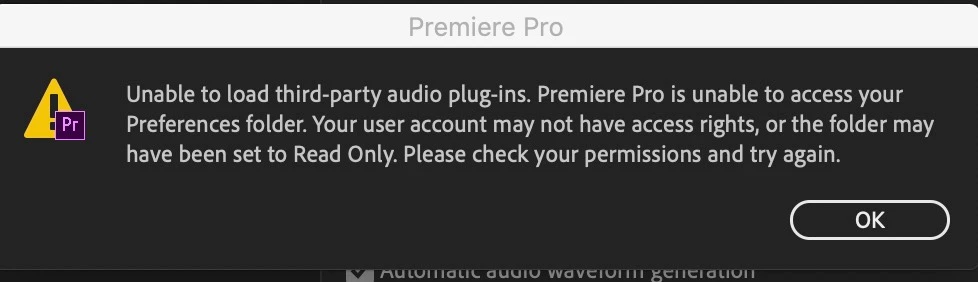
Premiere Pro 2020 v14 Is Unable To Access Preferences Folder and Load Third-Party Audio Plug-Ins
  • November 30, 2019
  • 3 replies
  • 2866 views

I can access and use my VTS audio plugins just fine in all previous versions of Premiere Pro (2018 and 2019) on my system but they're refusing to load in 2020. Every time I try to add them I get this message. Help! What got messed up when I installed 2020 on this machine? Everything worked fine on my desktop but my Macbook Pro is not working nearly as well with the upgrade.

This topic has been closed for replies.

3 replies

Participant
April 15, 2020

I have come across the same issue. By doing some research I found that it had something to do with Disk Permissions, which once sorted fixed the issue. I'm running on Mojave 10.14. Follow this tutorial to get your permissions right and working: Repair Disk Permissions on Mac OSX 

Legend
November 30, 2019

are these 3rd party plug-ins?  If so, they may not be compatible with cc2020 although I think you indicated that they work on your desktop machine in 2020.  After you've changed permissions, and you do a get info for the plug-ins folder, has it updated correctly?  Can you save or move a file into that folder (which would be a way of testing permissions)?

Legend
November 30, 2019

macs can have issues with permissions.  Can you find where the plug-ins are located and control click on the containing folder and choose "get info" and look at "Sharing and Permissions" at the bottom of the get info window.  Make sure you have full read and write permissions.  You'll need to click on the lock icon at the bottom of the info window and put in your password to change things.   Once that's done, you'll have to click on the gear icon below and click on "apply to enclosed items."  


Sometimes this can be difficult to fix...  Post back if you have trouble with this or if it doesn't fix things.

Participant
November 30, 2019

Yeah, I've done that for every folder possible and it still won't fix it. I have Premiere Pro 2018 and 2019 on my machine and all my audio VST plug-ins work just fine in there, no permissions or preferences issues whatsoever. Just an issue with the new 2020 version.