

Premiere Pro 2022 consuming 100% CPU even with GPU options enabled
I have a very heavy 4k video to export, 10 hours duration. I have a decent computer. And I have 100% CPU usage while exporting it. Please help me understand what's going on and how to use GPU instead of CPU...
Let's provide some info:
WHAT'S HAPPENING:
A) When I hit play on the timeline, Premiere works as it should using hardware. My GPU processing spikes and CPU stays almost the same.
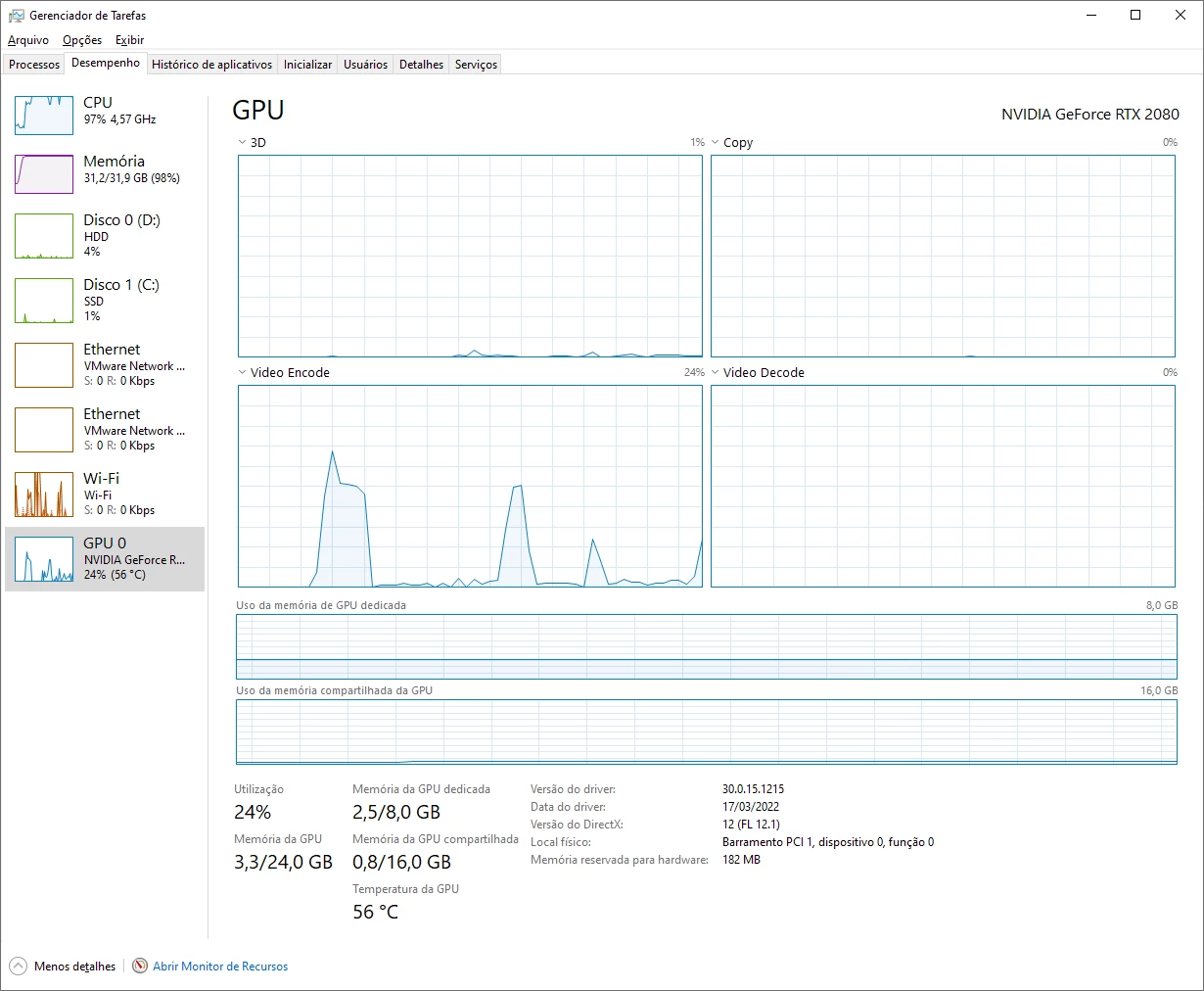
B) When I start the export, the CPU tops 100% usage while GPU stays at 0-10% usage.
More info.
1) System Configs
CPU: Intel(R) Core(TM) i7-9700K CPU @ 3.60GHz 3.60 GHz
RAM: 32,0 GB 3000+mhz
GPU: Nvidia 2080 8gb
SO: Windows 10 x64
Boot drive: NVME m-2 (premiere is installed on this drive, exporting to this drive)
2) Premiere configs
- CUDA enabled on the Project settings
- H264/HEVC hardware accelerated decoding enabled with nvidia
- Export on CBR bitrate with Hardware encoding enabled, 40 target bitrate
 AdChoices