
arunava.nag
Participant
October 31, 2021
Answered

Premiere Pro 2022 crash on clicking File> Export> Media

  • October 31, 2021
  • 8 replies
  • 8194 views

Hello I am on MacOS,

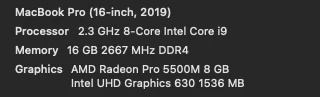
I haved updated to the latest PP yesterday (Oct 30, 2022), now as I try to export my project, I click File>Export>Media, premiere pro crashes and exits. It does not even go into the export screen. Attached are my computer specs. I did not have this issue before, it started since I updated to the latest premiere pro version. Kindly help. My projects are stuck.


This topic has been closed for replies.
Correct answer arunava.nag

I was exporting video with footages from sony a7III, some screen videos, images, graphics and bunch of audio files. These are same media sources I have been using past 2 years. With that said, for the time being I reinstalled PP 2021 (v15.4.1) and because the project headers got updated by v22.0 it wont open using previous version any more.

However after spending few hours I used this hack in the youtube to able to open the project in the old version:

https://www.youtube.com/watch?v=g8ecJNJsnn8 (mod note: you can do the same thing via FCP XML export)


That said the problem with v22.0 is not solved. I also tried exporting it through media encoder v22.0 it would get stuck ( I waited couple hours to make sure it did not move a percent).

8 replies

Richard van den Boogaard
Community Expert
Community Expert
December 13, 2021

Please check if your project contain any dynamically linked assets from After Effects. If so, you may need to open these assets in the latest version of After Effects as well, save them in that new version as a separate file (or overwrite at your own risk) and then relink them in PPro.


Hope this helps.

Participant
December 7, 2021

Same issue. I can get it working temporarily and then it breaks again. Trying to roll back to an older version to get the project done on time. 

Participant
November 28, 2021

Same issue here, usually what gets it working is a full cache clear (before opening the project) then open the project and go straight to an export. Am new to premier pro but it has taught me already to save, save, save before trying to export anything haha!


John

Participant
November 24, 2021

I was having the same issues last night. My project was created in the 2021 version, but have since converted it to 2022. I never had any issues exporting multiple videos a week until last night. Just crashed with his Export Media or Command+M. I even tried on a different computer, same thing.
Finally what worked for me was uninstalling and reinstalling Media Encoder. 
Hopefully no more bugs arise. 

Participating Frequently
November 17, 2021

How I solved it on MacOS 
if you temporarily remove the plugins located at:

/Library/Application Support/Adobe/Common/Plug-ins/7.0/MediaCore/

Then it works.

I used to have neatvideo there, so maybe is a compability issue and the plugin needs to be updated for it to work on Premiere Pro 2022.

arunava.nag
arunava.nagAuthorCorrect answer
Participant
October 31, 2021

I was exporting video with footages from sony a7III, some screen videos, images, graphics and bunch of audio files. These are same media sources I have been using past 2 years. With that said, for the time being I reinstalled PP 2021 (v15.4.1) and because the project headers got updated by v22.0 it wont open using previous version any more.

However after spending few hours I used this hack in the youtube to able to open the project in the old version:

https://www.youtube.com/watch?v=g8ecJNJsnn8 (mod note: you can do the same thing via FCP XML export)


That said the problem with v22.0 is not solved. I also tried exporting it through media encoder v22.0 it would get stuck ( I waited couple hours to make sure it did not move a percent).

Legend
October 31, 2021

when you say screen videos are you talking about screen captures/recordings?  If so, the problem may be the result of variable frame rate sources which can cause unpredictable and intermittent problems.  Here's how to confirm the diagnosis and fix it.  Let us know if this solves the problem.


use mediainfo to determine whether your source is variable or constant frame rate
https://mediaarea.net/en/MediaInfo/Download
if it's variable use handbrake to convert to constant frame rate setting the quality slider in the video panel to maximum
https://handbrake.fr
and here's a tutorial on how to use handbrake
https://www.youtube.com/watch?time_continue=34&v=xlvxgVREX-Y

Legend
October 31, 2021

revert to the previous version.  Always dangerous to start working on an important project on a new version...  Premiere allows you to have multiple versions on your system so if you deleted the previous version, you should be able to reinstall it.  If you need to revert your project if you saved it in 2022 , do some searching here for techniques on how to do that.

arunava.nag
Participant
October 31, 2021

Yes that was the plan but i messed up and not backing the project. As it opened in the new version it will not open in the older version. I just fixed it - I mean being able to open it back in the older version using this hack from youtube : https://www.youtube.com/watch?v=g8ecJNJsnn8

Community Expert
October 31, 2021

Can you give us information on the media that you're exporting? Size/type. Also, is the media good quality without any technical problems?

arunava.nag
Participant
October 31, 2021

Hello,

Yes I am exporting a 4k video, which includes graphics, 4k footage from Sony A7III, some screen videos, all in the format of .mp4.

These are the same media source I have been using past 2 years so I would assume not technical issues.