


Inspiring
March 12, 2023
Answered

Premiere Pro 2023.23.2 shortcut keys display bug

  • March 12, 2023
  • 2 replies
  • 382 views

If you click on the .prproj file directly from the File Explorer to open the Premiere Pro,
the shortcut keys in the toolbar will not be displayed.

If you run Premiere Pro and then open prproj from Premiere Pro main window,
there will display the toolbar shortcuts .
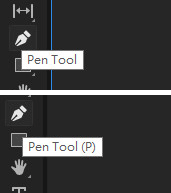


Premiere Pro 2023.23.2 ,Win10

This bug has been around since at least Premiere Pro 2020


@Kevin-Monahan

When I updated to 24.3, this issue has not been fixed yet.could you check it please?

Correct answer Amy the Stuv

This issues is reported to have been fixed in 26.2

Please let us know if you are still having these issues in the most recent version of Premiere.

Thank you,

Amy

2 replies

Amy the Stuv
Community Manager
Amy the StuvCommunity ManagerCorrect answer
Community Manager
August 31, 2026

This issues is reported to have been fixed in 26.2

Please let us know if you are still having these issues in the most recent version of Premiere.

Thank you,

Amy

Kevin J. Monahan Jr.
Legend
April 14, 2023

Thanks for tagging me, C27. I was able to verify the bug and have reported it to the product team. I hope they will respond to it soon.


Thanks,
Kevin

Kevin Monahan - Sr. Community and Engagement Strategist – Adobe Pro Video and Audio