
Jorge Jaramillo Hdz
Known Participant
February 21, 2023
Question

Premiere Pro 23.2 Crash

  • February 21, 2023
  • 3 replies
  • 2717 views

So I updated the latest version, random four crash playing the video, no effects, no filter, nothing, just making some rough cut. This message appear and then close.
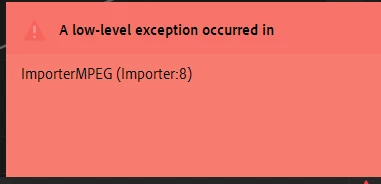
 

 Any suggestions? I think I saw this kind of crash maybe two or three times in years, but this was four crash in a row.


Windows 11 | SSD | 32gb Ram | i7 10th gen | Nvidia GTX 2070|


This topic has been closed for replies.

3 replies

Jorge Jaramillo Hdz
Known Participant
February 25, 2023

This is how has been my life since the 23.2 update. And yes my mistake it was doing it in the middle of a project, wait, not my mistake since I "trusted" Adobe to release reliable updates.

After 14 years using Premiere I'm really considering changing editor, last years has been full of bugs updates.


MicheleVideoMaking
Participant
March 6, 2023

I am in your same boat, i am in the middle of 2 important projects and it keeps crashing, it's saddening that adobe keeps having such problems and still pushes out updates, as i am done with projects i will start learning other softwares to make the switch, hopefully we can find a solution to fix this

Jorge Jaramillo Hdz
Known Participant
March 6, 2023

Yes, I think Adobe it's killing Premiere, there is not other reason. It's been a trash since last updates.

Jorge Jaramillo Hdz
Known Participant
February 21, 2023

It happen again. Sight. With other project, just rought cut, not effects, not filter, nothing. 


I'm assuming it's a 23.2 bug since never happen in the 23. I'ts been like 10 crash since yesterday. Now different project in different ssd.

Peru Bob
Community Expert
Community Expert
February 21, 2023

See if this helps:

Premiere Pro crashes after updating to NVIDIA’s latest drivers

Issue: When running Adobe Premiere Pro on machines with NVIDIA cards, there is a known bug in the latest NVIDIA drivers, which can cause the application to crash.

Workaround: 

  • If you have NVIDIA GeForce Experience running while you are using Adobe Premiere Pro and are experiencing issues, please quit the GeForce Experience application and restart Premiere Pro.
  • There is a known issue with the NVIDIA drivers, which can cause Adobe applications to crash when running alongside NVIDIA GeForce Experience.


from here:

https://helpx.adobe.com/premiere-pro/kb/known-issues.html

Jorge Jaramillo Hdz
Known Participant
February 21, 2023

Thank you so much. I'll try it.

Kevin J. Monahan Jr.
Legend
February 21, 2023

Jorge, Sorry. Which camera shot these files?


Thanks,

Kevin

Kevin Monahan - Sr. Community and Engagement Strategist – Adobe Pro Video and Audio
Jorge Jaramillo Hdz
Known Participant
February 21, 2023

Lumix S5


I downgraded to 23 but then all my colors was messed up. Then upgrade again to 23.2 clean al the cache, restart and seems working good.