



AndrewTheGreat
Known Participant
December 5, 2024
Question

Premiere Pro 25.1 - iGPU stopped decoding my footage

  • December 5, 2024
  • 68 replies
  • 52935 views

Ok, just updated to v 25.1 opened my projects in progress to find out that none of them uses my iGPU to decode.

Went on checking it with different formats that are decoded (h264 8-bit 4:2:0, h265 8-bit 4:2:0, h265 10-bit 4:2:0, h265 10-bit 4:2:2) by the iGPU - all of them show 0% load.
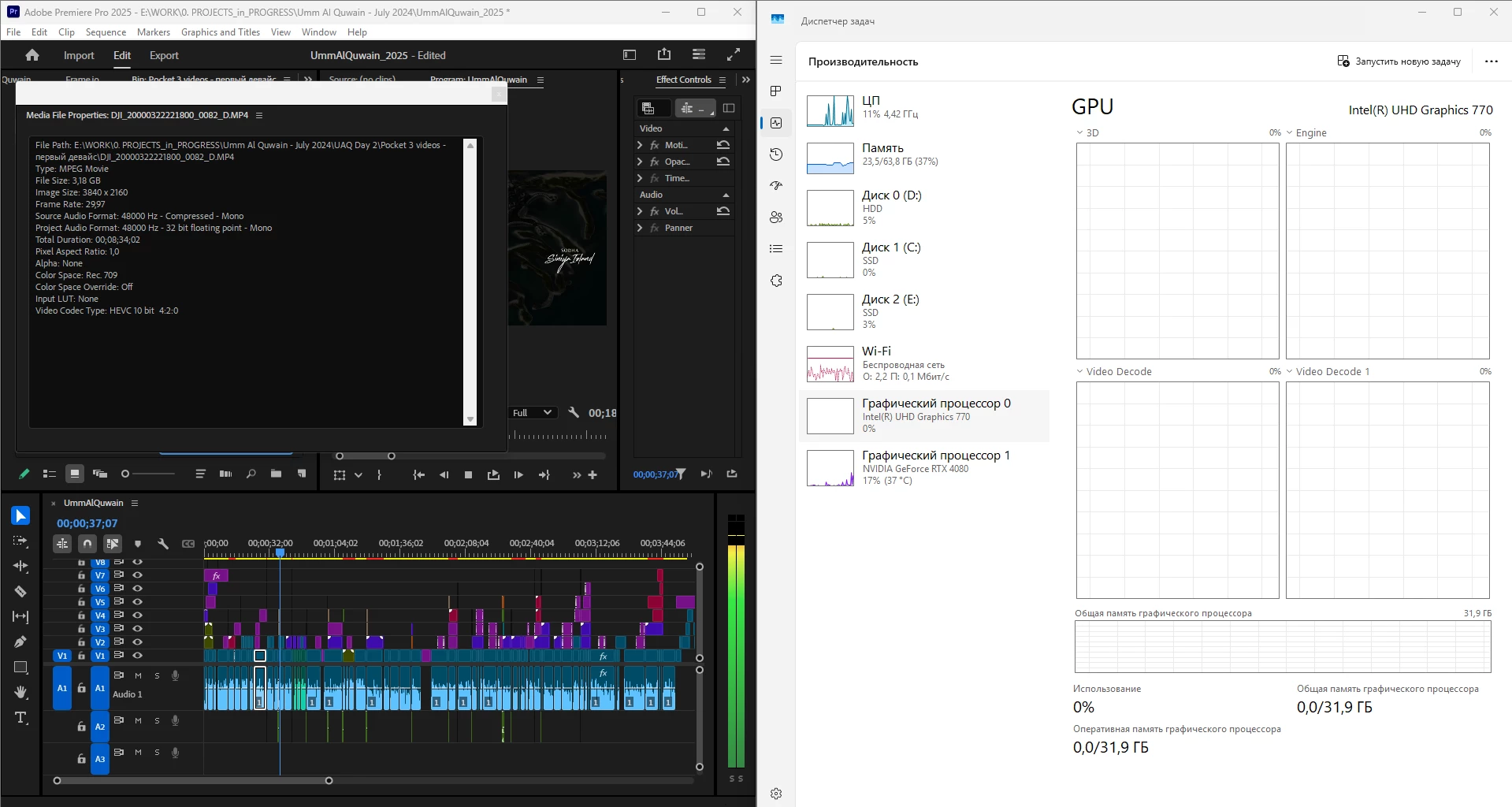
 

What is going on, guys? Why is it "new version - new bugs" thing every time? My CPU immediately started being loaded more, like by 60% all the time, even though my GPU does the decoding, whereas on the previous versions the average CPU load was 20-30% with the iGPU doing all the decoding job.


Yes, I tried reinstalling both Premiere Pro (as well as resetting its cache, preferences and plugins via the start+shift menu) and all the drivers. 


Steps to reproduce? Open a project or create one, import a knowingly decoded video, put it on your timeline, press Play. Watch the the Windows Task manager - Performance graphs.


i7 14700K, RTX 4080, 64 Gb ram, SSDs, Win 11 24h2

68 replies

Participating Frequently
January 15, 2025

Good evening. I can confirm everything said above. I have two systems. And this problem is observed on both systems.
The first system is PC msi z690 tomahawk wifi ddr4, 12700K, msi rtx 3080, 32gb. Before the New Year, I decided to clean up my PC and reinstall Windows. I downloaded the latest version from the MS website, updated all the drivers and installed all the software I needed from the new versions. As soon as I launched the project in 25.1, I immediately heard the hum of the CPU fans - it was heavily loaded. This did not happen before (23h2 and Premier 25.0). I tested the timeline and it also ran quite poorly. Again, this project used to just fly (the project consists of 4k25 10bit frames from Lumix s5ii, GoPro 4k50 10bit, and frames from Air 2s). Task manager shows CPU load and no iGPU work. 3080 shows 3D load but no Code/Decode load.
The second system is a Gigabyte aero xe4 laptop (12700H/16384/SSD 1Tb/NV RTX3070Ti). It was also updated to Win 24h2 and Premier 25.1. It has the same problems - CPU load and no iGPU work.
I did a lot of experiments comparing different versions of Windows and Premiere. As a result, I came to the following conclusions - on the laptop, 24h2 does not work with Premiere 25.0 and 25.1, so I switched to 23h2 and 25.0. On the PC, I stayed on 24h2 and 25.0 - this combination works.

Participating Frequently
January 21, 2025

UPS: Since yesterday Premiere (25.0 on 24H2) started showing playback with glitches. I thought that the problem was in the fresh driver that was installed the other day (32.0.101.6458/32.0.101.6257 WHQL). I rolled back, but the glitches remained. Perhaps there was some Windows update at the same time - I did not monitor it. If I disable encoding on Intel, the glitches disappear. I am completely confused. I can't work. It seems to me that Microsoft Intel and Adobe should get together in one room and solve their problems.

AndrewTheGreat
Known Participant
January 13, 2025

Some more tests with these files, @jamieclarke posted a link to. Premiere Pro 25.1, Win11 24h2, all drivers up to date. After any changes Premiere Pro is restarted.

1) Intel and NVidia are turned on in Preferences > Media, CUDA renderer:


2) Intel only is turned on, nVidia - off in Preferences > Media, CUDA renderer:

3) Intel and NVidia are turned on in Preferences > Media, OpenCL renderer:


4) Intel is turned on, nVidia - off in Preferences > Media, OpenCL renderer:


4) Mercury Renderer (software only), Intel and nVidia ON:

JonesVid
Community Expert
Community Expert
January 13, 2025

I also see no activity whatsoever for iGPU on H264 material.

However on the 2 second H265 4.2.0 Puget test clip you get a 'blip' on iGPU same as me. - Is that because once it has decoded the 2 seconds of video  - it is cached and doesn't need to decode it again despite that fact you play over and over again.

That is same behviour I had.

One would only expect any hardware activity on the green labelled clips of course as these are only able to be hardware decoded.

Personally I think we have all done enough user tests to show an issue on 25.1.

I am going to escalate through Support chat and get Case number

AndrewTheGreat
Known Participant
January 14, 2025

@JonesVid 

Intel ask me for a case number. If you share yours to my PM it'll be helpful

jamieclarke
Community Manager
Community Manager
January 8, 2025

If you are experiencing this issue please provide the following information:

1.Run the PugetBenchmark Test

Download the PugetBenchmark test to ensure consistency across tests using the same media.

•Share your results with us.

2.File Details

•Specify the Codec, Bit Rate, and Chroma Sampling of the file you are testing.

3.Device Manager Screenshot

•Include a screenshot of the iGPU driver tab from your Device Manager.

4.Premiere Pro Version

•Let us know the version of Premiere Pro you are using.


This will help us better understand and address the issue. Thank you!


JonesVid
Community Expert
Community Expert
January 9, 2025

OK so I have downloaded the Puget Systems Assets and Test Project and followed the instructions.

See screenshot of project in Premiere 25.1

I put H264 assets (4.2.0) and H265 (4.2.0) on timeline and run the playback.

As these are green assets no SW decoding is taking place which is correct (See Importer .mpeg report on right)

Both the NVidia and the iGPU kick in for H265 but not H264 - only NVidia

Both iGPU and NVidia are ticked in Media settings

Unless you 'kill' NVidia for decode then iGPU will not be used. This to me is a bug !

I don't want to flip back to 25.0 again as I have done this twice before and showed that H264 iGPU does get used in that version.

Media Info for the Puget Systems files (Green H264 and H265) are included below as requested

CPU is 13900K with on board UHD 770 iGPU

My conclusion to all of this is that I can reproduce the problem on my system - hopefully someone else will back this up using Puget Systems Assets

I had an idea to just run this on Premiere Version 24 to show you that and how iGPU performs then

Hold tight


Participant
January 7, 2025

Hello, so ive been having a similar issue, had to install windows again because my drive died and now on the new premiere the IGPU wasnt working,


I have enabled hevc decoding on intel only (nvidia unchecked)

I have enabled hardware encoding


this has resolved my issue and now both nvida and intel using about 30% effort when i playback, my theory is nvidia have already enabled or forced the Nvidia card to stay on in the background anyway so we need to only enable the intel, ofcourse that is just a theory but worked for me


using rtx4070 and 13700k

JonesVid
Community Expert
Community Expert
January 7, 2025

For H265 HEVC Codec both Intel iGPU and NVidia GPU can be seen to decode in Windows Task Mgr

For H264 only NVidia GPU can be seen to decode.

It is H264 footage that iGPU does not decode anymore on Premiere 25.1. Turning off NVidia GPU will then force iGPU to decode H264 but this defeats the object of having two GPU resources to share decode/encode.

You only only mention HEVC H265 codec ?

shellkursk
Inspiring
January 2, 2025

I have exactly the same story.

Both video devices are enabled in the decoding settings, but ONLY discrete nvidia is working on decoding.

Win - 24H2

intel driver - 32.0.101.6332

Adobe Premier 25.1


Turned off nvidia decoding resolution in the media settings, only then did intel start decoding.

Participant
December 21, 2024

I confirm the problem. Initially, on a freshly installed Windows 11 24H2 Premiere Pro 25.0 used iGPU decoding instead of dGPU. After updating to 25.1, decoding occurs on dGPU. When turning off Nvidia decoding in the settings, it decodes on iGPU. Config is Intel i5 9300h with Intel UHD 630 Graphics, Nvidia Quadro P620 (Dell Precision 3541 Laptop, latest BIOS). So, it's only Premiere's problem.

JonesVid
Community Expert
Community Expert
December 20, 2024

On Premiere Pro 25.0 this decoded H265 and H264 on timeline during an encode export process to another codec (such as exporting to ProRes as a test) using split with iGPU and discrete (Nvidia) GPU. This is correct.


On Premiere Pro 25.1 and also on the latest 25.2 beta Build 58  this does not happem and it is ignoring the iGPU resource entirely for H264 hardware decoding Media


This is a bug that has been introduced after Premiere 25.0 version


jamieclarke
Community Manager
Community Manager
January 7, 2025

Hi @JonesVid - I do not see this issue in Premiere Pro 25.1 or beta 25.2.  We need a few more details to try to help with the issue. Can you post a screen recording of the issue you are seeing.  Can you post a screenshot of your media file properties.  What GPU are you using and which driver?

JonesVid
Community Expert
Community Expert
December 20, 2024

My final post on this until we get more information from Adobe.

Have just gone back to Premiere 25.0 and with Win 11 23H2 this does decode H264 on the iGPU. Behaviour is the same as decoding a H265 clip.

So if we isolate Win 11 24H2 issues at present, looking at Premiere 25.1 release, it has different behaviour handling decode of H264 clips - i.e: it does not use iGPU.


As requested Adobe team please give us an explanation - still silence from Dev team on this??


Also - what does your text advertising Premiere 25.1 mean, I quote " faster H64 performance ...." see attached picture snip

I would say the complete opposite quite frankly.


R Neil Haugen
Legend
December 20, 2024

The faster H.264 performance was clearly tested on a bunch of machines, noted in the public beta testing, and several of the people on this and other forums have posted notable improvements on their rigs.


The specific issue you're hitting in this, which is hitting a relatively small subset, is a nasty little bugger and I'm grateful for the testing you've done ... and posting the results.


@Mayjain17122444  ... comment?

Everyone's mileage always varies ...
Legend
December 19, 2024

Further testing with my main system with Premiere Pro 25.1 on Windows 11 24H2 with actual H.264 and actual HEVC footage confirmed my earlier suspicions: With both the iGPU enabled and with a discrete RTX 4070 Ti installed, the iGPU did function with HEVC but not H.264. All H.264 decoding got sent to the dGPU.


And the lack of activity on the "Video decoding" portion of the iGPU graph for HEVC does not mean that the decoding is broken per se, but rather a bug with the reporting in the Windows' Task Manager itself. The "video decoding" part of the graph only works properly when the iGPU processes everything while the dGPU sits idle or is disabled.

JonesVid
Community Expert
Community Expert
December 19, 2024

I have also conducted similar tests on H264 and H265 decoding but on Win 23H2 as I have stuck with that for now.

I can confirm I get similar results on PPro 25.1 with H264 decoding not active on iGPU. All load spread accross Nvidia RTX 4080 Super and CPU (13900K).


We are dealing with several variables here as we know there are issues on Win 24H2 as seen in many articles and statements from companies like ASUS.

I have also seen this Oct 24 article on Tom's hardware - https://www.tomshardware.com/pc-components/cpus/z890-motherboards-are-having-instability-issues-with-windows-11-24h2-bios-updates-or-disable-igpud-required-to-update-windows

This however,  talks about the later generation Ultra CPU's, but not sure it is limited to that if you are using a newer driver.

I might try my older ASUS iGPU driver to see if that changes things, as per @AndrewTheGreat tests.


A bit more research on Microsoft blog reveals a lot going on with iGPU reporting and its use - dependent on many factors.

Ref article - https://devblogs.microsoft.com/directx/gpus-in-the-task-manager/

This is an old article and Task Manager with these capabilities were introduced in Windows 10 so who knows what might have been upset in Win 11 24H2 if Microsoft have reworked some graphics code in that new release.

I will need to read this a few times to get my head around it 🙂


Regardless of all that,  it would be useful to know what Adobe have done in version 25.1 which makes it behave differently for H264 decoding, as this has introduced a change, even on Win 11 23H2.

Unless you are looking at task manager you may not even notice any difference in performance if you are using a fairly good dGPU as that is taking additional load with the CPU.

If you platform is older it may have more impact where it relies on the iGPU.


We await more news.


nathaliedevent
Participating Frequently
December 18, 2024

I'm also having this exact same issue. Used to work before.


When I'm rendering, scrubbing, playing or encoding h.264 (or any other codec), the iGPU stays at 0% during the process. My playback is severely lagging and stuttering.

All drivers are up to date, Windows 11 Version 23H2 for x64-based Systems (KB5043076), entire creative suite is up to date, BIOS has been flashed and the iGPU is enabled in the BIOS, yet the iGPU is not utilized during any work in Premiere Pro.


This is an i9 14900k on a MSI Z790 Tomahawk Max Wifi.


Again, this used to work fine a few months ago.

JonesVid
Community Expert
Community Expert
December 20, 2024

See my posts below.

Premiere Pro 25.1 seems to treat H264 differently for decoding (even on Win 11 23H2) - so discrete GPU is used and not the iGPU on motherboard.

You can go back to 25.0 which is what I am going to do until Adobe come back with some sensible statement on this issue - which we are still waiting on @mayjain7130546