Raddles
Participating Frequently
September 26, 2025
Question

Premiere Pro 25.5 Wide Gamut Tone Mapping Export Issue working with Lumetri Gamma compensation LUT

  • September 26, 2025
  • 1 reply
  • 299 views

Hi,

Just tried the new Wide Gamut Tone Mapping color setup on a project working with Panasonic GH7 Prores Raw files, and there are undesirable results exporting with settings ive been using for years with REC 709 outputs. Previously I always shot Prores HQ and just graded in a REC 709 color setup sequence workflow and then applied a gamma correction LUT for exports to Quicktime and for Vimeo/Internet upload. This always ensured the final colour and luma of the export matched my calibrated 10 bit monitor's picture in Premiere. Happy days but now I'm using Prores RAW files with Wide Gamut color setup, which is great for grading, but applying the gamma LUT at the Export/Effects stage distorts the resulting picture so for now I've had to export without this LUT with my resulting video not being as deep in the hues. 


This is Quicktime/H264 with no export gamma LUT applied
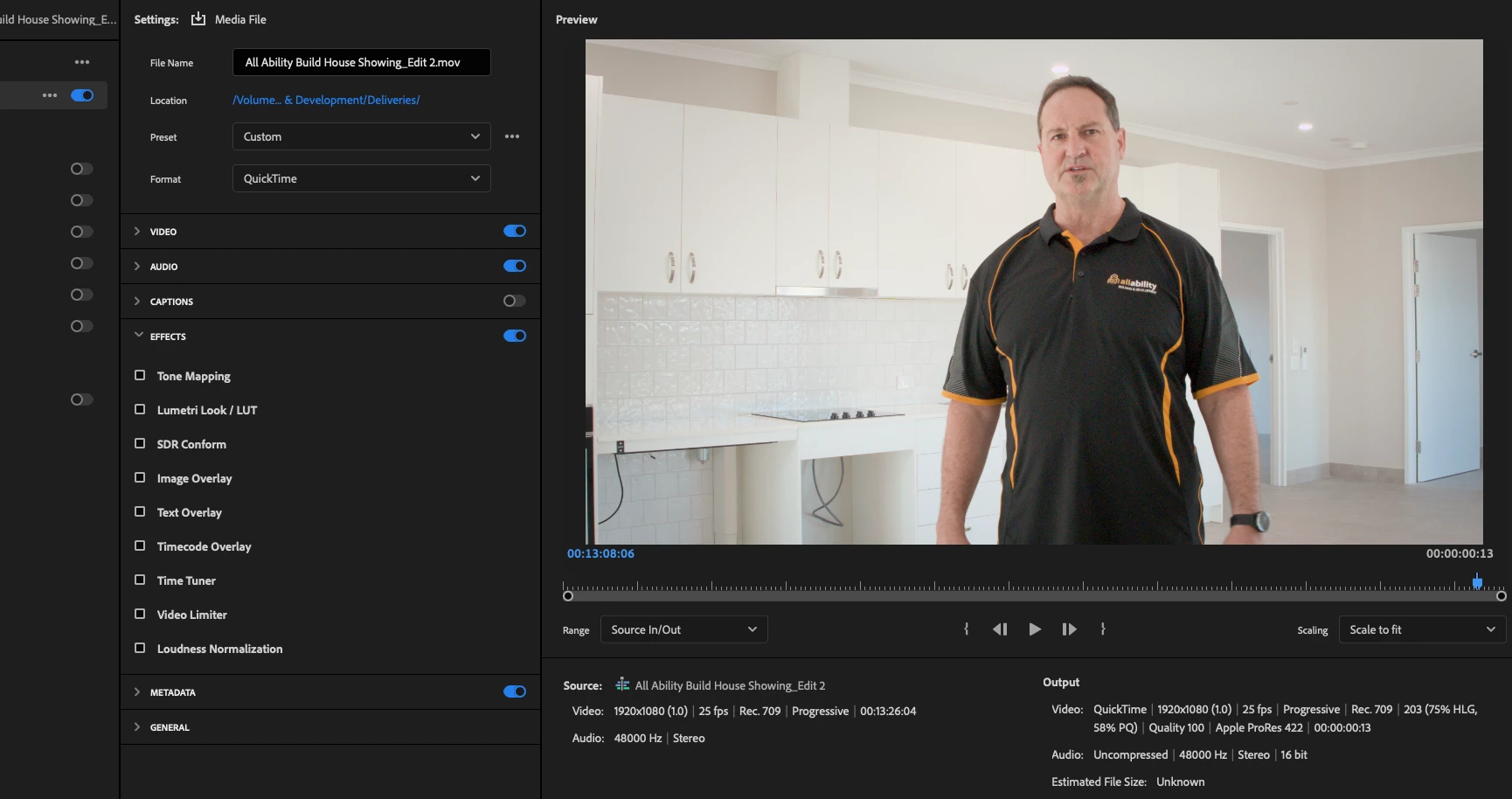
The resulting export is fine but the blacks and hues are not quite as deep as my grading monitor shows

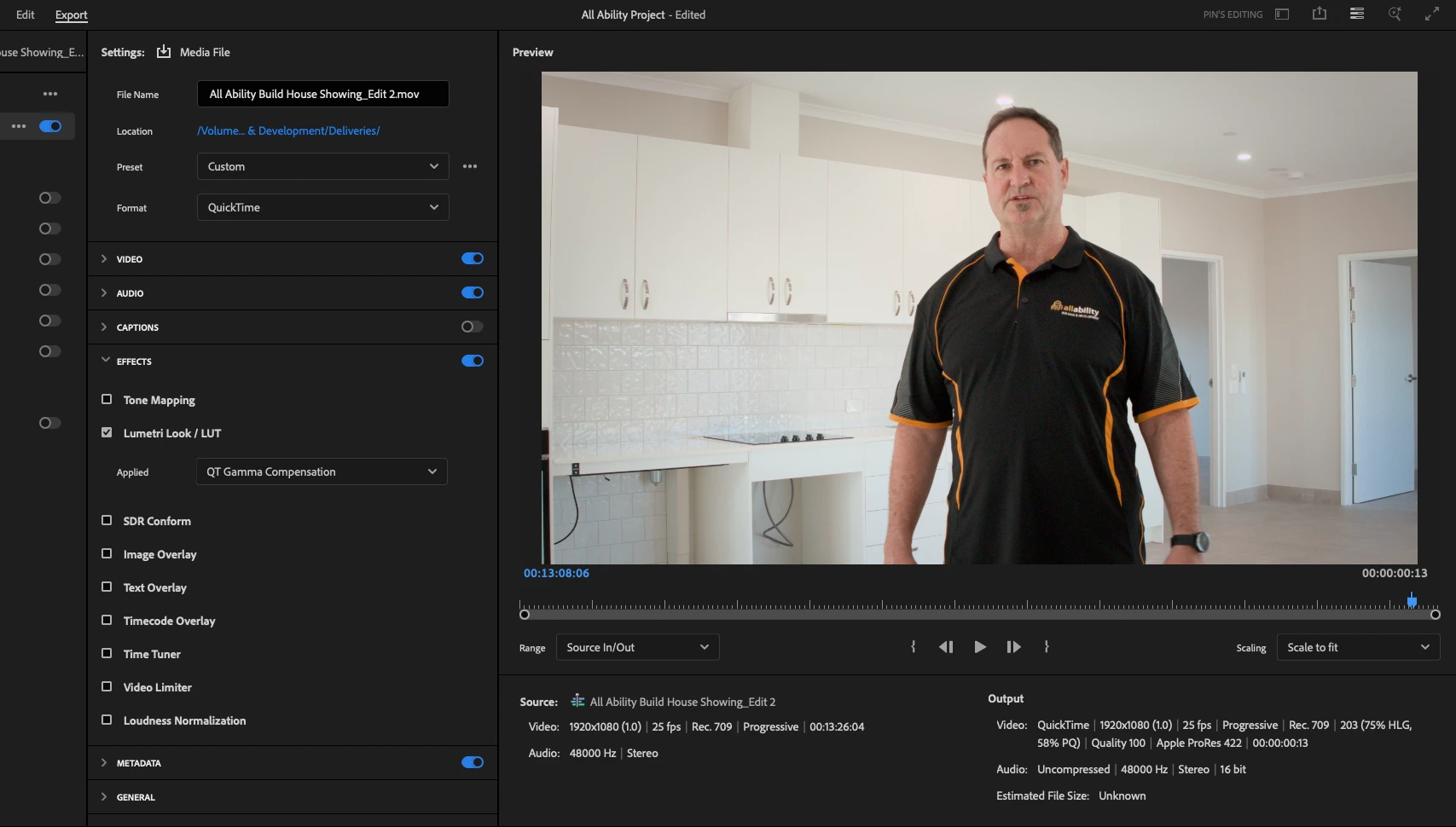
This is the same export codec with a QT Gamma Compensation LUT applied.

The blacks and hues are deeper and closer match my grading monitor. (My normal workflow for years)
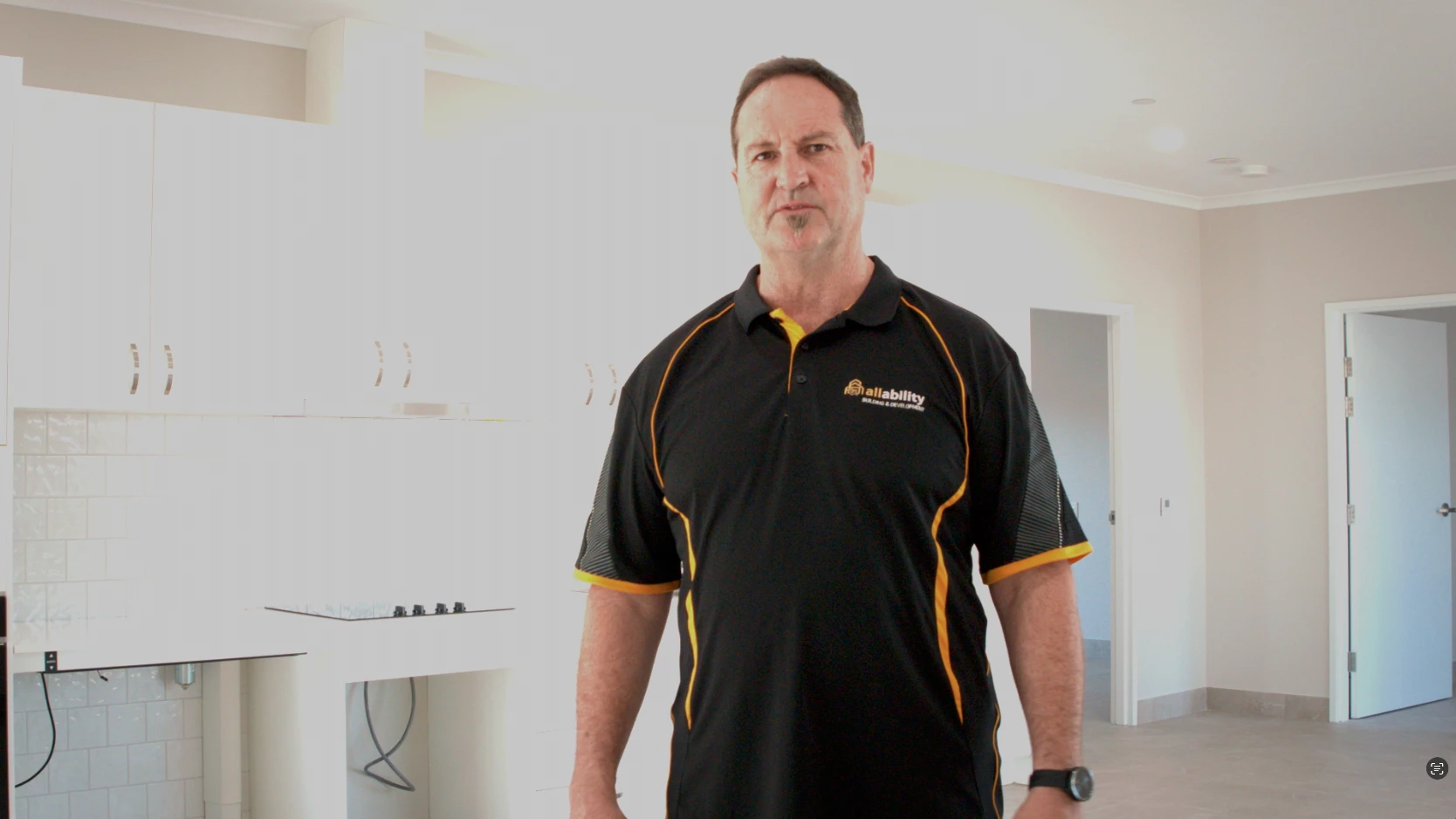
The resulting export gives this unacceptable result
 

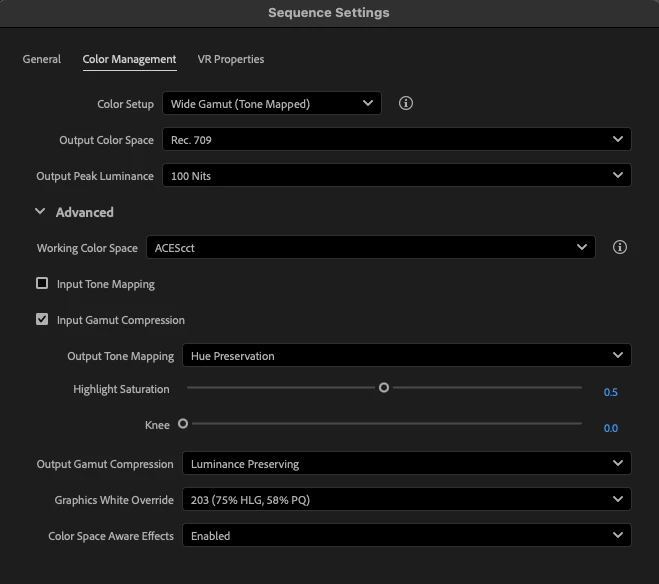
Here are my color managment settings for reference
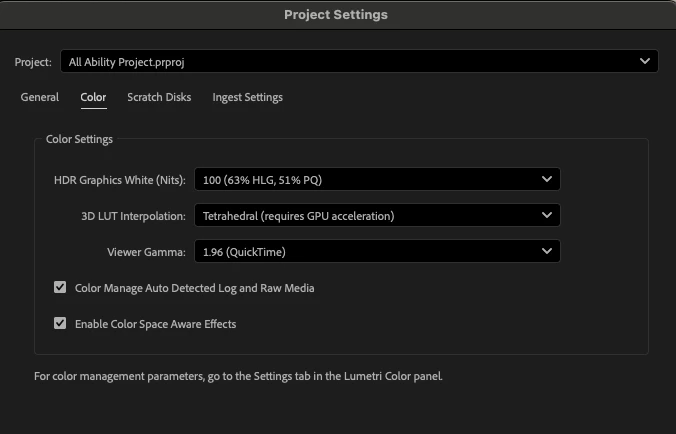


As a bug issue, I can confirm, by my tests today that, the Project color settings/Viewer Gamma makes absolutely no noticable difference (that I can see) to the gamma quality of the resulting export. It was recommended previously to select the 1.96 (Quicktime) gamma setting for Macs viewing exports with quicktime but below is a side-by side comparison of each of the three settings and there is no difference at least for Gamut Tone Mapped media
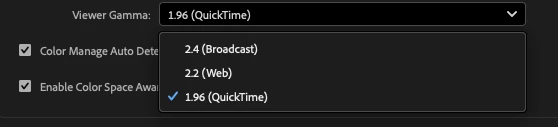
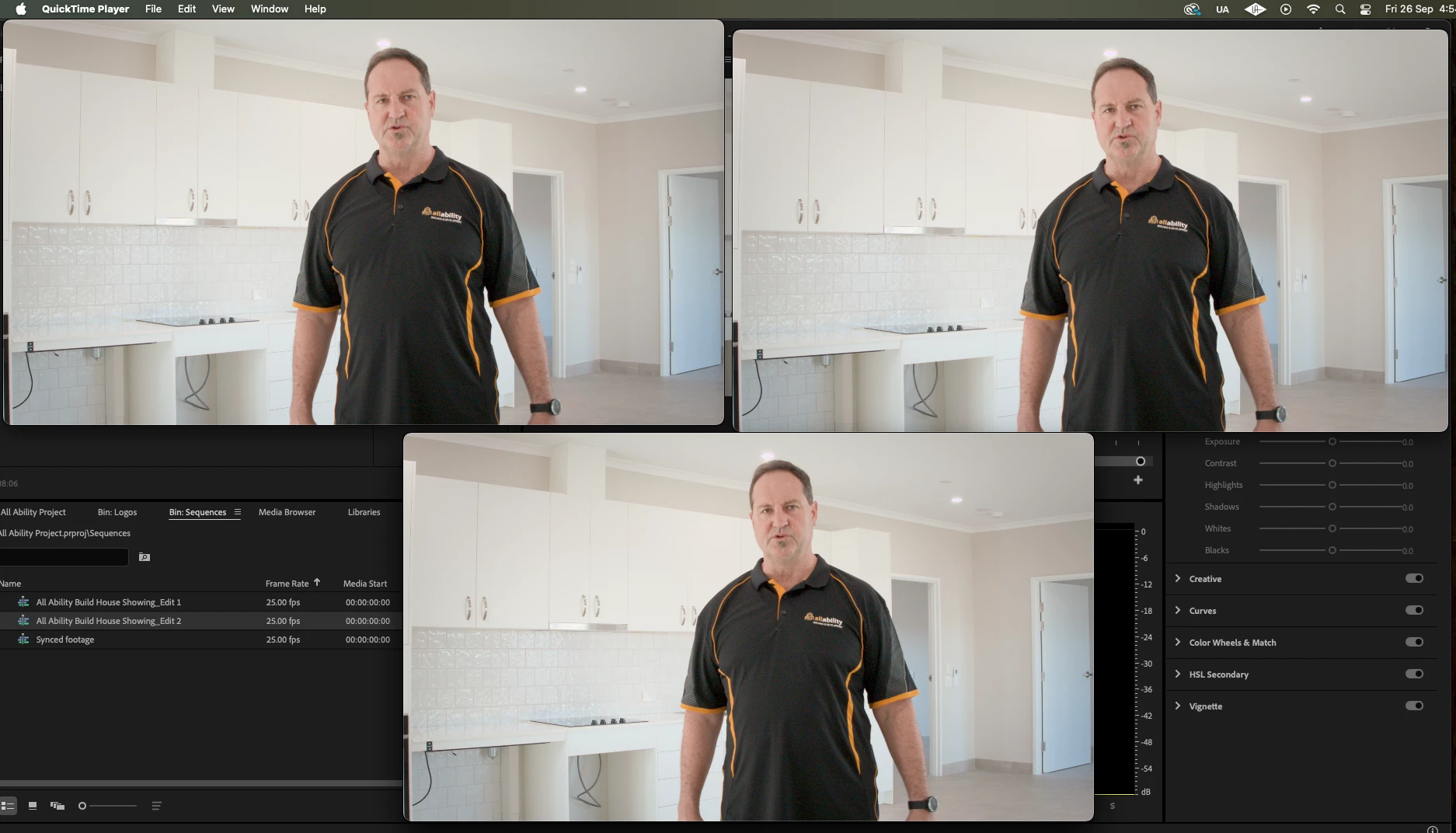
 

Top left - Gamma 2.4

Top right - Gamma 2.2

Bottom - Gamma 1.96 (QT)


I can also confirm that any Prores export settings with the export LUT produce the same blown out highlight issue as with the H264 export so in summary,  I'm looking for a workaround to be able to use a gamma correction curve REC709 LUT in the export chain to REC709 while still grading through wide gamut Tone Mapping. Or if not, what other settings could I try to achieve a similar result?


1 reply

R Neil Haugen
Legend
September 26, 2025

Ok ... I work for/with/teach pro colorists, mostly based in Resolve. I've a long time of hearing about the mess Apple made with their improper Rec.709 display transform built into their ColorSync utility. Hours of listening to and talking with full color scientists ... colorist presentations and all. To the nth degree.


But before going into the deep tech, please understand ... there is no uniform "accurate" color shared across screens and devices as that is physically impossible. All colorists are taught this to begin with. They setup according to the standards only so that their produced media falls in the general area on other machines, that other professionally produced media does. "You can't fix gramma's green TV." is still applicable.


Every screen out there is at least a little if not a lot different from any other screens. That's just Life at this time.


To the Mac issues.


ColorSync applies a display transform essentially equivalent to gamma 1.96, instead of the specified Rec.709/Bt.1886 display transform essentially gamma 2.4. But only on Macs without Reference modes that are set to the HDTV setting. Which do show the correct transforms.


But wait ... there's more!


According to testing by a number of colorists, they don't do a good job remapping Rec.709 hue values within the monitor's native P3 space. So Apple by design blows both the tonal and chromal transforms on many Macs.


But again, only on Macs not using the Reference mode setting of HDTV, which does apply correct transforms.


So the issue you have is only on some Macs, is specific only to those computers/devices, and will show a different, lighter image of the Rec.709 file than all other screens/devices, including all broadcast compliant machines/systems, most PCs, Androids, and TVs.


That is the cause of the issue and you need to realize how specific it is. 


Try viewing the files in VLC or Potplayer, and you will see much closer to the image other systems, including many Macs, will see.


That ancient LUT ... was Adobe's attempt to satisfy Mac geeks who wanted equivalent views on their Macs, no matter what the image was like everywhere else. As on all 'normal' Rec.709 screens, the image will be way too dark and over-saturated.


BlackMagic's Resolve has the Rec.709-A export option, which yes A is specifically meaning Apple. It changes the NCLC header tags in the file, using a totally unspecified (and non-standard) second value, that for some odd reason causes many Mac rigs to apply the correct Rec.709 transform. 


Unfortunately, as that second digit is an odd thing, on other screens it can cause unexpected things to happen. Not always, but I've seen some where that causes a very dark image. So ... it is maybe better than the Adobe ancient 'Gamma Compensation LUT' ... but not by too much.


I do not recommend continuuing to use the ancient LUT. As there is a better process for that within Premiere for the last two major versions.


Premiere now has all the color management options in ONE place, thankfully ... the Lumetri panel's Settings  tab ... the tab named Settings.


Go to the Viewing Options section, and set the viewing gamma to 1.96/QuickTime, and that will present the lighter image in Premiere. And export without worrying about that stupid ancient LUT.


Do check for the difference between QuickTime, a totally bonkers player, and VLC and Potplayer though. As the latter two will show you what most others will see of that file.

Everyone's mileage always varies ...
Raddles
RaddlesAuthor
Participating Frequently
October 9, 2025

Thanks for the great feedback. i have been aware of this difference between what mac monitors and non-mac monitors see, but your detailed explanation has offered a lot more valuable insights. I ended up re-calibarating my main 10 bit monitor and realised the saturation displayed somehow was too strong. Since the calibration, my grades showing on this monitor are more in line with what is broadcast on the web across a number of screens without using this REC708 correction LUT so cheers, I'm ditching it and relying on regular monitor calibration.


My only confusion in your comments is that while you recommend I alter sequence viewing gamma settings to see different results on a mac, your also suggesting (or as i'm interpreting) that many mac screens  wont show the gamma differences of  Gamma 2.4, Gamma 2.2, Gamma 1.96 (QT) because of their inherent issues displaying accurate gamma. This I confirmed in my post with the examples I put up. So then I guess I would have to view these examples on a PC screen to see the difference? Can you see a difference between the three gamma viewing settings on the same clip I posted?

R Neil Haugen
Legend
October 9, 2025

It's a mess, isn't it? And while Apple certainly mucked things up worse than they already were, the differences screen to screen are not nearly a minor thing.


As in ... you can't get visually identical images on two "identical" monitors side-by-side in a room, heavily calibrated and profiled to check the calibrations ... running the same data from the breakout device. So how can you get visually close images across operating systems, screens, user settings, the displays applying their own things to "enhance the viewing experience" ... and of course, being viewed in entirely different viewing environments, which also heavily affects the perceived image.


On a Mac without Reference Modes set to HDTV, use VLC or Potplayer to check the image outside of Premiere. Those apps apply the proper standard Rec.709 display transforms.

Everyone's mileage always varies ...