
Participant
Nov 9, 2026 1:45 PM UTC
Answered

Premiere Pro 26.5.2 – Playhead behaves erratically in newly created sequences (Windows 11 / RTX 5080)

Issue Description:

Hi everyone,

I'm experiencing a very frustrating issue with Adobe Premiere Pro 26.5.2.

Whenever I create a new sequence, the Playhead starts behaving erratically. It jumps around unexpectedly along the timeline, making it extremely difficult, if not impossible, to work normally.

The issue occurs with newly created sequences, regardless of what media or clips I place in them.

I've attached a video demonstrating the issue so you can see exactly what happens.

Troubleshooting already performed:

  • Updated NVIDIA GPU drivers to the latest version.
  • Updated motherboard BIOS.
  • Completely uninstalled and reinstalled Premiere Pro several times.
  • Reset Premiere Pro preferences to default settings.

Unfortunately, none of these steps resolved the issue.

System Specifications:

  • Operating System: Windows 11
  • CPU: Intel Core Ultra 9
  • RAM: 64 GB
  • GPU: ASUS NVIDIA GeForce RTX 5080
  • Motherboard: ASUS ROG STRIX Z890-H
  • Adobe Premiere Pro: Version 26.5.2

Has anyone experienced a similar issue?

Could this be a bug introduced in Premiere Pro 26.5.2, a GPU compatibility issue, or something related to the latest update?

I would really appreciate any help or suggestions from the Adobe community or the development team.

This issue is seriously affecting my workflow, and despite multiple attempts to fix it, I haven't found a solution.

Thank you in advance for your help!
nicuvCorrect answer
Participant
Nov 10, 2026 8:33 AM UTC

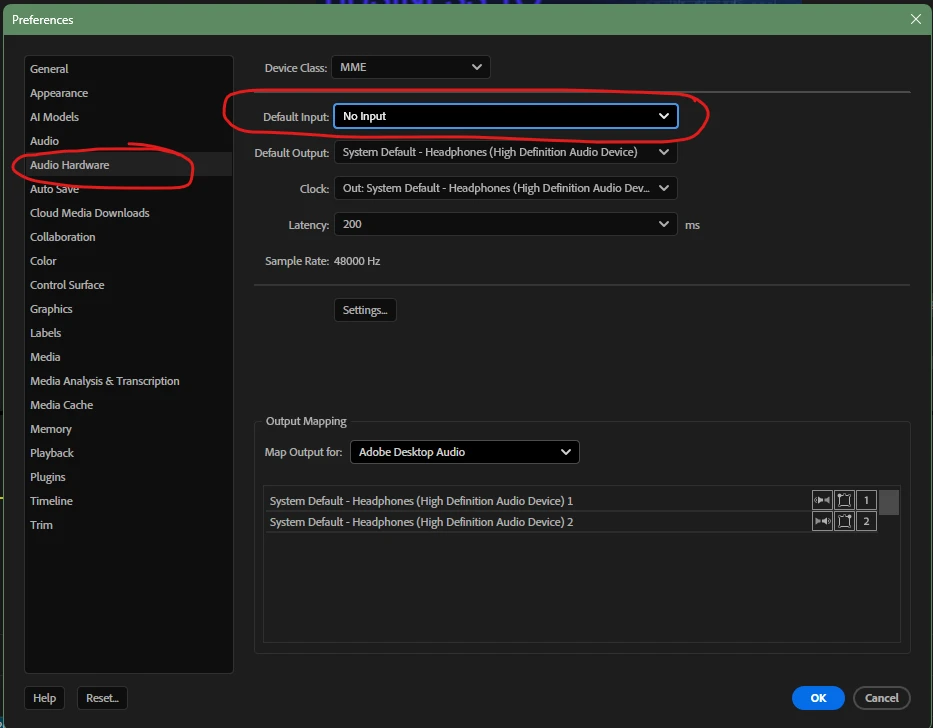
Following up with an update on the situation! I resolved the issue by making the following changes in Preferences! Any setting other than "NO INPUT" causes these symptoms!


Thanks for the support!

3 replies

KatieToo
Community Manager
Community Manager
Nov 9, 2026 5:08 PM UTC

Hi ​@nicuv Thanks for stopping by the Premiere forums and giving us all those helpful details about this stuttering playhead issue you’re having. Sorry for the frustrations with that! Yes, in the recording I can see how often the playhead is just jumping backwards a bit then moving forward and repeating again throughout.

Though the test is with a jpg, noting that you mention any type of media is doing this behavior. Appreciate that screen recording, by the way. We ran a quick test on our Win11 using v26.5.2 Premiere, but it is not having this issue, so wondering what could be missing. Also curious what the media properties on the jpg example is, like it’s dimensions.

Does the Program Monitor timecode jump backward at the same time playhead jumps, or is it only that the playhead moves a bit wildly? We could not see due to that area of Premiere being cut off in the recording.

Do you have any extensions or third party plugins installed, if so which ones? Does SHIFT launching Premiere to toggle the temporarily disable plugins/clear that cache help at all?

As for setup, I see you’re on ASUS NVIDIA GeForce RTX 5080, but which driver version and build? Studio is recco’ed, so wanted to confirm if Studio or Game Ready, or something else.

It also shows playback resolution set to ½, I wonder if you were to try ¼ if that would clear anything. You could try testing that on same jpg to keep it consistent, but perhaps in a new project/sequence and with another type media that’s been affected like a clip since it seems to be an all around issue.

Let us know, and we hope to help!
Katie

Translate
nicuvAuthorCorrect answer
Participant
Nov 10, 2026 8:33 AM UTC

Following up with an update on the situation! I resolved the issue by making the following changes in Preferences! Any setting other than "NO INPUT" causes these symptoms!


Thanks for the support!

Translate
KatieToo
Community Manager
Community Manager
Nov 10, 2026 3:10 PM UTC

​@nicuv AH! Sneaky audio hardware input. Thanks for letting us know and updating with that screenshot preference setting to help others out with. I’ll mark that as best answer and glad Premiere is back to behaving.

Appreciate it,
Katie

Translate