
Participant
July 30, 2017
Answered

Premiere Pro and After Affects not working together

  • July 30, 2017
  • 1 reply
  • 2390 views

Hi! I’m having trouble getting Premiere Pro CC to work with After Effects CC.

I’m running 64-bit Windows 10 with 32Gb of RAM and two NVIDIA GeForce GTX 660 cards.

Premiere Pro 2017.1.2  11.1.2(22) build

After Effects 2017.2 Release  14.2.1.34

Both show as up-to-date with no pending updates.

Here is an example of the problem.

Start a new Premiere Pro CC project and sequence.  From within it do either Dynamic Link, New After Effects Composition, or add a clip, right-click it and choose Replace With After Effects Composition

Either option results in the same behavior:  After Effects opens and as I start to work in it, Premiere Pro pops up an error message saying that After Effects must be installed.

If, instead, I choose Import After Effects Composition, or import a AEP file using Media Browser I get the following behavior:

Premiere Pro will only allow the After Effects clip to be dragged onto an audio track. But the After Affects project has no audio, it is nothing but text  with some effects applied to the text (doesn’t matter what effects, or even no effects at all just stationary text).

So, two questions:

1. Why does Premiere Pro think that the After Effects composition is an audio track, when it has no audio, and is there a way to work around this so that I can use the After Effects project in Premiere?

2. Any suggestions on how to get Dynamic Link to work properly between Premiere Pro and After Effects?

Thanks!
    This topic has been closed for replies.
    Correct answer Ashley7

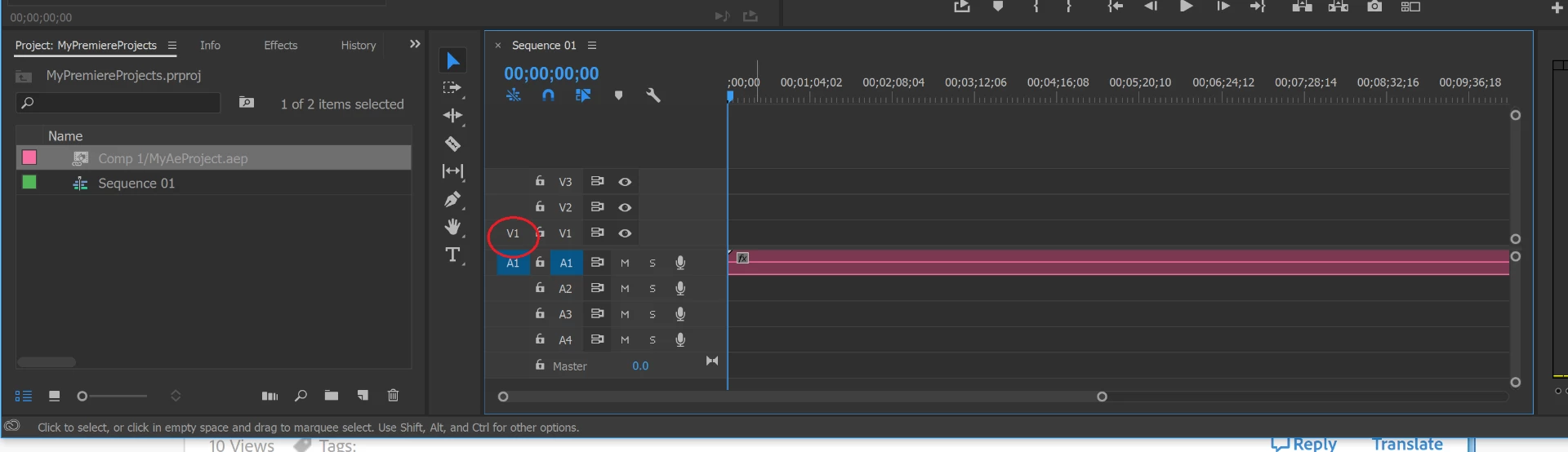
    For your latter test, when you import an AE comp but there's only an audio track... are you targeting both a video/audio track? I bet you have video track deselected for patching/inserts.  See screenshot below... notice I don't have V1 selected for track patching/inserts (red circle in screenshot)... because of that, when I drag/drop the comp, only the audio is dropped...

    Regarding the first issue you experienced with Premiere reporting the odd error message about installing AE (even though it's installed), you might consider a clean install, perhaps using Adobe's cleaner tool before hand... see the following page: Use the Creative Cloud Cleaner Tool to solve installation problems

    I use Pr with AE DynLink without that issue ... it works great... so you're system seems to have something odd going on, or you're hitting a bug others are not.

    1 reply

    Ashley7Correct answer
    Legend
    July 30, 2017

    For your latter test, when you import an AE comp but there's only an audio track... are you targeting both a video/audio track? I bet you have video track deselected for patching/inserts.  See screenshot below... notice I don't have V1 selected for track patching/inserts (red circle in screenshot)... because of that, when I drag/drop the comp, only the audio is dropped...

    Regarding the first issue you experienced with Premiere reporting the odd error message about installing AE (even though it's installed), you might consider a clean install, perhaps using Adobe's cleaner tool before hand... see the following page: Use the Creative Cloud Cleaner Tool to solve installation problems

    I use Pr with AE DynLink without that issue ... it works great... so you're system seems to have something odd going on, or you're hitting a bug others are not.

    Participant
    July 30, 2017

    Thanks Ashley for your suggestions!  I did do an uninstall and re-install with no change in behavior.

    I did find a work-around for the problem of Premiere only allowing the AEP to be dropped into an audio track.  In the Source Monitor (which always showed the text effect just fine), I clicked Modify Audio and then UNchecked both left and right audio tracks (because there was no audio anyway).  After UNchecking both audio tracks, it allowed me to drag the AEP project onto a video track in the Premiere Pro timeline.  Strangely, it also dragged a related (but empty) audio track along with it, but I can live with that since the After Effects clip is now working just fine in Premiere.

    It seems strange, but perhaps this behavior is related to whatever is preventing Dynamic Link from working.

    So, although the problem is not resolved, I am at least able to get the After Effects composition to work in Premiere Pro now.  Thanks again!

    Legend
    July 30, 2017

    bobf14563669  wrote

    Thanks Ashley for your suggestions!  I did do an uninstall and re-install with no change in behavior.

    I did find a work-around for the problem of Premiere only allowing the AEP to be dropped into an audio track.  In the Source Monitor (which always showed the text effect just fine), I clicked Modify Audio and then UNchecked both left and right audio tracks (because there was no audio anyway).  After UNchecking both audio tracks, it allowed me to drag the AEP project onto a video track in the Premiere Pro timeline.  Strangely, it also dragged a related (but empty) audio track along with it, but I can live with that since the After Effects clip is now working just fine in Premiere.

    It seems strange, but perhaps this behavior is related to whatever is preventing Dynamic Link from working.

    So, although the problem is not resolved, I am at least able to get the After Effects composition to work in Premiere Pro now.  Thanks again!

    Was your video track deselected for patching/inserts??? If it was selected that would be odd... but I suspect it was not.

    If you want to delete the extra audio portion of the clip, ensure all clips are deselected, then hold ALT and click the audio portion of the clip you want to delete/remove, then click delete. You will then have the video only portion of the clip. As you mention, it doesn't harm anything if you disable, mute, or it otherwise doesn't affect the outcome.