Premiere Pro: Audio and Video sync - especially in music videos
Hi,
I've run into an interesting problem which I seem to be unable to find an answer to.
I am editing a music video. The footage was shot with a Canon DSLR at 25 fps and audio was recorded for reference. As it is a music video the reference audio can be heard in the video clips so that lipsync can be achieved. Now I am syncing the video clips to a wav file that has the music.
However the problem is that in a couple of video clips the reference audio that was recorded is around 1/2 frames off, so I am unable to accurately sync the video clips to the WAV-file to get accurate lip sync.
In most cases this could be solved by changing the timecode to audio units and moving the audio 1/2 frames, however as the WAV-file audio is the whole song of the music video, all of the video clips have to sync with the audio and not vise versa.
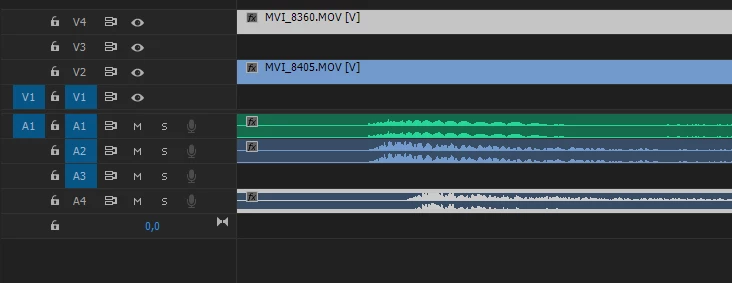
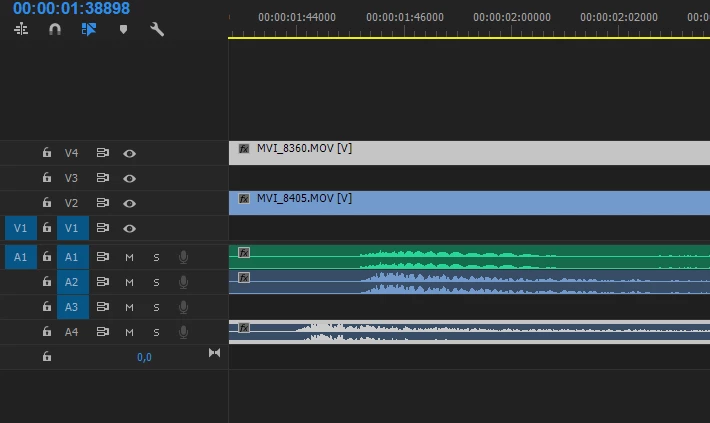
As you can see in example images, I have moved the WAV audio (A1) to sync with the reference audio of video 1 (A2+V2), but I am unable to sync it with video 2 that is 1/2 frames off (A4+V4). Example images 1 and 2 show the difference of moving V4+A4 one frame, always ending up starting too early or too late.
How is it even possible to sync all of the video clips with the music video main audio? Seems like many of the video clips that have been shot have the reference audio offsetting from each other by around half a frame. 1/2 frame of offset in a lip sync is somewhat noticeable.
Is there something to be done in the shooting of the videos for music videos to guarantee the sync of reference audio with the music and what can be done now?
 AdChoices